Blerp alternative
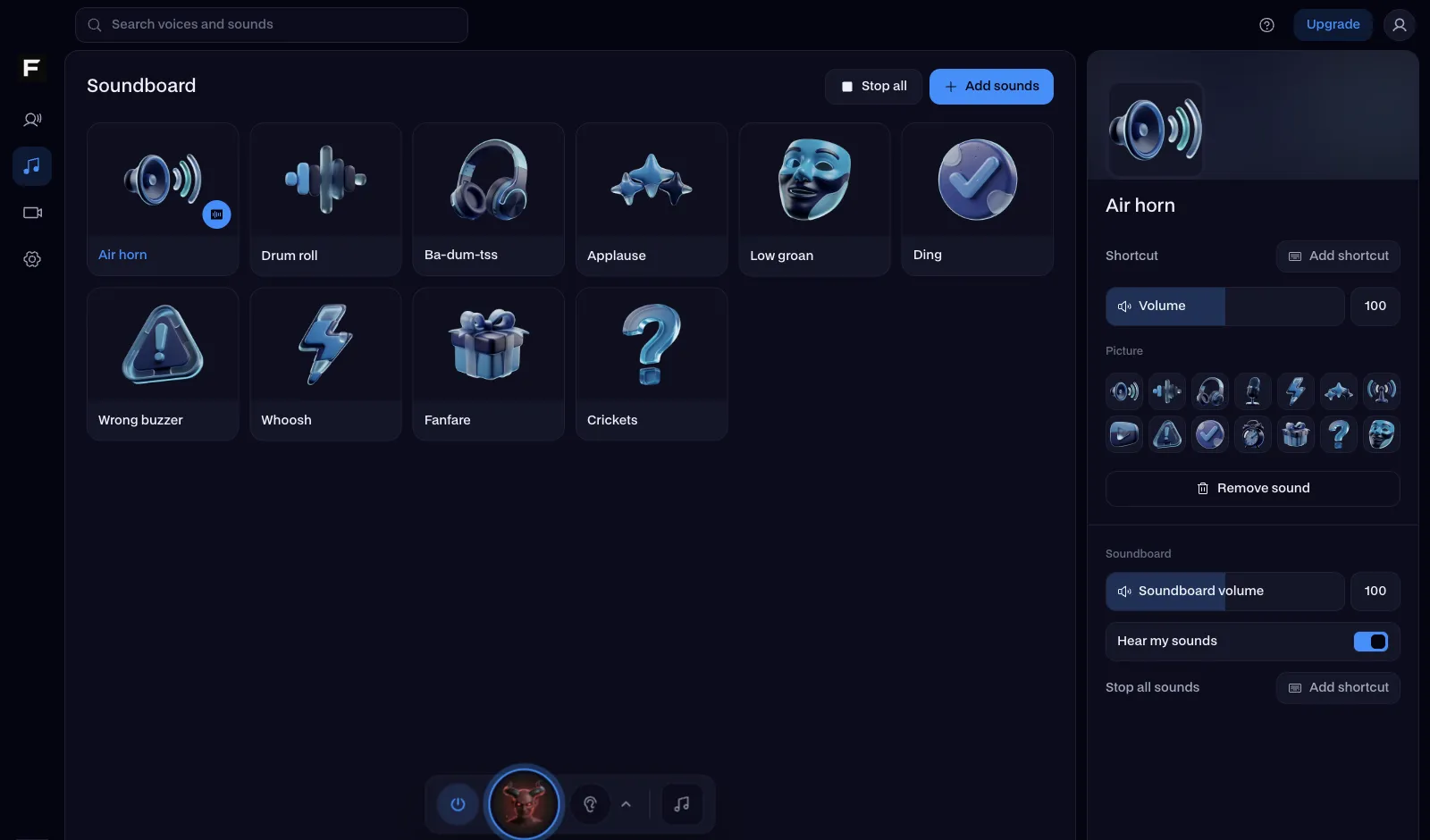
Blerp is built for viewers: they spend points to play sounds on a stream. Facecam is the alternative when you want to play the sounds yourself, in calls, in Discord and on stream.
Updated · Tested by the Facecam team
Verdict
Stay with Blerp if you stream and want your viewers to trigger sounds, TTS and GIF alerts on your stream, with channel points or Blerp's own Beets: that's what it's built for, and it works across Twitch, YouTube, Kick and TikTok Live. Pick Facecam if the person pressing the button is you: a free soundboard that plays into Discord, Meet, Zoom and OBS, with its own sounds and a desktop app with hotkeys.
How they compare
| Blerp | Facecam | Edge | |
|---|---|---|---|
| Who presses the sound | Mostly viewers, on your stream | You | — |
| Where it plays | Your stream on Twitch, YouTube, Kick, TikTok Live and more | Discord, Meet, Zoom, OBS and game voice chat | — |
| Sounds | A library of over a million sound memes, per a product listing; uploads | Our own library, made with AI for Facecam, plus your own clips and the AI Sound Effect Generator | — |
| TTS | Yes, AI TTS in over 50 languages | Yes, the Character Voice Generator | — |
| Video and GIF alerts | Yes | No | Blerp |
| Viewer currency | Blerp Beets and channel points | No | — |
| Price | Free plan, paid Unlimited plans | Free: the soundboard and every library sound | — |
Facecam's side
Where each one wins
Blerp
Pros
- Viewers can play sounds and TTS on your stream
- Works across Twitch, YouTube, Kick and TikTok Live
- Alerts with emotes and GIFs over the stream
Cons
- Built around viewers and points, not your own hotkeys in a call
- Advanced features are on paid Unlimited plans
Facecam
Pros
- Free soundboard you play yourself, in calls and on stream
- Our own sounds with free MP3 downloads
- A voice changer in the same app
Cons
- No viewer-triggered sounds or alerts
- No stream currency or channel point rewards
Viewer sounds or your own soundboard
Blerp and Facecam solve different problems. Blerp turns sounds into something your audience does: a viewer picks a sound meme, pays with points or Beets, and it plays on your stream. Facecam is a soundboard you control: you press a pad and the sound goes into your microphone, so it plays in a Discord call, a Zoom meeting or your OBS scene. Some streamers use both: Blerp for viewers, a soundboard for themselves.
Play your own sounds on stream
Pick a board
Start from the meme, brainrot or phonk board, or build your own with Add sounds.
Add it to OBS
Add the board as a Browser source in OBS, or send it into your mic with Facecam Virtual Mic so OBS hears it with your voice.
Give it hotkeys
In the Facecam desktop app, every pad gets a shortcut, so you can fire sounds mid-game without alt-tabbing.

Sources
- Blerp browser extension listing: platforms, Beets, channel points, TTS (checked 2026-10-16)
- Blerp product listing: integrations, plans, library size (checked 2026-10-16)

Questions
What is Blerp?
A sound platform for streamers: viewers use a browser extension or the stream's integration to play sound memes, TTS and alerts on a stream, with Blerp Beets or channel points.
Is Blerp free?
Blerp has a free plan and paid Unlimited plans (monthly, annual and two-year) that add features like TTS voices and channel point rewards. Facecam's soundboard is free.
Can Facecam let my viewers play sounds?
No. Facecam's soundboard is played by you. For viewer-triggered sounds and alerts, Blerp is built for that.
Does Blerp work in Discord?
Blerp has had a Discord bot for sharing clips in voice channels. Facecam plays sounds into Discord through Facecam Virtual Mic in Chrome, or from hotkeys in the desktop app.
Other comparisons
- Deep-Live-Cam alternative without a gaming PC
- FaceFusion alternative for live video calls
- DeepFaceLive alternative for Mac, Windows and any laptop
- Swapface alternative with no download
- Remaker alternative with card plans and live face swap
- Uberduck AI alternative
- 15.ai alternative
- TopMediai alternative
- Voicemod alternative
- Clownfish voice changer alternative
- Live3D AI face swap alternative
- Snap Camera alternative
- Dubbing AI voice changer alternative
- Okada voice changer alternative
- Voxal voice changer alternative
- EaseUS voice changer alternative
- HitPaw voice changer alternative
- Tuna soundboard alternative
- Soundboard Max alternative
- ManyCam alternative
- YouCam alternative
- XSplit VCam alternative
- NVIDIA Broadcast alternative
- Streamfog alternative
- FilterOnMe alternative
- SplitCam alternative
- CiCi Cam alternative
- Facecam vs LiveSwap
- Facecam vs Livesync









Related
- Soundboard for TwitchA free soundboard for Twitch streams: three ways to get your sounds on stream, with or without OBS.
- Discord SoundboardA free Discord soundboard, no sign-up: play any clip you add into discord.com voice chat through your mic, in Chrome.
- Soundboard for OBSGet the Facecam soundboard into OBS: on its own as a browser source, or mixed with your mic through VDO.Ninja. Free, no sign-up.
- SoundboardA free online soundboard with no account needed: it plays sounds into your mic in Google Meet, Discord and Zoom, so everyone in the call hears them.

Soundboard
Play sounds into your mic
Start