Soundboard Max alternative
Soundboard Max is a free website full of meme and sound buttons. Facecam is the alternative when you want those sounds to come out of your microphone in a call, not just your speakers.
Updated · Tested by the Facecam team
Verdict
Stay with Soundboard Max if you want to press buttons and hear meme sounds on your own speakers: it's free, needs no account and has thousands of clips in categories. Pick Facecam if you want the whole call to hear the sound: Facecam's soundboard sends it through Facecam Virtual Mic into Discord, Meet or Zoom in Chrome, where Soundboard Max's own FAQ points you to a virtual audio cable.
How they compare
| Soundboard Max | Facecam | |
|---|---|---|
| Sounds | Thousands of meme and sound buttons, per the site | Our own library, made with AI for Facecam, plus your own clips and the AI Sound Effect Generator |
| Categories | Sound effects, anime, games, notifications, movies, memes, trending | Themed boards: meme, brainrot, animal, game, Halloween and more |
| Playing into Discord or a call | Not built in; its FAQ suggests a virtual audio cable | Built in: Facecam Virtual Mic in Chrome (Discord, Meet, Zoom); the desktop app for the Discord app and games |
| Downloads | MP3 downloads for many sounds, per its FAQ | A free MP3 for every library sound |
| Account | None | None for the soundboard |
| Works on school or work networks | The site says it's meant to be unblocked | Runs in the browser; the unblocked board page explains how |
| Price | Free | Free: the soundboard and every library sound |
Facecam's side
Where each one wins
Soundboard Max
Pros
- Thousands of buttons in many categories
- Free, with no account
- Simple: open the page and press
Cons
- Sounds play on your speakers; getting them into a call needs extra software
- Clips come from all over, so their sources aren't listed
Facecam
Pros
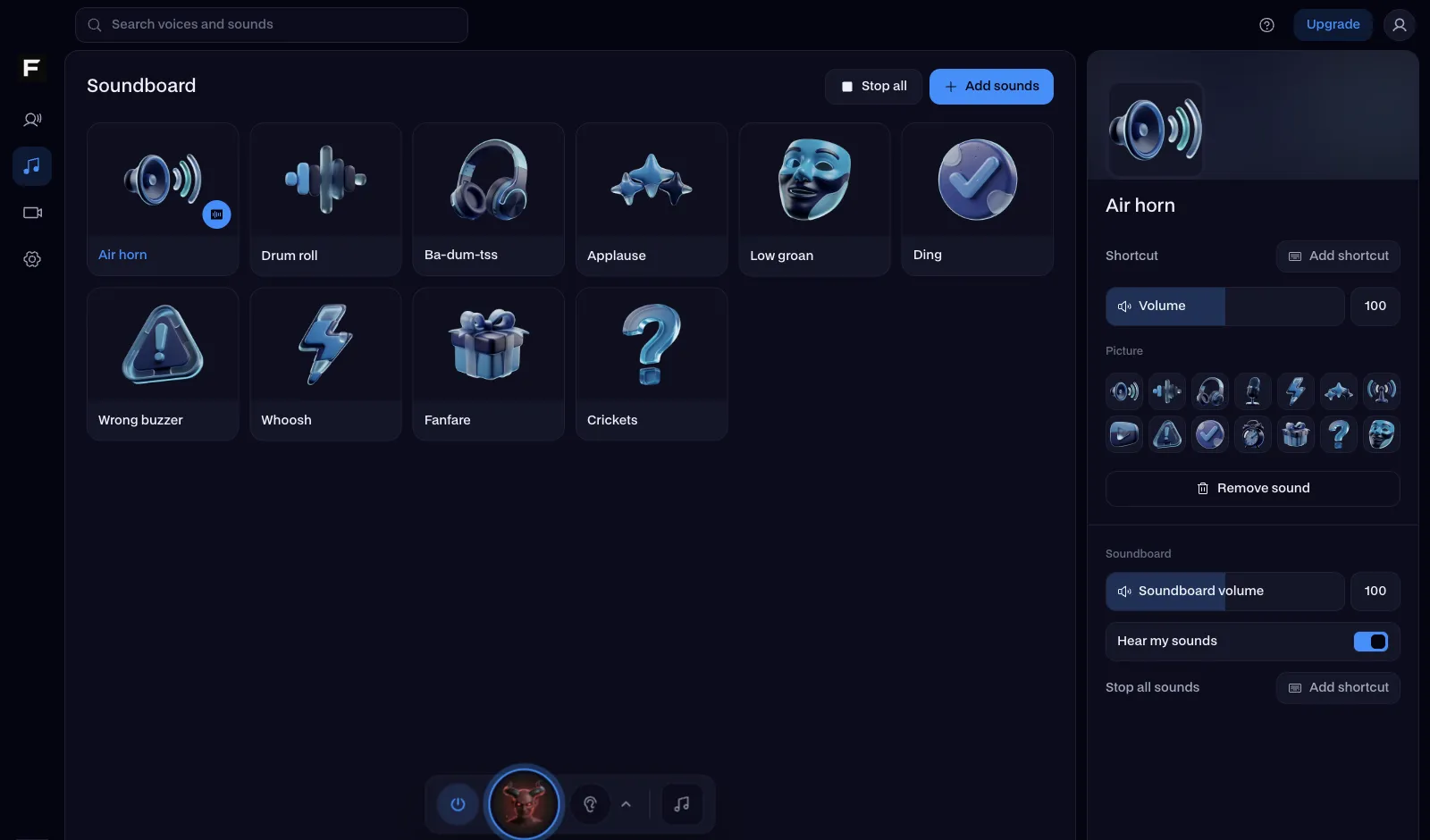
- Plays straight into Discord, Meet and Zoom through Facecam Virtual Mic
- Our own sounds, each with a page, variations and a free MP3
- A desktop app with hotkeys for the Discord app and games
Cons
- Fewer sounds than a big meme button site
- No trending feed of the newest clips
Why a meme button site can't play into your call
A web page plays sound through your speakers or headphones. Discord, Meet and Zoom only hear your microphone. To get a meme button into a call, the sound has to go into a microphone the call can pick, which is what a virtual audio cable does on its own and what Facecam Virtual Mic does for you: choose it as your microphone and the call hears both your voice and the pad you press.
From Soundboard Max to Facecam
Open a board
The meme, brainrot and unblocked boards cover the classics: vine boom, bruh, metal pipe, fahh and more.
Send it into the call
Press Use these sounds in calls, then pick Facecam Virtual Mic as your microphone on discord.com, Meet or Zoom.
Add what's missing
Drop in your own clips with Add sounds, or describe a sound to the AI Sound Effect Generator.

Sources
- Soundboard Max: categories, FAQ (free, no account, virtual audio cable for calls) (checked 2026-10-16)

Questions
Is Soundboard Max free?
Yes, its FAQ says it's free with no account. Facecam's soundboard is free with no account too.
How do I use Soundboard Max in Discord?
Its FAQ suggests routing your browser's audio into a virtual audio cable and picking that as your microphone. With Facecam, choose Facecam Virtual Mic in Discord and the board plays into the call directly.
Does Facecam have meme sounds like Soundboard Max?
Yes: the meme and brainrot boards have vine boom, bruh, metal pipe, fahh, 67 and more, each our own take with its own page and download.
Can I use a soundboard at school?
Facecam's soundboard runs in the browser with no install. The unblocked soundboard page covers what to try when a network blocks sites.
Other comparisons
- Deep-Live-Cam alternative without a gaming PC
- FaceFusion alternative for live video calls
- DeepFaceLive alternative for Mac, Windows and any laptop
- Swapface alternative with no download
- Remaker alternative with card plans and live face swap
- Uberduck AI alternative
- 15.ai alternative
- TopMediai alternative
- Voicemod alternative
- Clownfish voice changer alternative
- Live3D AI face swap alternative
- Snap Camera alternative
- Dubbing AI voice changer alternative
- Okada voice changer alternative
- Voxal voice changer alternative
- EaseUS voice changer alternative
- HitPaw voice changer alternative
- Tuna soundboard alternative
- Blerp alternative
- ManyCam alternative
- YouCam alternative
- XSplit VCam alternative
- NVIDIA Broadcast alternative
- Streamfog alternative
- FilterOnMe alternative
- SplitCam alternative
- CiCi Cam alternative
- Facecam vs LiveSwap
- Facecam vs Livesync












Related
- Soundboard unblockedTwelve meme sounds that play right on this page: no download, no account, nothing to install. Open it on a school Chromebook or a work laptop and press a key.
- Meme soundboardMeme buttons for vine boom, bruh, metal pipe and nine more funny sounds, one key each. Play them here or straight into your Discord call.
- Sound effects for streamsEvery reaction sound in one place: press to hear it, download the MP3, or play it into Discord and your stream.
- SoundboardA free online soundboard with no account needed: it plays sounds into your mic in Google Meet, Discord and Zoom, so everyone in the call hears them.

Soundboard
Play sounds into your mic
Start