Clownfish voice changer alternative
Clownfish voice changer is free, light and Windows-only. Facecam is the alternative with far more voices, a real soundboard, a Mac app and a version that runs in your browser.
Updated · Tested by the Facecam team
Verdict
Stay with Clownfish if you're on Windows and want something tiny and free that hooks straight into your existing microphone, with VST plugin support and its text-to-speech Voice Assistant: it has done that job for years. Pick Facecam if you want more than a dozen effects (it has 26 voices, from deep and girl to characters like Ghostface), a soundboard with a hotkey per pad, a Mac version, or to try every voice in your browser before installing anything.
How they compare
| Clownfish | Facecam | Edge | |
|---|---|---|---|
| Systems | Windows Vista to Windows 11 | Windows and macOS (desktop app), any computer with Chrome | — |
| How it changes your voice | Installs on your microphone itself, so every app hears it | Adds Facecam Virtual Microphone, which you pick in each app | — |
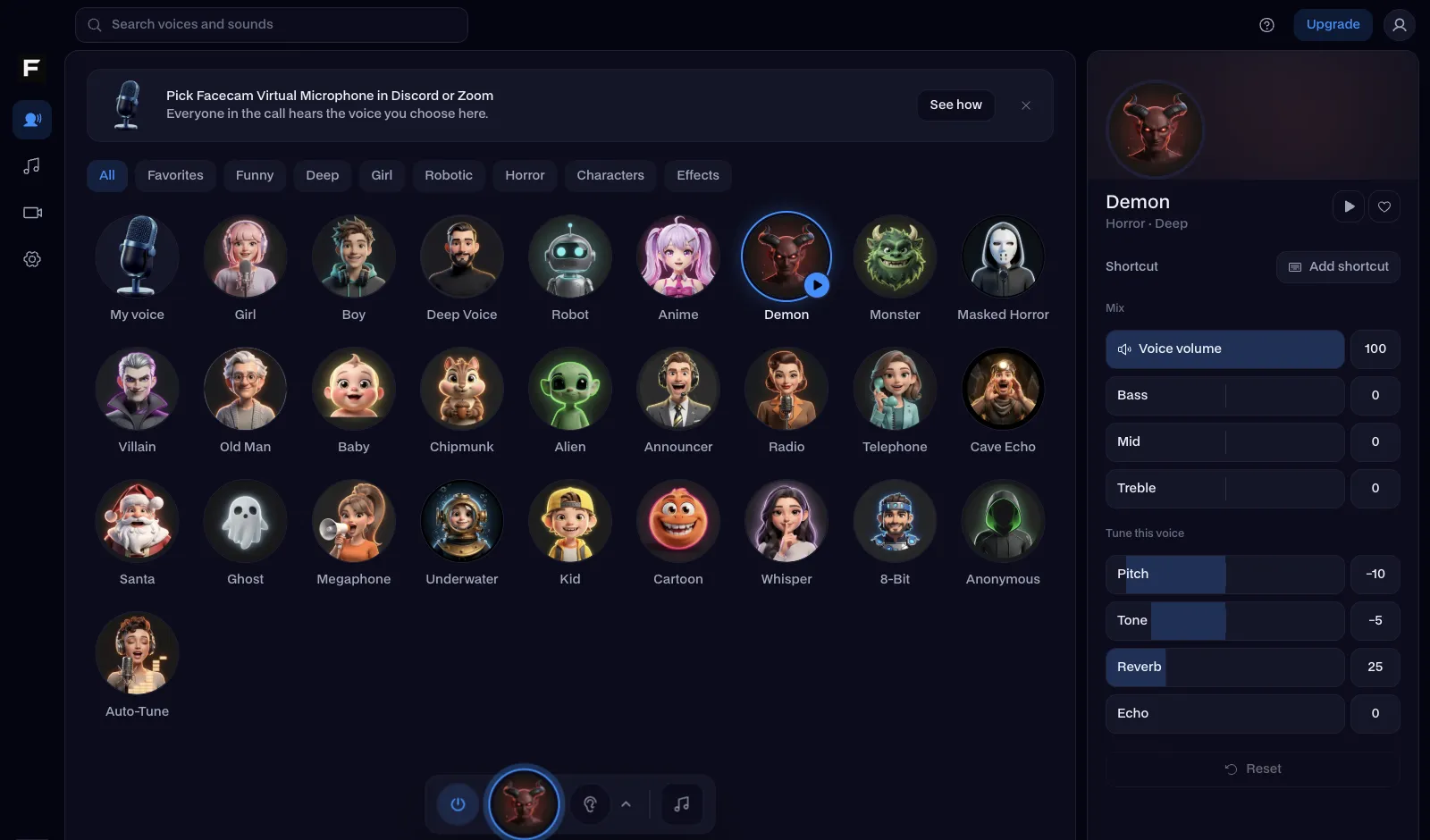
| Voices | 14: alien, Atari, clone, mutation (normal, fast, slow), male, female, helium, baby, radio, robot, custom pitch, silence | 26 voices with per-voice tuning: pitch, tone, bass, reverb, echo | — |
| Soundboard | A sound player with hotkeys and your own files | A soundboard with pads, hotkeys, volume per pad and free sound packs | — |
| Music through the mic | Yes, a built-in music player | Play sounds and clips from the soundboard | — |
| Text to speech | Yes, the Voice Assistant | Yes, the Character Voice Generator | — |
| VST plugins | Yes | No | Clownfish |
| Try it without installing | No | Yes: every voice runs on facecam.ai in your browser | Facecam |
| Price | Free | The voice changer and soundboard are free | — |
Facecam's side
Where each one wins
Clownfish
Pros
- Free, small and fast to install
- Hooks into your real microphone, so there's nothing to pick in each app
- VST plugin support and a text-to-speech assistant
Cons
- Windows only
- About a dozen classic effects, mostly pitch and robot
- Can't be tried before installing
Facecam
Pros
- 26 voices, each one tunable
- A soundboard with free packs and a hotkey per pad
- Windows, Mac, and a browser version that needs no install
Cons
- No VST plugins
- You pick Facecam Virtual Microphone in each app instead of it taking over your real mic
Switch from Clownfish in three steps
Try the voices in your browser
Open the real-time voice changer on facecam.ai, press Start and go through the voices: nothing to install.
Get the desktop app
Download Facecam for Windows or Mac and add Facecam Virtual Microphone when it asks.
Pick it in your apps
Choose Facecam Virtual Microphone as the input in Discord, TeamSpeak, Steam or your game. If Clownfish is still installed on your real mic, turn it off so the two don't stack.
Clownfish's effects, and the Facecam voice to use instead
| Clownfish effect | Facecam voice |
|---|---|
| Female pitch | Girl voice |
| Male pitch | Deep voice |
| Helium pitch | Helium voice |
| Baby pitch | Baby voice |
| Robot | Robot voice |
| Radio | Radio voice |
| Alien | Alien voice |
| Atari | 8-bit voice |
Sources
- Clownfish Voice Changer: features, effects and supported Windows versions (checked 2026-10-16)

Questions
Is Clownfish voice changer free?
Yes, Clownfish is free for Windows. Facecam's voice changer and soundboard are free too, on Windows, Mac and in the browser.
Is there a Clownfish voice changer for Mac?
Clownfish's own page lists only Windows versions, Vista to 11. On a Mac, Facecam's desktop app or its browser voice changer do the same job.
Why is Clownfish not working in Discord?
Usually Discord's noise suppression or Windows' microphone enhancements undo the effect. Turn both off. If you switch to Facecam, pick Facecam Virtual Microphone as Discord's input device and turn noise suppression off the same way.
Can I use Facecam and Clownfish together?
You can, but the effects stack: Clownfish changes your real mic, and Facecam changes that again. Turn one off for a clean voice.
Does Facecam have a soundboard like Clownfish's sound player?
Yes, with pads, a hotkey and volume for each, your own clips and free packs like the meme and fart boards.
Other comparisons
- Deep-Live-Cam alternative without a gaming PC
- FaceFusion alternative for live video calls
- DeepFaceLive alternative for Mac, Windows and any laptop
- Swapface alternative with no download
- Remaker alternative with card plans and live face swap
- Uberduck AI alternative
- 15.ai alternative
- Live3D AI face swap alternative
- Facecam vs LiveSwap
- Facecam vs Livesync





Related
- Real-Time Voice ChangerA free real-time voice changer, no sign-up needed: talk, hear your new voice right away and use it in Discord, Meet and Zoom.
- Online Voice ChangerA free online voice changer with no sign-up: upload or record audio, pick one of 26 voices and download a WAV. Nothing is uploaded.
- Voice changer for gamingChange your voice for the squad while you play: in game voice chat, Discord, Steam and party chat with the Facecam desktop app, or in Chrome with nothing to install.



Real-Time Voice Changer
Change your voice live
Start