AI Cover Generator
Make an AI cover of any song: upload it, pick a voice, and hear it sung over the original music.
Where it works
How to use AI Cover Generator
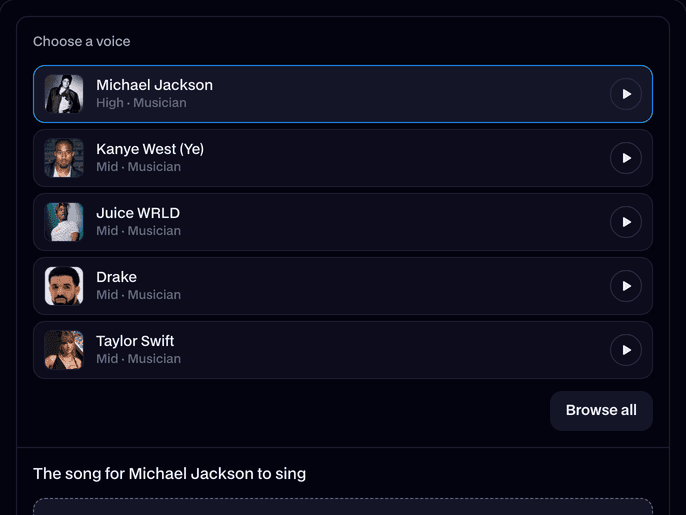
Pick a voice
Choose from 82 famous voices and characters. Play a sample first, or search Browse all.
Upload the song
Drop in an MP3, WAV, M4A or OGG, up to 10 minutes and 50 MB. Leave Pitch on Auto.
Make the cover
Press Make cover. A song takes a minute or two; then play it and download the MP3.
What is an AI cover?
An AI cover is a song sung again by an AI voice: the singer's vocals are taken out of the song, sung in another voice, and put back over the music. Facecam's AI Cover Generator does all three from one song file.
Before and after
What you can do with AI Cover Generator
AI song covers for TikTok and Shorts
Put a famous voice on the song that's trending and post the MP3 with your clip.
Hear your favorite character sing
SpongeBob on a ballad, Hatsune Miku on a rap: any song, any voice in the list.
Singing streams for your VTuber
Make covers in a character's voice for a VTuber or AITuber stream, then play them on air.
Just the vocals or just the music
AI Cover Generator features
Whole songs
Up to 10 minutes, sung start to finish, verses and choruses alike.
Stays in key
The cover follows the song's melody note for note. Auto moves it a whole octave when a voice can't sing that high or low, never off key.
82 voices
Singers, rappers, actors, cartoons, anime and game characters, each with a sample to hear first.
Two files back
The finished cover, and the AI vocals alone for your own mix.
Original music
The drums, bass and instruments are the song's own, at the same level as before.






More about AI Cover Generator
Facecam's AI Cover Generator takes a song you upload and gives it back sung by a famous voice or character, over the song's own music, with the AI vocals as a second file.
AI Cover Generator: what you need and limits
| How it works | Online. Works on any laptop. |
|---|---|
| You get | Audio download |
| You need | Any up-to-date browser |
| Phones and tablets | Supported |
| Songs | MP3, WAV, M4A or OGG, up to 10 minutes and 50 MB |
| You get | The cover (the new voice over the music) and the AI vocals alone, both MP3 |
| Voices | 82 famous people and characters, the same as the AI Voice Generator |
| Pitch | Auto keeps the song's key and moves the vocals a whole octave only when the voice needs it. Octave down and Octave up choose for you. |
| Price | Comes with every paid plan, by the minute of song. A cover that fails doesn't count. Kept in your Library for 7 days. |
How an AI voice cover is made
First the song is split into its vocals and its music by Demucs, an AI model made to separate songs into parts. Then the vocals are sung again by the voice you picked: its voice model follows the original singer's melody, timing and words. Last, the new vocals go back over the music at the original singer's level.
Because the melody comes from the song, the cover stays in key. Auto only moves the vocals a whole octave, for example when a deep voice covers a high song, so it still fits the music.
Getting the best AI cover
- Songs with one clear lead singer work best. Backing vocals and harmonies are sung in the new voice too.
- Heavy reverb, autotune or distortion on the original vocals carries into the cover.
- If the cover sounds too high or too deep for the voice, make it again with Octave down or Octave up.
- A rap works as well as a ballad: the voice follows the rhythm as well as the notes.
Your files
The song you upload is stored privately while the cover is made and deleted when it's done, always within an hour. The cover and the vocals stay in your Library for 7 days. Only upload songs you have the right to use.

AI Cover Generator FAQ
Is the AI cover generator free?
It comes with the paid plans, charged by the minute of song, and the tool shows what a song uses before you start. A cover that fails doesn't count. New accounts get free tries.
How do I make an AI cover of a song?
Pick a voice, upload the song as an MP3, WAV, M4A or OGG file, and press Make cover. You get the cover and the AI vocals as MP3s in a minute or two.
Which voices can sing my cover?
Any of the 82 voices in the AI Voice Generator: singers like Taylor Swift, Michael Jackson and Drake, and characters like SpongeBob, Mario and Hatsune Miku.
Does the cover keep the original music?
Yes. Only the vocals change. The drums, bass and instruments are the song's own.
How long can the song be?
Up to 10 minutes and 50 MB. Trim longer songs first.
Why does the cover sound an octave higher or lower?
Auto moves the vocals a whole octave when the voice is far from the song's range, so the cover stays in key. Choose Octave down or Octave up to pick for yourself.
Can I get just the AI vocals?
Yes. Every cover comes with a second MP3 of the AI vocals alone.
Is this like Jammable?
It does the same job: upload a song, pick a voice, get an AI cover. Facecam's covers come with the AI vocals as a separate file, and the same voices also speak your text in the AI Voice Generator.
Can I make an AI cover with my own voice?
Not yet: covers use the voices in the list. To make a copy of your own voice for speech, use Voice Clone.
Does it work on my phone?
Yes. Upload a song from your phone's files in any modern mobile browser.



Try AI Cover Generator now
- Cancel any time
- Runs in your browser
- No gaming PC needed