Free Voice Isolator
A free voice isolator and background noise remover: pull your voice out of the noise in any recording, right in your browser.
Where it works
How to use Voice Isolator
Record or upload
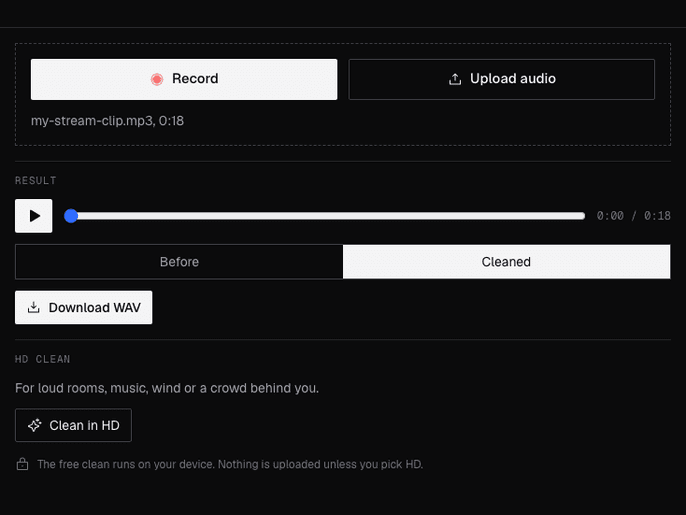
Press Record and talk, or upload a WAV, MP3, M4A, OGG, WebM or FLAC file of up to 10 minutes.
Hear the difference
The noise comes out right away. Switch between Before and Cleaned at the same spot.
Download
Download WAV saves your clean voice. For music or a crowd behind you, try Clean in HD.
What is a voice isolator?
A voice isolator is a tool that separates your voice from everything else in a recording, like fans, hum, keyboards or a noisy room. Facecam's runs free in your browser, with an HD clean for louder noise.
Before and after
What you can do with Voice Isolator
Remove background noise from clips and VODs
Take the fan, the PC hum and the room out of a stream highlight before you post it.
Clean voice lines for VTubers and games
Record your VTuber or game character lines anywhere, then clean them before you edit.
Clean audio before a voice change
Voice Isolator features
Free and on your device
The free clean runs in your browser with RNNoise, an open-source noise remover. Your audio stays with you.
Before and after
One player switches between the original and the clean version at the same moment.
Remove fan, hum and room noise
Fans, air conditioning, hum, hiss and room tone, plus the noise between your words.
HD for hard noise
Music, wind, traffic or other voices behind you, on recordings of up to 5 minutes.
Record or upload
Use your mic on the page or any common audio file, on a computer or a phone.






More about Voice Isolator
Facecam's Voice Isolator is a free browser tool that removes background noise from a recording and leaves your voice. The free clean runs on your device; an HD clean takes on louder noise.
Voice Isolator: what you need and limits
| How it works | Right on this page. Nothing is uploaded. |
|---|---|
| You get | Audio download |
| You need | Any up-to-date browser |
| Phones and tablets | Supported |
| Files | WAV, MP3, M4A, OGG, WebM or FLAC, up to 10 minutes |
| Free clean | Runs on your device; nothing is uploaded. You get a 48 kHz mono WAV. |
| HD clean | Up to 5 minutes. Runs on our audio partner's servers. You get an MP3, kept in your Library for 7 days. Needs an account and a paid plan; a failed clean doesn't count. |
Remove background noise from audio, free or in HD
The free clean uses RNNoise, a small open-source model made for steady noise. It runs in your browser, so it costs nothing and nothing leaves your device. It is very good with fans, hum, hiss and room tone, and it also lowers what is left between your words.
Music, a TV, wind or other people talking are harder, because they change all the time. That is what HD is for: it sends the recording to our audio partner's voice isolation model and returns only the voice. Compare both on the samples above.
What it won't do
- Separate two voices: if two people talk at once, both stay in.
- Take the singing out of a song: that's a vocal remover for music, a different tool.
- Clean your mic live in a call: it works on recordings. Discord and most call apps have their own noise suppression for live audio.
- Bring back words the noise drowned out: it removes noise, it can't recreate speech.
Privacy
The free clean never uploads anything. HD sends the recording to our audio partner (fal.ai) to clean it; the result is kept for 7 days so you can download it again, then deleted. Only upload recordings you have the right to use.

Voice Isolator FAQ
Is the voice isolator free?
Yes. The free clean is unlimited and needs no account. HD is optional and comes with the paid plans.
How do I remove background noise from audio for free?
Record or upload the clip above. The free clean runs right away on your device, then Download WAV saves your voice without the noise. No account, no watermark.
Is this the same as an audio cleaner or a voice cleaner?
Yes. It cleans the noise out of a voice recording, which is what people usually mean by an audio or voice cleaner. It isn't built for cleaning up music.
Is it an audio enhancer?
For voice, mostly yes: taking the noise out is what makes a recording sound clearer. It doesn't add EQ or effects, and it can't fix a voice that clipped or a mic that sounds thin.
Does it upload my recording?
Not for the free clean: it runs on your device. Only HD sends the recording to our servers.
Can it remove echo?
A little. The free clean is made for noise, not room echo. HD does better with a roomy sound, but a very echoey recording won't come out dry.
Can it remove music behind my voice?
Use HD for that. The free clean is made for steady noise and leaves most music in.
Does it work on my phone?
Yes, in any modern mobile browser. Record with the phone's mic or upload a file.
Can I use it live on Discord or on stream?
No, it cleans recordings. For live audio, turn on the noise suppression in Discord or your streaming app.
How long can the recording be?
Up to 10 minutes for the free clean and 5 minutes for HD.



Try Voice Isolator for free
- Free, no sign-up
- Runs in your browser
- Nothing is uploaded