Vocal Remover
Remove the vocals from any song and get the instrumental and the acapella as two files.
Where it works
How to use Vocal Remover
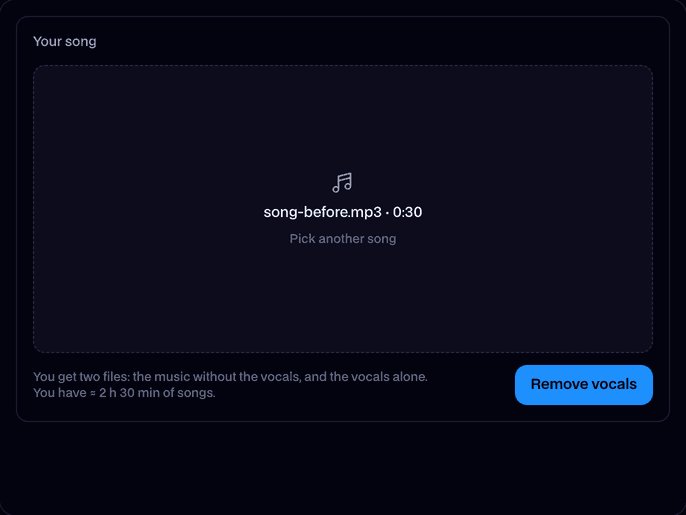
Upload a song
Drop in an MP3, WAV, M4A or OGG, up to 10 minutes and 50 MB.
Remove vocals
Press Remove vocals. A song is split in about a minute.
Download both
Play the instrumental and the vocals, then download each as an MP3.
What is a vocal remover?
A vocal remover is a tool that takes the singing out of a song and leaves the music, the instrumental. Facecam's uses AI to split the song, so you get the vocals alone as well: an acapella.
Before and after
What you can do with Vocal Remover
Karaoke tracks
Take the singing out of any song and sing over the instrumental at home or on stream.
Acapellas for remixes
Pull the vocals out to remix, mash up or put over your own beat.
Practice and covers
Play or sing along to the instrumental, or hear the vocals alone to learn the part.
An AI cover in a famous voice
Vocal Remover features
Instrumental and acapella
Every song comes back as two files: the music without the vocals and the vocals alone.
Clean split
Demucs separates the voice from drums, bass and every other instrument, with far less bleed than old center-channel tricks.
Whole songs
Songs up to 10 minutes, in MP3, WAV, M4A or OGG.
Original quality
The instrumental keeps the song's stereo mix and its own levels.
On any device
Works in the browser on a computer or a phone. Nothing to install.






More about Vocal Remover
Facecam's Vocal Remover splits a song you upload into its vocals and its instrumental with AI and gives you both as MP3 files.
Vocal Remover: what you need and limits
| How it works | Online. Works on any laptop. |
|---|---|
| You get | Audio download |
| You need | Any up-to-date browser |
| Phones and tablets | Supported |
| Songs | MP3, WAV, M4A or OGG, up to 10 minutes and 50 MB |
| You get | The instrumental (no vocals) and the vocals alone (acapella), both MP3 |
| Model | Demucs (htdemucs_ft), an AI model made to separate songs into parts |
| Price | Comes with every paid plan, by the minute of song. A split that fails doesn't count. Kept in your Library for 7 days. |
Remove vocals from a song with AI
Older vocal removers cancelled out whatever was in the middle of the stereo mix, which took the bass and kick drum with it and left the reverb behind. Demucs is a neural network trained to hear each part of a song, so it separates the voice from the instruments instead, with the music left whole.
It works best on songs with a clear lead vocal. Backing vocals count as vocals, and a lot of reverb or effects on the voice can leave a faint trace in the instrumental.
Acapella extractor, karaoke maker or instrumental maker
They're all the same split. The vocals file is the acapella; the instrumental file is the karaoke track or the beat. You get both from one upload.
Your files
The song you upload is stored privately while it's split and deleted when it's done, always within an hour. The two files stay in your Library for 7 days. Only upload songs you have the right to use.

Vocal Remover FAQ
Is the vocal remover free?
It comes with the paid plans, charged by the minute of song, and the tool shows what a song uses before you start. A split that fails doesn't count. New accounts get free tries.
How do I remove vocals from a song?
Upload the song above and press Remove vocals. In about a minute you get the instrumental and the vocals as two MP3s to play and download.
Can I get the acapella, just the vocals?
Yes. Every split gives you the vocals alone as well as the instrumental.
Which files can I upload?
MP3, WAV, M4A or OGG, up to 10 minutes and 50 MB. A long WAV can be bigger than that; export it as an MP3 first.
Will the instrumental sound like the original?
Yes, minus the voice. The drums, bass and instruments keep their mix. On songs with heavy vocal effects you may hear a faint trace where the voice was.
Can it remove the voice from a video?
Save the video's sound as an MP3 or M4A first, then upload that.
Can I turn the song into an AI cover?
Yes, with the AI Cover Generator: it splits the song the same way, then sings the vocals again in a famous voice.
Does it work on my phone?
Yes, in any modern mobile browser. Upload the song from your phone's files.



Try Vocal Remover now
- Cancel any time
- Runs in your browser
- No gaming PC needed