Voice changer for Chromebook
A free voice changer for Chromebook: add the Chrome extension, pick a voice, and choose Facecam Virtual Mic in Google Meet or discord.com.
Your browser will ask for microphone access when you click.
Set it up in Chromebook
01
Add the extension
Open the Facecam page in the Chrome Web Store and select Add to Chrome → Add extension. This doesn't work in a Guest session or Incognito.
02
Check ChromeOS mic access
Select the time (bottom right) → Settings → Privacy and security → Privacy controls, and make sure Microphone access is on. When it's off, no website gets a mic.
03
Pick your real mic
In Settings → Device → Audio, under Input, choose the mic the voice changer should use. A headset mic avoids picking up the Chromebook's speakers.
04
Choose a voice
Turn on Facecam's voice effect and pick a preset. Watch the meter move as you speak.
05
Select it in the call
In Google Meet or discord.com, open the audio settings and choose “Facecam Virtual Mic” as the microphone.
Tested by Facecam team. Facecam extension 2.1.0 in Chromium 153 (the open-source version of Chrome) on macOS 26.5, set to report itself as a Chromebook (ChromeOS user agent), with a recorded synthetic voice clip as the microphone, in a plain test call page we built. Not a real Chromebook: the ChromeOS settings, the Web Store install, Google Meet and discord.com steps come from Google's and Discord's help pages (see Sources).
Our test recording
What the test call received through Facecam Virtual Mic: 6 seconds each of voice off, Robot and Anime
Our recording, 2026-10-02. The voice was switched from Off to Robot to Anime during the call, without leaving it. The speaker is a synthetic speech clip, not a person.
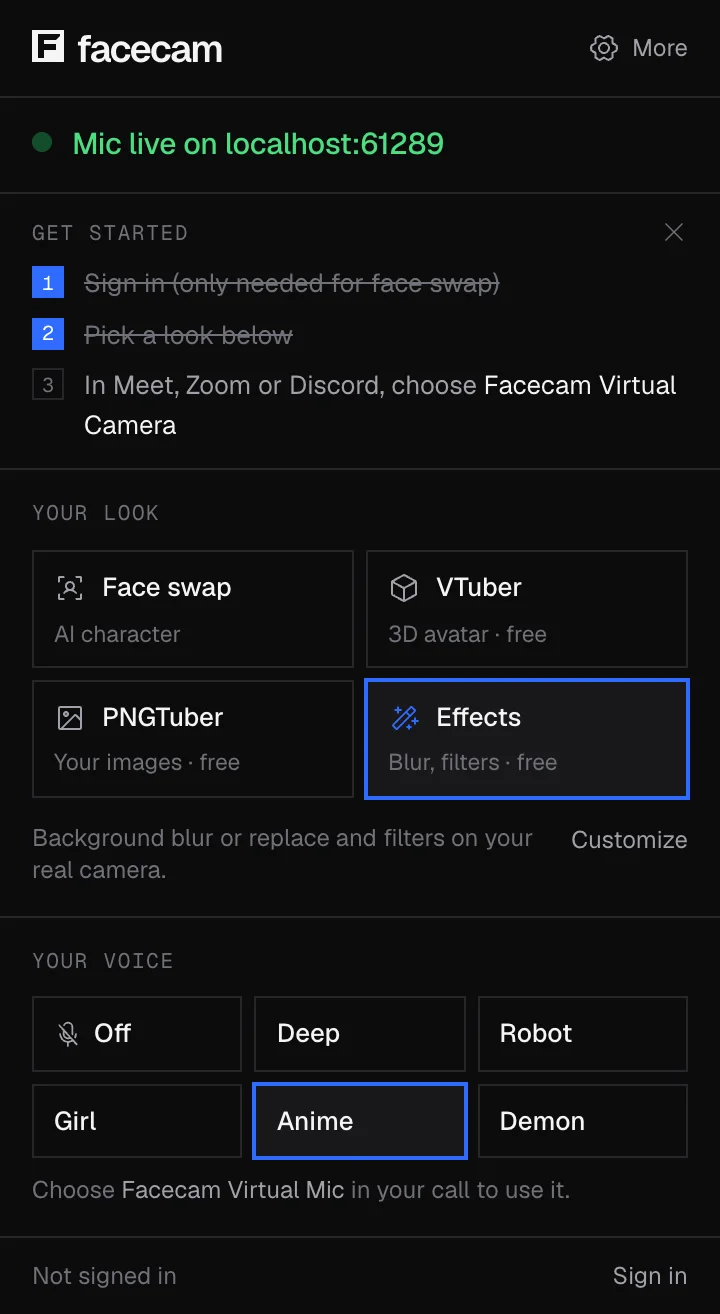
The real extension popup in the same run. The test page ran on the test computer itself, hence the localhost address.
If it doesn't work
| Problem | Fix |
|---|---|
| Add to Chrome is greyed out | Your organisation blocks extensions. Ask the admin; on managed Chromebooks there's no way around it. |
| The site says no microphone found | Microphone access is off in Privacy controls, or a physical mic switch is off. |
| The voice sounds robotic and choppy | Close other busy tabs. Older Chromebooks have less power to spare. |
| Discord app from the Play Store hears my normal voice | Android apps can't use it. Open discord.com in Chrome instead. |
| facecam.ai says to open it on a computer | A convertible Chromebook in tablet mode can look like a touch device to websites. Fold it back to laptop mode, or connect a mouse, and reload. |
What we measured
| Voice | Delay |
|---|---|
| Off (your normal voice) | about 40 ms |
| Robot | about 42 ms |
| Anime (pitch raised) | about 55 ms |
Voices that change your pitch added about 15 ms over your normal voice. Robot doesn't change pitch, so it added almost nothing.
More about Chromebook
Why Chromebooks are different
Most voice changers for Windows and Mac install extra audio software. ChromeOS doesn't allow that, which is why the big desktop voice changers have no Chromebook version. Facecam works inside Chrome itself, so the only install is the extension.
On a school Chromebook
Admins choose whether users can install extensions in the Google Admin console (Devices → Chrome → Apps & extensions). If it's blocked, you'll see a message that your organisation manages the device. Please don't try to work around it.
Sources
- Chrome Web Store: install extensions — support.google.com/chrome_webstore/answer/2664769 (checked 2026-10-01)
- Chromebook: camera and microphone privacy controls — support.google.com/chromebook/answer/13128177 (checked 2026-10-01)
- Chromebook: audio input settings — support.google.com/chromebook/answer/10045949 (checked 2026-10-01)
- Chrome Enterprise: allow or block apps and extensions — support.google.com/chrome/a/answer/6177431 (checked 2026-10-01)
- Voicemod: Chromebook voice changer page — voicemod.net/en/chromebook-voice-changer (checked 2026-10-02)
Questions
Is there a Voicemod for Chromebook?
Not as of 2026-10-02: Voicemod's Chromebook page asks you to sign up to be notified. Facecam works in Chrome today.
Is this voice changer for Chromebook free?
Yes. The voice effects run on your Chromebook and don't need an account.
Can I use it in Roblox or Minecraft on my Chromebook?
No. Those run as Android or desktop apps, which can't see the Facecam Virtual Mic. It works on websites in Chrome.
Does it need Linux or developer mode?
No. It's a normal Chrome extension.
Other platforms
Updated