How to add sounds to Discord soundboard
Add your own sounds to a Discord server's soundboard in under a minute: the menu, the file limits, the permission, and free sounds that already fit.
By Facecam team · Published · Updated
Short answer
Join a voice channel on Discord's desktop app or in a browser, open the soundboard from the voice controls, and click Add Sound. Upload an MP3 or Ogg file of up to 5.2 seconds and 512 KB, trim it if it's longer, give it a name and an emoji, and upload. You need the Create Expressions permission, and the server needs a free slot: 8 to start, more with Server Boosts.
You need
- Discord's desktop app or discord.com in a browser (sounds can't be added from the phone app)
- The Create Expressions permission on the server (owners and admins have it)
- An MP3 or Ogg file, up to 5.2 seconds and 512 KB
Step by step
Get a sound that fits
Download one from the list below: every one is our own MP3, under 5.2 seconds and well under 512 KB. Your own clip works too; trim it to the part you want first.
Open the soundboard
Join any voice channel on the server, then click the Soundboard button in the voice controls. Or go to Server Settings, Soundboard.
Click Add Sound
At the bottom of the soundboard panel, click Add Sound, then Browse and pick your file. Discord shows a trim bar if it's longer than 5.2 seconds: drag it to the part you want.
Name it and pick an emoji
Give the sound a short name and an emoji; both show on the button. Set its volume, then click Upload.
Play it
Open the soundboard in the voice channel and click the button. Everyone in the channel hears it. Members need the Use Soundboard permission to play sounds.
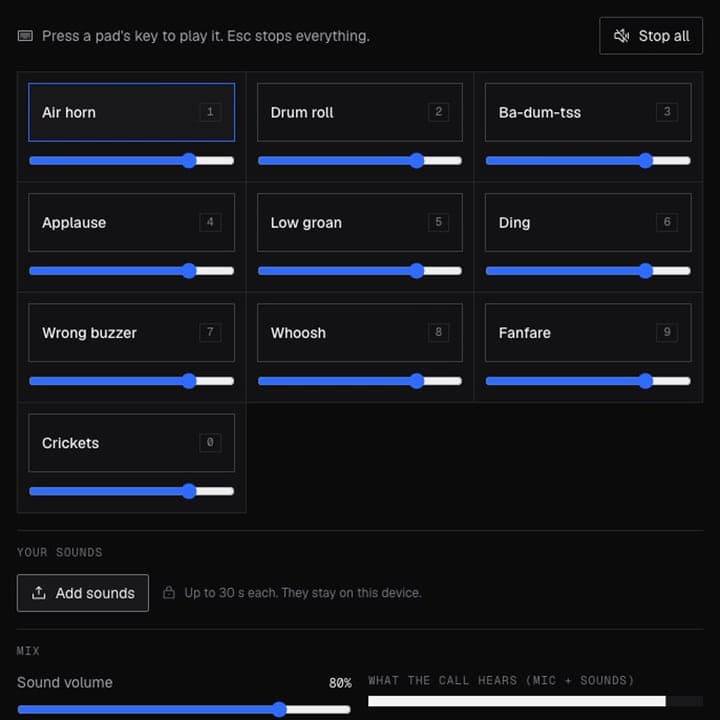
From our test
Our recording in a test call: the way to play longer sounds without Discord's slots. Unmute to hear what the call received.

If it doesn't work
| Problem | Fix |
|---|---|
| There's no Add Sound button | You don't have the Create Expressions permission, or you're on the phone app. Ask an admin, and add sounds from the desktop app or a browser. |
| Discord says the file is too large | Sounds must be under 512 KB. Export the clip as an MP3 at 128 kbit/s or less, or trim it shorter. |
| My WAV file won't upload | Discord's soundboard takes MP3 and Ogg only. Convert the WAV to MP3, or use one of the MP3s below. |
| All the slots are full | Each server has 8 slots, 24 at Boost level 1, 36 at level 2 and 48 at level 3. Remove a sound you don't use, or boost the server. |
| I want sounds longer than 5.2 seconds | Discord's soundboard can't. Facecam's soundboard plays clips up to 30 seconds through your microphone, in any server, with no slots. |
Free sounds sized for Discord
Our own sounds, made with AI for Facecam and free to use. Play one, download the MP3 and add it with Add Sound: each is under 5.2 seconds and well under 512 KB.
Discord's soundboard limits
| Limit | |
|---|---|
| Length | 5.2 seconds |
| File size | 512 KB |
| File types | MP3 or Ogg |
| Slots | 8; 24, 36 and 48 at Server Boost levels 1, 2 and 3 |
| Adding sounds | Desktop app or browser, with Create Expressions |
| Playing sounds | Use Soundboard permission; other servers' sounds need Nitro |
Discord's soundboard or Facecam's
| Discord soundboard | Facecam soundboard | |
|---|---|---|
| Clip length | Up to 5.2 seconds | Up to 30 seconds |
| Slots | 8 to 48, shared by the server | Up to 24 on your own board |
| Works in | That server's voice channels | Any server, DMs, Zoom, Meet, games |
| Needs | Create Expressions to add | Facecam Virtual Mic as your input |
| Hotkeys | No | Yes, one per pad |
Use Discord's when your server already has the sounds and everyone can add them. Use Facecam's for longer clips, sounds that follow you to every server, or a hotkey per sound mid-game.

Questions
Can you add sounds to the Discord soundboard on mobile?
No. You can play sounds from the phone app, but adding them needs Discord's desktop app or discord.com in a browser.
Do you need Nitro to add sounds to a soundboard?
No. Anyone with the Create Expressions permission can add sounds to the server. Nitro lets you play sounds from other servers and set entrance sounds.
How many sounds can a Discord soundboard have?
8 to start, 24 at Boost level 1, 36 at level 2 and 48 at level 3.
Why is my sound too long for Discord?
Discord caps sounds at 5.2 seconds. Use the trim bar when you upload, or pick a shorter clip.
Where can I get sounds for the Discord soundboard?
Download the free MP3s on this page, or any of the sound effects and themed boards on Facecam: every one fits Discord's limits.
Used in this guide
Related
 Discord SoundboardA free Discord soundboard, no sign-up: play any clip you add into discord.com voice chat through your mic, in Chrome.
 Meme soundboardMeme buttons for vine boom, bruh, metal pipe and nine more funny sounds, one key each. Play them here or straight into your Discord call.
 Voice changer for DiscordA free voice changer for Discord voice chat: open discord.com in Chrome, pick Facecam Virtual Mic, and talk in a new voice.
Soundboard
Play sounds into your mic
Start