Free Auto-Tune
Free auto tune online: record or upload your singing, and it snaps to the key, from a gentle touch-up to the hard robotic effect.
Where it works
- Chrome, Edge, Firefox and Safari, on desktop and mobile.
- The result is a file you download.
Updated · Tested by the Facecam team
How to use Auto-Tune
Record or upload
Press Record and sing, or upload a vocal of up to 10 minutes. A vocal on its own works best.
Pick a style
Hard for the robotic snap, Pop for a polished vocal, Natural to stay in tune without sounding tuned. The key is found for you.
Listen and download
Switch between Before and Tuned at the same spot while you move the sliders, then Download WAV.
What is an auto tune effect?
An auto tune effect is pitch correction: software that hears which note you sang and moves it onto the right note of the song's key. Set fast, it jumps between notes for the robotic T-Pain sound; set slow, it just keeps you in tune.
Before and after
What you can do with Auto-Tune
Get the T-Pain sound
Hard style with instant retune makes every note jump: the robotic effect from 2000s R&B and today's trap.
Fix a vocal that drifts
Natural style keeps a cover or a demo in tune and leaves your vibrato alone.
Tune a vocal from a song
Auto-Tune features
Free, on your device
The tuning runs in your browser. No account, no upload, no limit on how many takes.
Finds your key
It listens to the whole take and sets the key and scale for you. Change them any time.
Natural to robotic
Retune speed, strength and humanize go from a touch you can't hear to the hard snap.
See every note
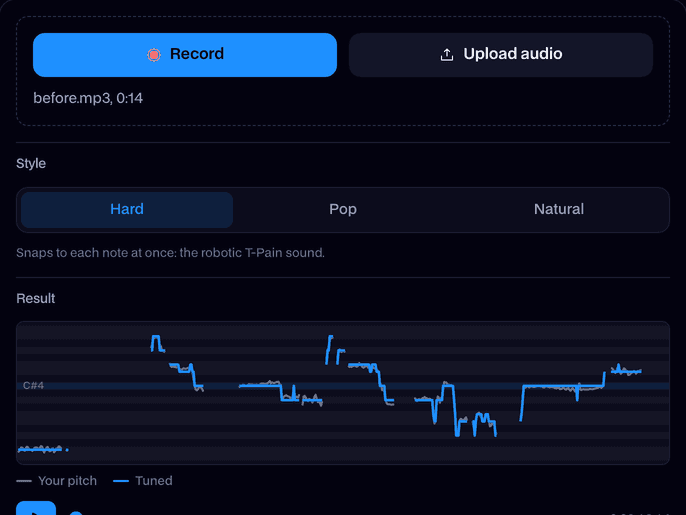
A pitch graph draws your singing and the tuned line over the notes of the key.
No warble on long notes
Held notes land on the note and stay there, instead of wobbling around it.






More about Auto-Tune
It runs in your browser, so your voice never leaves your device.
Facecam's Auto-Tune is a free browser tool that finds the pitch of your singing, moves each note to the nearest note of your key and gives you the result as a WAV. How fast and how far it pulls decides whether it sounds natural or robotic.
Auto-Tune: what you need and limits
| How it works | Right on this page. Nothing is uploaded. |
|---|---|
| You get | Audio download |
| You need | Any up-to-date browser |
| Phones and tablets | Supported |
| Files | WAV, MP3, M4A, OGG, WebM or FLAC, up to 10 minutes. Or record on the page. |
| Runs | On your device, in the browser. Nothing is uploaded. |
| Controls | Key and scale (found for you), style, retune speed, strength, humanize and formant. |
| You get | A mono WAV at your file's sample rate. |
| Price | Free, no account, no limit. |
How to auto tune your voice online
Sing a few lines into your mic, or upload a recording. The tool first finds the pitch of every moment of your singing, then works out which key it is in. Each note is pulled to the nearest note of that key, and you hear the result right away.
Two settings decide the sound. Retune speed is how fast a note is pulled: Instant is the robotic jump, 50 ms and up sounds like a singer who is simply in tune. Humanize lets held notes keep their own vibrato. Strength sets how far each note moves.
Hard, Pop and Natural
| Hard | Pop | Natural | |
|---|---|---|---|
| Retune speed | Instant | 15 ms | 50 ms |
| Strength | 100% | 100% | 90% |
| Humanize | Off | 15% | 50% |
| Sounds like | T-Pain, trap vocals | A polished pop vocal | An in-tune singer |
Tips for a clean result
- Use a vocal on its own. Music under the voice confuses the pitch tracking; take it out first with the Vocal Remover.
- Pick the song's key if you know it. The detected key is a guess from your singing, and a short take has few notes to go on.
- For the hard effect, sing the melody plainly. The tool does the jumps; slides you sing on purpose become steps.
- If a note lands on the wrong neighbour, slow the retune speed a little or choose the key by hand.
What it won't do
- Tune a full mix: it follows one voice. Harmonies and backing vocals are tuned as one line at best.
- Write a melody for you: it moves the notes you sing to the closest ones in the key.
- Change the words or your voice into someone else's. For that, try the AI Cover Generator.
Where the auto tune sound comes from
Auto-Tune began in 1997 as a studio plug-in by Antares, built to fix singers who drifted slightly off key without anyone noticing. A year later Cher's "Believe" turned the retune speed all the way up on purpose, and the jumpy, robotic voice became an effect of its own. T-Pain made it his signature in the mid-2000s, and it has been part of R&B, trap and pop vocals ever since.
Today "autotune" means both things: the invisible fix and the obvious effect. The only real difference is the retune speed, which is why this tool's three styles are mostly three speeds.

Auto-Tune FAQ
Is this auto tune free?
Yes. It's free with no account and no limit, because it runs on your own device.
How do I auto tune my voice online for free?
Press Record and sing, or upload a recording. It's tuned right away. Pick a style, listen, then click Download WAV.
How do I get the T-Pain effect?
Choose the Hard style. It sets the retune speed to Instant and full strength, so every note jumps to the next one with no glide. The T-Pain effect page opens the tool already set up that way.
What key should I use?
Keep the one it finds unless you know the song's key. If notes land on the wrong neighbour, set the key by hand, or choose All notes to tune to every semitone.
Can I auto tune my voice live on Discord?
Yes, with the Real-Time Voice Changer: choose the Auto-Tune voice and use it in Discord, Meet or Zoom in Chrome with the Facecam extension.
Can I auto tune a whole song?
Tune the vocal on its own. Use the Vocal Remover to split the song, tune the vocals here, then put them back over the instrumental in any audio editor.
Does it upload my recording?
No. The pitch tracking and the tuning both run in your browser.
Does it work on my phone?
Yes, in any modern mobile browser. Record with the phone's mic or upload a file.
Will auto tune fix a bad recording?
It fixes the pitch, not the recording. Notes that are a little sharp or flat come out in tune, but noise, echo, clipping and mumbled words stay. Record close to the mic in a quiet room and the result sounds far better.
Do I need a DAW or a plugin?
No. This page does the tuning on its own and gives you a WAV. You only need an audio editor or a DAW if you want to mix the tuned vocal back over a beat.



Try Auto-Tune for free
- Free, no sign-up
- Runs in your browser
- Nothing is uploaded