FaceFusion alternative for live video calls
A FaceFusion alternative for live calls in Chrome, with the frame rate we measured, for anyone who only needs the webcam part.
By Facecam team · Updated
Verdict
FaceFusion is mainly a tool for editing video files, and it's very good at it: free, open source, with lip sync and lots of models. Keep it for that. Its webcam mode is a side feature that streams to OBS over a network address, which takes some setup. If what you actually want is your face swapped live in Meet, Zoom on the web or Discord in Chrome, Facecam does only that, with no install beyond an extension.
Tested by Facecam team. Facecam's side only. Facecam extension 2.1.0, signed in, in Chromium on a Mac (macOS 26.5). The webcam played a clip of a fictional, computer-made man. We measured the Facecam camera for 60 seconds on a plain test page. We didn't install or run FaceFusion; its column comes from its README, docs and installer page, checked 2026-10-03.
How they compare
| FaceFusion | Facecam | |
|---|---|---|
| Main use | Swapping faces in video files and images, plus lip sync | Live calls and streams only |
| Install | Python 3.12, conda and ffmpeg from a terminal (“not recommended for beginners”), or a paid installer | One Chrome extension |
| Hardware | Your own; runs on NVIDIA (CUDA), AMD, Apple (CoreML) or Intel (OpenVINO) acceleration | Any laptop with Chrome; the swap runs on our servers |
| Live output | A webcam layout that streams to udp://localhost:27000 or a /dev/video device for OBS to capture | A camera called “Facecam Virtual Camera” in Chrome |
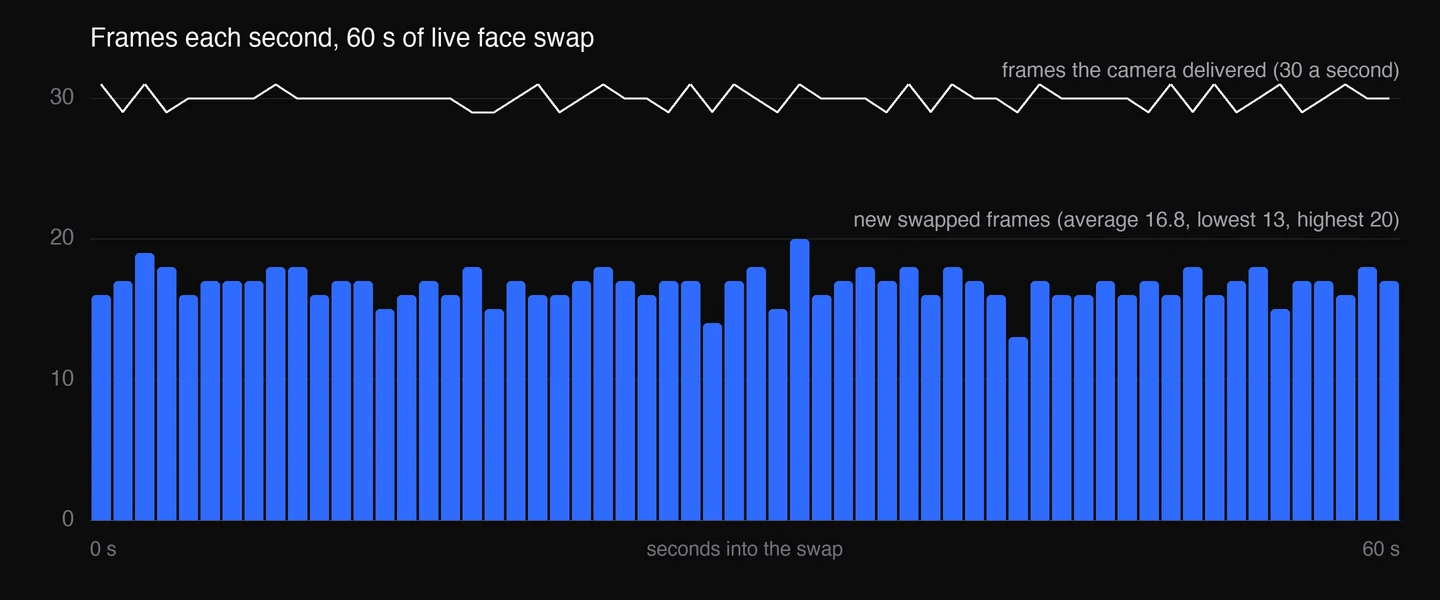
| Frame rate | Depends on your graphics card | 1280×720 at 30 frames a second; 16.8 new swapped frames a second on average (13 to 20) |
| Desktop apps | Yes, through OBS | No, websites in Chrome only |
| Price | Free source (OpenRAIL-AS licence); Windows or macOS installer $20 ($10 for members) | $0.033 a minute on Premium or Pro |
Facecam's side
Where each one wins
FaceFusion
Pros
- Free and open source, with frequent releases
- Much more than live swap: video and image swaps, lip sync, face enhancers
- Runs on your own hardware, offline, with no per-minute cost
Cons
- Terminal install; its own README says it isn't for beginners
- Live use needs OBS to pick up its stream
- Smoothness depends on your graphics card
Facecam
Pros
- Live swap in a few clicks, with no terminal
- Shows up as a camera on any website in Chrome
- Frame rate doesn't depend on your laptop
Cons
- No video-file editing in the live tool (that's the separate Video Face Swap)
- About 17 new swapped frames a second in our test, so fast head turns look less smooth than the 30 fps camera
- Paid per minute, and websites in Chrome only
What we measured on the Facecam camera
| Measure | Result |
|---|---|
| Size and rate the camera delivered | 1280×720 at 30 frames a second |
| New swapped frames each second | 16.8 on average; lowest 13, highest 20 |
| New frames from the test webcam itself | 24 a second |
| First swapped frame after picking the camera | 22 to 26 seconds |
We counted a frame as new when its picture differed from the one before. The camera keeps sending 30 frames a second, so calls never see it stall; between swapped frames it repeats the last one.
If you mainly edit videos
Stay with FaceFusion. It's built for files, runs as long as you like on your own machine and has options we don't offer. Facecam's Video Face Swap handles short clips online for a credit price, which only makes sense if you don't have the hardware.
Try it
Sources
- FaceFusion on GitHub (README, licence) (checked 2026-10-03)
- FaceFusion docs: installation (checked 2026-10-03)
- FaceFusion docs: webcam usage (checked 2026-10-03)
- FaceFusion Windows installer page (checked 2026-10-03)
Questions
Does FaceFusion have a live webcam mode?
Yes. Its docs describe a webcam layout that streams to a local UDP address or a /dev/video device, which you then capture in OBS to use in calls.
Is FaceFusion free?
The source is free. The one-click Windows and macOS installers cost $20, or $10 for members, on 2026-10-03.
Can Facecam swap faces in a video file?
Not the live tool. Facecam's separate Video Face Swap does short clips online. For long videos, FaceFusion on your own computer is the better fit.
Do I need a fast computer for Facecam?
No. The frames above came from our servers, not the laptop. A steady internet connection matters more than the computer.
Other comparisons
Related
Updated