Facecam vs LiveSwap
Facecam vs LiveSwap: both swap your face live from the browser. They differ on price per minute and on how the video reaches your call.
By Facecam team · Updated
Verdict
Both run the swap in the cloud, so neither needs a graphics card. On their pricing pages on 2026-10-03, LiveSwap's minutes cost $0.73 to $0.83 each and Facecam's $0.033. Facecam is also a camera in Chrome itself, while LiveSwap goes through OBS. Pick LiveSwap if you need the desktop Zoom or Teams app (OBS makes that possible), want 1080p, or make many short calls: it bills by the second, while Facecam charges at least 3 minutes per call.
Tested by Facecam team. Facecam's side only: the camera picked on a public WebRTC test page. Facecam extension 2.1.0, signed in, in Chromium on a Mac (macOS 26.5). The webcam played a clip of a fictional, computer-made man. We didn't sign up for or run LiveSwap; its column comes from its home page, pricing page and Zoom and virtual camera guides, checked 2026-10-03.
How they compare
| Facecam | LiveSwap | |
|---|---|---|
| Runs on | Our servers; a Chrome extension adds the camera | Its servers; you use its web page |
| Getting it into a call | Pick “Facecam Virtual Camera” in the call's camera menu | Add its streaming page as an OBS Browser source, crop it, start OBS Virtual Camera, pick that in the call |
| Desktop Zoom, Teams, Discord | No | Yes, through OBS |
| Entry price | $20 a month for 600 minutes | $12 a month for 15 minutes |
| Price per minute | $0.033 a minute | $0.73 to $0.83 a minute, depending on plan |
| Billing unit | Per minute, at least 3 minutes (12 credits) per call | Per second |
| Free to try | None: live face swap is on Premium and Pro | Not shown on its pricing page |
| Picture | 1280×720 at 30 frames a second in our test | Up to 480p on Basic, 720p on Creator, 1080p on Pro and Studio (its claims) |
Facecam's side
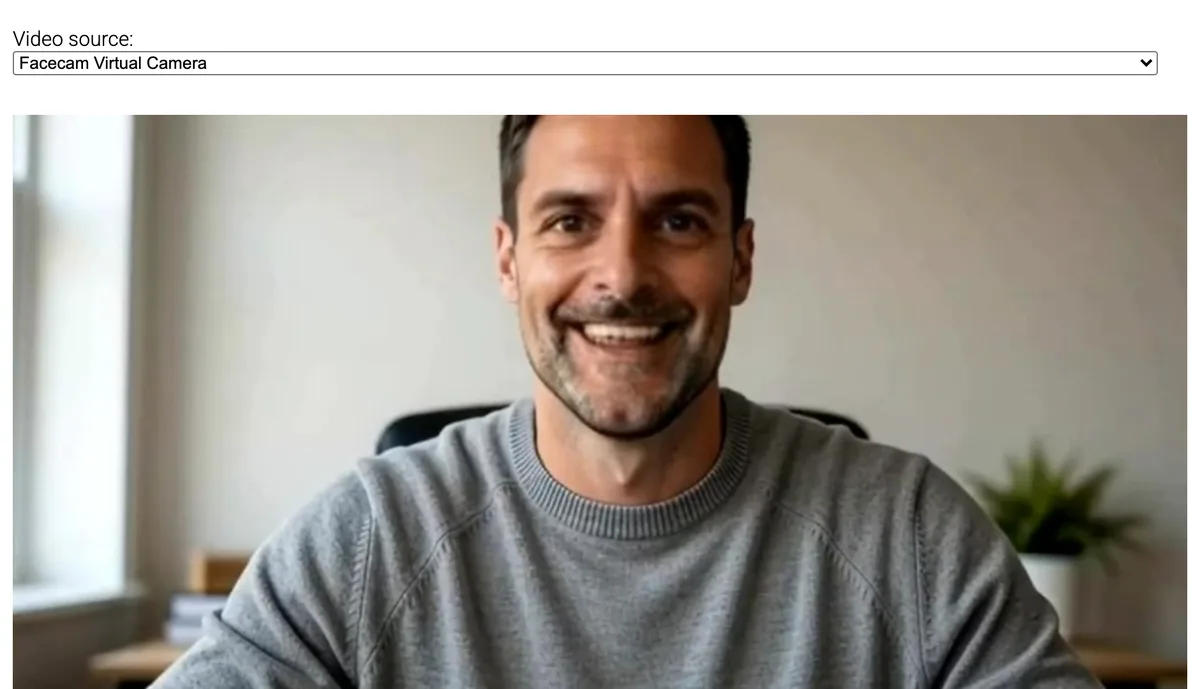
Where each one wins
Facecam
Pros
- About 24× cheaper per minute than LiveSwap's Basic plan
- No OBS: the camera appears in browser calls directly
- Free voice effects on the Facecam Virtual Mic
Cons
- Not in desktop apps
- At least 3 minutes charged per call
- No pay-as-you-go: live minutes come with a monthly plan
LiveSwap
Pros
- Works in desktop apps through OBS Virtual Camera
- Billed by the second
- 1080p on its Pro and Studio plans
Cons
- 15 minutes for $12 on the entry plan
- Every call needs OBS set up and cropped
- No free minutes listed on its pricing page
Price per live minute, from both pricing pages
| Plan | Price | Live minutes | Per minute |
|---|---|---|---|
| Facecam Premium | $20 a month | 600 minutes | $0.033 a minute |
| Facecam Pro | $50 a month | 1,500 minutes | $0.033 a minute |
| LiveSwap Basic | $12 a month | 15 minutes | $0.80 a minute |
| LiveSwap Creator | $29 a month | 40 minutes | $0.73 a minute |
| LiveSwap Pro | $99 a month | 120 minutes | $0.83 a minute |
| LiveSwap Studio | $299 a month | 400 minutes | $0.75 a minute |
Many short calls? Check the minimum
Facecam charges at least 3 minutes when a call starts, because starting a swap ties up a server. A one-minute call costs 12 credits. Reconnecting within half an hour uses up the time already paid before charging again. LiveSwap meters to the second, and its Zoom guide warns that credits keep running until you stop the stream.
Where the camera comes from
LiveSwap's guides send its web page into OBS as a browser source, crop out the page around the video, and start OBS Virtual Camera. That's what lets it reach desktop apps, and it's also an extra program to run for every call.
Facecam's extension adds “Facecam Virtual Camera” to Chrome's own camera list, so a site sees it like a webcam. That's why it works in Meet, Zoom on the web and discord.com with no other software, and why the desktop apps can't see it.
Try it
Sources
- LiveSwap pricing (checked 2026-10-03)
- LiveSwap home page (no install, latency and frame-rate claims) (checked 2026-10-03)
- LiveSwap guide: face swap on Zoom (checked 2026-10-03)
- LiveSwap guide: virtual camera setup (checked 2026-10-03)
Questions
How much does LiveSwap cost per minute?
On 2026-10-03: Basic $12 for 15 minutes ($0.80 a minute), Creator $29 for 40, Pro $99 for 120 and Studio $299 for 400, so $0.73 to $0.83 a minute.
Does LiveSwap need OBS?
Its own Zoom and virtual camera guides use OBS: a browser source with your streaming page, then OBS Virtual Camera as the camera in Zoom.
Can Facecam be used in the Zoom desktop app?
Not directly. Join from the browser with “Join from browser”. LiveSwap's OBS route is the way to reach the desktop app.
Can I use my own photo as the face?
Yes. Upload any face from a photo in the Facecam extension, or pick one of the built-in characters.
Other comparisons
Related
Updated