Free Sound Test
A free speaker and headphone test: play left and right, sweep the stereo field, find where your bass starts and set a comfortable volume.
Where it works
- Chrome, Edge, Firefox and Safari, on desktop and mobile.
Updated · Tested by the Facecam team
How to use Sound Test
Turn your volume down
Set your computer's volume low and the slider at the top to about half.
Play left, then right
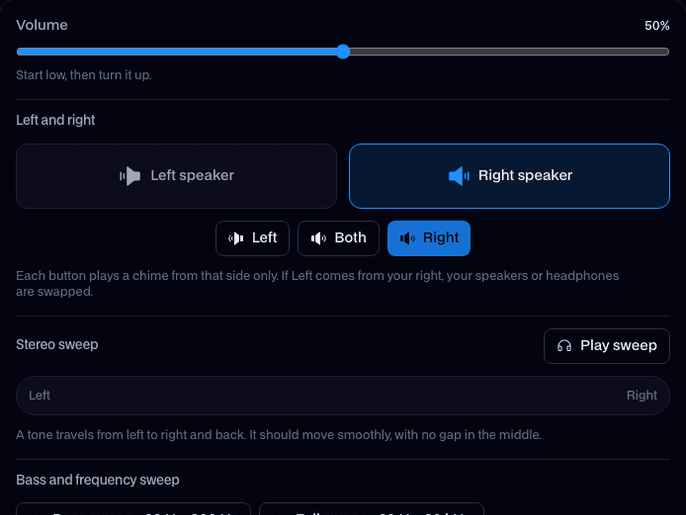
Click Left and Right. Each chime should come only from that side.
Run the sweeps
Play the stereo sweep, then the bass sweep, and tap I hear it now when the tone starts.
What is a sound test?
A sound test is a quick check that plays known sounds through your speakers or headphones: left is left, right is right, the bass comes through and both sides are equally loud. Facecam's is free, with no sign-up.
What you can do with Sound Test
Headphones on the right way round
Hear a chime in one ear at a time and know at once if left and right are swapped or stuck in mono.
How deep your bass goes
Sweep from 20 to 200 Hz and tap when you hear it, to check a subwoofer, earbuds or new speakers.
Before a call or a stream
New speakers or a new setup
Unboxed new speakers, moved your desk or plugged in a monitor? One run checks sides, bass and level.
Sound Test features
Left, right and both
Three rising chimes panned fully to one side, or centered from both.
Stereo sweep
A 440 Hz tone that glides left to right and back over 6 seconds, with a dot that follows it.
Bass and full range
A 20 to 200 Hz bass sweep and a 20 Hz to 20 kHz sweep, with a live frequency readout and I hear it now.
Volume check
Steady pink noise in both channels with an output meter, for setting a comfortable level.
Free and private
Every sound is made in your browser. No sign-up, no mic, nothing uploaded.
Any device
Works in Chrome, Edge, Firefox and Safari on computers and phones.





Left and right speaker test
Click Left, then Right. With headphones, the chime should sit in one ear only; with speakers, it should come from that speaker alone. Both plays the same chime in the middle. If Left comes from your right, the headphones are on backwards or the speaker cables are crossed. If both buttons sound the same, something is turning your sound into mono.

If it doesn't work
| Problem | Fix |
|---|---|
| Left plays from the right | Your headphones are on backwards, or the speaker cables are swapped. Check the L and R marks on the cups or the back of the speakers. |
| Left and right both play from both sides | Your output is set to mono. On Windows, turn off Mono audio in Settings → Accessibility → Audio; on a Mac, turn off Play stereo audio as mono in System Settings → Accessibility → Audio. |
| One side is quieter | Check the balance slider: Windows Settings → System → Sound → your output → Left and Right, or System Settings → Sound → Balance on a Mac. Then check the cable and the ear cup. |
| Nothing plays at all | Check the volume and mute key, then the output device: the sound may be going to a monitor, a TV or Bluetooth headphones that aren't on. On a phone, check the silent switch. |
| The bass sweep is silent until about 100 Hz | That's normal for laptop and phone speakers, which can't move enough air for deep bass. Headphones or a subwoofer reach much lower. |
| The stereo sweep drops out in the middle | The two speakers may be out of phase (one wired + to −). Swap the two wires on one speaker and run it again. |
More about Sound Test
Facecam's Sound Test is a free online speaker test that plays test sounds in your browser: a chime in the left or right channel, a tone that pans across, a bass and full frequency sweep, and steady noise for setting the volume.
Sound Test: what you need and limits
| How it works | Right on this page. Nothing is uploaded. |
|---|---|
| You get | Result on the page |
| You need | Any up-to-date browser |
| Phones and tablets | Supported |
| Left and right | Three rising chimes in the left channel, the right channel or both |
| Stereo sweep | A tone that pans left to right and back over 6 seconds |
| Bass sweep | 20 to 200 Hz over 10 seconds, with I hear it now |
| Full sweep | 20 Hz to 20 kHz over 15 seconds, logarithmic |
| Volume check | Pink noise in both channels, with an output meter |
| Privacy | Every sound is made in your browser. No mic, nothing uploaded |
Headphone test
- Left and right: each chime in one ear only.
- Stereo sweep: the tone glides from ear to ear and passes through the middle of your head.
- Bass sweep: good over-ear headphones play from about 20 Hz; earbuds often start around 30 to 50 Hz if they seal well.
- Volume check: the noise should sound centered and equally loud in both ears. If it leans to one side, check the balance setting and the fit.
What the frequency sweep tells you
| Speakers | Bass usually starts around |
|---|---|
| Phone speaker | 150 to 300 Hz |
| Laptop speakers | 80 to 150 Hz |
| Desktop or bookshelf speakers | 50 to 80 Hz |
| Earbuds with a good seal | 20 to 50 Hz |
| Over-ear headphones or a subwoofer | 20 to 40 Hz |
The full sweep also checks the top end. Most adults stop hearing it somewhere between 14 and 18 kHz, and that's your ears, not your speakers. Keep the volume low: high and low tones can seem quiet and then jump out.
Privacy
Every test sound is made right on this page. The Sound Test never asks for your mic or camera, and nothing is uploaded.

Sound Test FAQ
How do I test my speakers?
Turn your volume down, click Left and Right, then play the stereo sweep and the bass sweep. Each chime should come only from its own side and the tone should glide smoothly across.
How do I know if my headphones are on the right way?
Click Left. If you hear it in your left ear, they're on the right way. If you hear it on the right, turn them around.
Why can't I hear the start of the bass sweep?
Small speakers can't play very low notes. Laptops usually start around 80 to 150 Hz. Headphones and subwoofers go much lower.
Is the sound test safe for my speakers?
Yes, at a sensible volume. Start low and turn up slowly, especially for the bass sweep and the top of the full sweep.
Does it work on a phone?
Yes. It works in up-to-date phone browsers. Phone speakers are usually mono, so use headphones for the left and right test.
Can I test my microphone too?
Yes, with the Mic Test: it checks your mic's volume and noise and plays back a short recording.
How do I test my headphones?
Put them on with the volume low, click Left and Right, then play the stereo sweep. Each chime should sit in one ear and the tone should glide from ear to ear with no gap. The bass sweep then shows how deep they go.
Why does sound only come out of one side?
Usually a plug that isn't pushed all the way in, the balance slider pushed to one side, or one dead earbud. Click Left and Right to see which side is silent, then check the plug and the balance setting.
Is this sound test free?
Yes. It's free with no sign-up and no limit, because every sound is made in your own browser.
Can it test 5.1 or 7.1 surround sound?
No. It tests the two stereo channels, left and right, which is what headphones, laptops and most desk speakers use.


Related
 SoundboardA free online soundboard with no account needed: it plays sounds into your mic in Google Meet, Discord and Zoom, so everyone in the call hears them.
 Real-Time Voice ChangerA free real-time voice changer, no sign-up needed: talk, hear your new voice right away and use it in Discord, Meet and Zoom.
Further reading: Loudspeaker on Wikipedia
Try Sound Test for free
- Free, no sign-up
- Runs in your browser
- Nothing is uploaded