Deep-Live-Cam alternative without a gaming PC
A Deep-Live-Cam alternative for laptops: the same live face swap idea, set up in Chrome with no Python, models or graphics card.
By Facecam team · Updated
Verdict
Keep Deep-Live-Cam if you have an NVIDIA graphics card or an Apple Silicon Mac, don't mind installing Python, and want it free, offline and unlimited. It also reaches desktop apps like Zoom through OBS. Pick Facecam if your laptop can't run it or you'd rather not install a toolchain: the setup is one Chrome extension and a click on the face you want, and the swap runs on our servers for a per-minute price.
Tested by Facecam team. Facecam's side only. Facecam extension 2.1.0, signed in, in Chromium on a Mac (macOS 26.5). The webcam played a clip of a fictional, computer-made man. We didn't install or run Deep-Live-Cam; its column comes from its README and site, checked 2026-10-03.
How they compare
| Deep-Live-Cam | Facecam | |
|---|---|---|
| What you install | Python 3.11 to 3.14, git, ffmpeg (plus Visual Studio runtimes on Windows), then two model files | One Chrome extension |
| Graphics card | NVIDIA, Apple Silicon or Intel to run well; it runs on the processor alone, but slower | None: the swap runs on our servers |
| Time to the first swap | Its README says 10 to 30 seconds after you click Live, once installed | 22 to 26 seconds after picking the camera, in our test |
| Getting it into a call | Capture its window with OBS, start OBS Virtual Camera, pick that in the call | Pick “Facecam Virtual Camera” in the call's camera menu |
| Desktop apps (Zoom, Teams, Discord) | Yes, through OBS | No, websites in Chrome only |
| Works offline | Yes | No |
| Price | Free source code (AGPL-3.0); pre-built NVIDIA version $22 a month or $40 a quarter | $0.033 a minute on Premium or Pro |
Facecam's side
Where each one wins
Deep-Live-Cam
Pros
- Free and open source, with a very large community
- Runs offline: your video never leaves your computer
- Unlimited use at no cost per minute once it runs on your hardware
- Reaches desktop apps through OBS Virtual Camera
Cons
- Setup takes a terminal, Python and the right graphics drivers
- How smooth it looks depends on your graphics card
- Needs OBS as an extra step for every call
Facecam
Pros
- Nothing to install beyond the extension, on any laptop with Chrome
- The camera appears directly in Meet, Zoom on the web, Teams on the web and discord.com
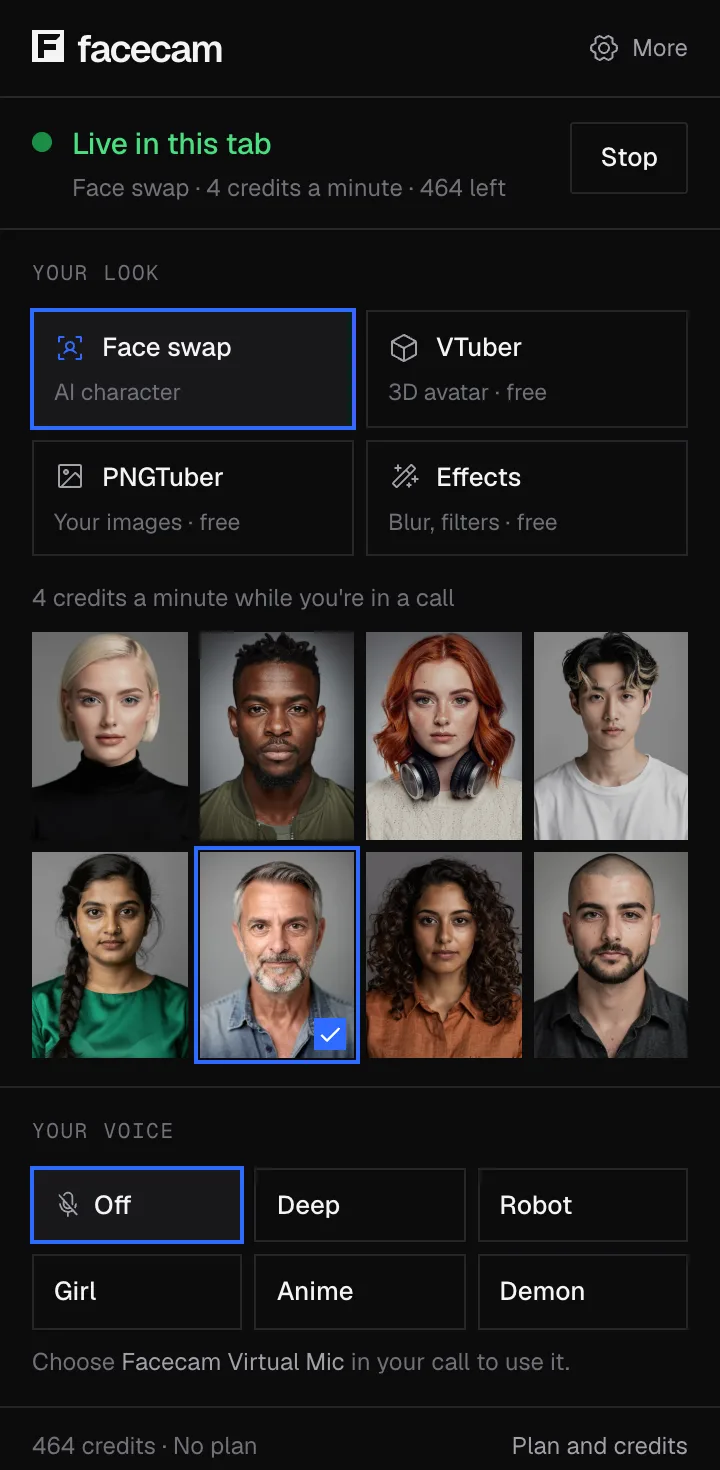
- Any face you upload, or one of eight built-in ones, switchable during a call
Cons
- No free minutes: live face swap needs Premium or Pro
- Websites in Chrome only, not desktop apps or phones
- Needs a steady internet connection: your video is swapped on our servers (not saved)
Why people look for a Deep-Live-Cam alternative
Most people who search for it find the GitHub page, then hit the install list: a specific Python version, git, ffmpeg, about 300 MB of models on the first run, and a graphics card driver setup. On a work laptop, a Chromebook or an older Mac, that's where it stops.
Facecam moves the heavy part to our servers. Your laptop only tracks the camera and shows the result, so it needs Chrome and a webcam, nothing more. The trade-off is that you pay per minute and need a steady connection.
Live mode in Deep-Live-Cam vs Facecam, step by step
| Step | Deep-Live-Cam (from its README) | Facecam (our test) |
|---|---|---|
| 1 | Install Python, git and ffmpeg, clone the repo, download two models | Add the extension to Chrome, sign in |
| 2 | Create a virtual environment and install the requirements | Pick Face swap and a face in the popup |
| 3 | Select a face image, click Live, wait for the preview | Open the call and pick “Facecam Virtual Camera” |
| 4 | Capture the preview window in OBS and start OBS Virtual Camera | Wait for the new face on the join screen, then join |
Which faces you can use
Deep-Live-Cam swaps in a face from any photo you give it. So does Facecam: upload any face in the extension, generate a new one, or pick a built-in one. Deep-Live-Cam's README asks for AI-made output to be labelled when shared; Facecam doesn't draw a label on the video.
Try it
Sources
- Deep-Live-Cam on GitHub: README, install steps, licence (checked 2026-10-03)
- deeplivecam.net plans (pre-built NVIDIA version) (checked 2026-10-03)
Questions
Can I run Deep-Live-Cam without a GPU?
Its README says it runs on the processor alone, but slower. For a smooth live swap it's built for NVIDIA cards and Apple Silicon. Facecam needs no graphics card because the swap runs on our servers.
Is Deep-Live-Cam free?
The source code is free under AGPL-3.0. Its developer also sells pre-built versions; the NVIDIA one was $22 a month on 2026-10-03.
Does Facecam work in the Zoom desktop app like Deep-Live-Cam does?
No. Facecam's camera only exists inside Chrome, so join Zoom from the browser. Deep-Live-Cam reaches the Zoom app through OBS Virtual Camera.
How long does Facecam take to start?
In our test, 22 to 26 seconds the first time and about 5 seconds when we started again a minute later. Until then, the call sees your normal camera, so wait on the join screen.
Other comparisons
Related
Updated