Facecam vs Livesync
Facecam vs Livesync: a Chrome camera at a lower price per minute, or a web studio with free minutes, recording and phone support.
By Facecam team · Updated
Verdict
Livesync wins on trying it and on extras: 10 free minutes for life, phones and iPads, recording, broadcasting, and the desktop Zoom app through OBS. Facecam wins on price and setup: $0.033 a minute against Livesync's $0.22 to $0.30 on 2026-10-03, and a camera that shows up in browser calls with no OBS or audio driver. On smoothness Livesync's plans state 24 frames a second; we measured about 17 new swapped frames a second on Facecam, so Livesync may look smoother.
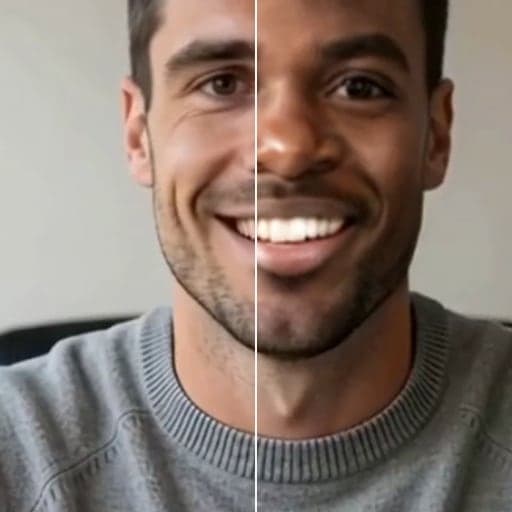
Tested by Facecam team. Facecam's side only: the camera on a public WebRTC test page and a 60-second frame count. Facecam extension 2.1.0, signed in, in Chromium on a Mac (macOS 26.5). The webcam played a clip of a fictional, computer-made man. We didn't sign up for or run Livesync; its column comes from its home page, pricing page and Zoom guide, checked 2026-10-03.
How they compare
| Facecam | Livesync | |
|---|---|---|
| Devices | Chrome on a laptop or desktop | Computer, phone or iPad |
| Getting it into Zoom | Zoom in the browser: pick “Facecam Virtual Camera” | OBS Browser source + OBS Virtual Camera, and a virtual audio driver (BlackHole, VB-Audio or JACK) for your voice |
| Desktop apps | No | Yes, through OBS |
| Free minutes | None: live face swap is on Premium and Pro | 10 minutes, once (480p, 24 frames a second) |
| Entry plan | $20 a month for 600 minutes | $9 a month for 30 minutes |
| Price per minute | $0.033 a minute | $0.22 to $0.30 a minute, depending on plan |
| Frame rate | 30 delivered, about 17 new swapped frames a second (our measurement) | Up to 24 frames a second below Enterprise (its plans) |
| Recording and broadcasting | No | Yes, with time limits per plan |
Facecam's side

Where each one wins
Facecam
Pros
- About 8× cheaper per minute than Livesync's Creator plan
- No OBS and no audio driver for browser calls
- Free voice effects on the Facecam Virtual Mic
Cons
- No free minutes: live face swap needs Premium or Pro
- No phones, no recording, no desktop apps
- The call sees your normal camera for the first 22 to 26 seconds
Livesync
Pros
- 10 free minutes with no plan
- Works on phones and iPads
- Recording and broadcasting built in
Cons
- Zoom needs OBS plus a virtual audio driver
- $9 buys 30 minutes on the entry plan
- 24 frames a second at most below Enterprise
Price per live minute, from both pricing pages
| Plan | Price | Live minutes | Per minute |
|---|---|---|---|
| Facecam Premium | $20 a month | 600 minutes | $0.033 a minute |
| Facecam Pro | $50 a month | 1,500 minutes | $0.033 a minute |
| Livesync Starter | $9 a month | 30 minutes | $0.30 a minute |
| Livesync Creator | $25 a month | 90 minutes | $0.28 a minute |
| Livesync Pro | $130 a month | 500 minutes | $0.26 a minute |
| Livesync Scale | $470 a month | 2,000 minutes | $0.24 a minute |
| Livesync Business | $2,200 a month | 10,000 minutes | $0.22 a minute |
Startup and smoothness we measured
| Measure | Facecam |
|---|---|
| First swapped frame, server starting cold | 22 to 26 seconds |
| Starting again a minute later | about 5 seconds |
| Frames delivered to the page | 1280×720 at 30 frames a second |
| New swapped frames | 16.8 new swapped frames a second on average (13 to 20) |
Until the first swapped frame, Facecam shows your normal camera. Pick the camera on the call's join screen and join once the new face is showing.
Why Livesync's Zoom setup needs an audio driver
Livesync's guide brings the swapped video into Zoom through OBS, with “Control audio via OBS” on and a virtual audio driver as Zoom's microphone, which keeps your voice in step with the video. Facecam only replaces the camera in the browser, and the call app uses your normal microphone.
Try it
Sources
- Livesync pricing (checked 2026-10-03)
- Livesync home page (devices, recording, OBS and Zoom) (checked 2026-10-03)
- Livesync guide: Zoom (checked 2026-10-03)
Questions
Is Livesync free?
It has a free plan with 10 credits (10 minutes) for life, at 480p and 24 frames a second. Paid plans start at $9 a month for 30 minutes.
Does Livesync work on a phone?
Its home page says it works on a computer, phone or iPad. Facecam needs Chrome on a computer.
Can Facecam record my call?
No, Facecam doesn't record. Use your call app's recording, or capture the Chrome window in OBS. Livesync has recording built in.
Which is cheaper for 10 hours a month?
Facecam Premium covers 10 hours for $20. On Livesync, 10 hours needs the Pro plan ($130 for 500 minutes).
Other comparisons
Related
Updated