Face Swap Apps Compared
A face swap app puts another face on yours: in a photo, in a saved video, or live on your webcam so you become anyone you want in a call or stream.
By Facecam team · Updated
Short answer
Pick by what you want to swap. For phone clips from templates, Reface. For photos and short videos in a browser, Magic Hour and Remaker have free starts. For a live swap on a gaming PC, Deep-Live-Cam and FaceFusion are free; Magicam and Swapface are easier desktop apps that also need a strong graphics card. On an ordinary laptop, the swap has to run in the cloud: Facecam does it in Chrome for about $0.039 a minute on Premium, while LiveSwap starts at $0.80 a minute and Akool includes 5 to 90 live minutes depending on the plan.
Step by step
Photo, video or live?
File swaps change a saved photo or clip and can take a minute. Live swaps change your webcam as you move, so they need to keep up with 30 frames a second.
Do you have a gaming graphics card?
Live apps that run on your own computer need one: Magicam asks for an RTX 2070 or better, Swapface an RTX 2060 with 6 GB. Without one, use a cloud swap that runs in the browser.
Where is the call or stream?
Desktop apps (Magicam, Swapface) add a camera every app can pick. Browser tools reach calls in the browser, and desktop apps through OBS. Facecam's camera works in Meet, Zoom on the web, Teams on the web and discord.com in Chrome.
Count the minutes
Cloud live swaps charge by the minute. Work out the price of the hours you'll actually use, and check free limits and watermarks before you pay.

From our test
Facecam's live swap as the other person received it in our Jitsi Meet test call, 2026-10-03. The caller changes face mid-call without rejoining. 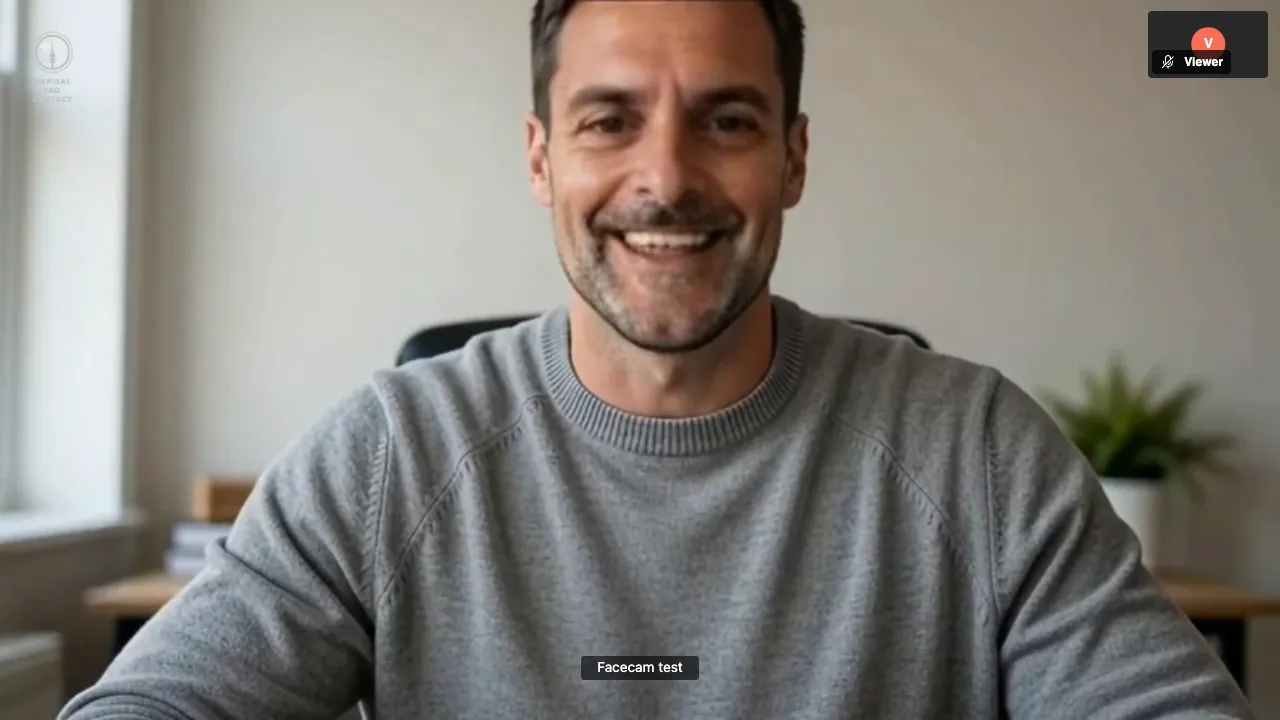
The other side of the same call: a plain browser with nothing installed.
How we chose and checked
We picked the tools people actually use for photo, video and live swaps, read each one's own pricing page, store listing or GitHub repository on 2026-10-03, and tested our own live swap in a real call. We haven't run the other apps, so the list isn't ranked on quality. Facecam is our product and gets the same facts and limits as the rest.
Photo and video face swap apps
| App | Swaps | Runs on | Price |
|---|---|---|---|
| Reface | Photos, video templates | iOS, Android | Free with in-app purchases; $24.99/yr (US App Store, checked 2026-10-01) |
| Magic Hour | Photo, video, GIF | Web | Free tier; Creator $12/mo billed yearly ($19 monthly) |
| Remaker | Photo, video | Web | Free credits at sign-up; packs from $5.99, no subscription |
| Facecam | Photo, GIF, video | Any browser | Paid plans; Premium $20/mo ≈ 8.6 h live |
File swaps forgive slow hardware because nobody is waiting live. Facecam's take up to 120 seconds for a GIF and 10 minutes for a video; for anything longer, Remaker's 30-minute limit fits better.
Live face swap apps for calls and streams
| App | Where the swap runs | How it reaches the call | Free live time | Entry price |
|---|---|---|---|---|
| Deep-Live-Cam | Your computer (NVIDIA, AMD, Apple silicon or slow on CPU) | Its own window; capture it in OBS | Unlimited (open source, AGPL-3.0) | Free; paid ready-made builds |
| FaceFusion 3.9 | Your computer | Webcam mode streams to OBS | Unlimited (open source) | Free; paid installers |
| Magicam | Your Windows PC (RTX 2070 or better suggested) | Its own virtual camera, any app | Free with watermark | $8.99/mo or $49.90/yr |
| Swapface | Your PC or Mac (RTX 2060, 6 GB+, on Windows) | Desktop app | Free to start | Paid plans in the app |
| Akool | Cloud, in the browser | Browser; separate Live Camera app | 5 minutes | Live minutes by plan: up to 15 on Pro ($252/yr), up to 90 on Pro Max ($495.60/yr) |
| LiveSwap | Cloud, in the browser | Virtual camera or OBS | None | $12 for 15 minutes ($0.80 a minute), 480p |
| Facecam | Cloud, through a Chrome extension | Its own camera in Chrome: Meet, Zoom web, Teams web, discord.com | None (paid plans from $10 a month) | Premium $20/mo ≈ 8.6 h live, about $0.039 a minute |
The split that matters is where the swap runs. On your own graphics card it's free per minute but only as fast as your hardware: Deep-Live-Cam's own FAQ quotes about 8 frames a second on a 6 GB NVIDIA card, about 20 on high-end cards and 6 to 10 on AMD or a Mac. In the cloud it runs on someone else's graphics card, so a plain laptop or a Chromebook keeps up, and you pay for the minutes.
Viggle LIVE is close but different: it animates a whole character picture from your webcam rather than swapping only the face (free for 5 to 10 minutes a day, then $24.99 a month for 133 minutes). DeepFaceLive, once the go-to free option, was archived on GitHub in November 2024 and no longer gets updates.
What Facecam's live swap did in our test call
| Measure | Result |
|---|---|
| Video the other person received | 1280×720 at 30 frames a second |
| Frames dropped | 3 of 2,020 |
| Freezes | 0 |
| Face changes mid-call | 7, with no rejoining |
| Time until the swap showed | 20 to 35 seconds |
You can be anyone you want: pick one of the built-in faces or upload any photo, and switch faces from the extension popup without leaving the call. The other people need nothing installed. Only the face changes, so a face with a hairstyle close to yours looks most convincing.
Best fit by situation
- Fun clips on your phone: Reface.
- A quick photo swap online: Remaker or Magic Hour's free starts.
- Live swap, free, and you own a gaming PC: Deep-Live-Cam or FaceFusion, if you're comfortable installing Python tools.
- Live swap in the Zoom, Discord or Teams desktop apps without OBS: Magicam or Swapface, with a strong graphics card.
- Live swap in browser calls on any laptop or Chromebook, by the hour: Facecam (about $0.039 a minute on Premium).
- A few minutes of live swap to try the idea for free: Akool's 5 free minutes.
Where Facecam falls short
- The extension's camera exists inside Chrome on a computer. Desktop call apps get the same swap through Facecam for PC and Mac, and phones aren't supported.
- There are no free live minutes: live face swap is on the paid plans, from $10 a month. Akool and Viggle let you try for free first.
- A swap takes 20 to 35 seconds to start in our tests; local apps start as fast as your computer loads the model.
- File swaps take up to 120 seconds for a GIF and 10 minutes for a video.
Official documentation
- Deep-Live-Cam on GitHub: https://github.com/hacksider/Deep-Live-Cam (checked 2026-10-03)
- Deep-Live-Cam quick start and FAQ: https://deeplivecam.net/index.php/quickstart (checked 2026-10-03)
- FaceFusion on GitHub: https://github.com/facefusion/facefusion (checked 2026-10-03)
- FaceFusion documentation: https://docs.facefusion.io/ (checked 2026-10-03)
- Magicam: https://magicam.ai/ (checked 2026-10-03)
- Swapface: https://www.swapface.org/ (checked 2026-10-03)
- Akool pricing: https://akool.com/pricing (checked 2026-10-03)
- LiveSwap pricing: https://www.liveswap.io/pricing (checked 2026-10-03)
- Viggle LIVE: https://viggle.ai/viggle-live (checked 2026-10-03)
- DeepFaceLive on GitHub (archived): https://github.com/iperov/DeepFaceLive (checked 2026-10-03)
- Magic Hour pricing: https://magichour.ai/pricing (checked 2026-10-03)
- Remaker: https://www.remaker.ai/ (checked 2026-10-03)
- Reface: https://reface.ai/ (checked 2026-10-03)

Questions
What's the best free face swap app?
For photos, Facecam's Photo Face Swap works without signing up (a few swaps a day, with a small watermark), and Remaker's sign-up credits and Magic Hour's free tier are other options. For live webcam swaps, Deep-Live-Cam and FaceFusion are free if your computer has a strong graphics card.
Can I face swap live on Zoom or Google Meet?
Yes. A live face swap gives you a camera to pick in the call. Facecam's works in Google Meet and Zoom on the web in Chrome; desktop apps like Magicam add a camera for the Zoom desktop app.
Can I face swap live without a graphics card?
Yes, with a cloud tool: the swap runs on a server and your laptop only sends and receives video. Facecam, Akool and LiveSwap work this way.
Is Deep-Live-Cam safe to download?
Get it from its GitHub repository or official site, not from re-uploads. It installs Python tools and AI models on your computer, so it isn't a one-click app unless you buy a ready-made build.
Is FaceApp a face swap app?
No. FaceApp edits your own face (age, makeup, hair); it doesn't swap faces.
Are face swap apps legal?
Yes, in most places.


Related
- Live Face Swap for Video CallsFacecam is a live face swap app: become anyone on camera, in real time, in Google Meet, Zoom, Discord and OBS. Upload any photo or pick a built-in face, and wear it in your calls and streams.
- How to Face Swap on a Video CallTo change your face on a video call, use Facecam's Live Face Swap and pick “Facecam Virtual Camera” instead of your webcam in Google Meet, Zoom, Teams or Discord. Everyone in the call sees the face you chose, from any photo or a built-in face, moving and talking with you in real time.
- Deep-Live-Cam alternative without a gaming PCA Deep-Live-Cam alternative for laptops: the same live face swap idea, set up in Chrome with no Python, models or graphics card.




Live Face Swap
Be anyone on your calls
Start