AI Hairstyle Changer
Try on hairstyles with your own photo before you sit in the chair: 23 cuts, 10 colors.

Where it works
How to use AI Hairstyle Changer
Add a photo
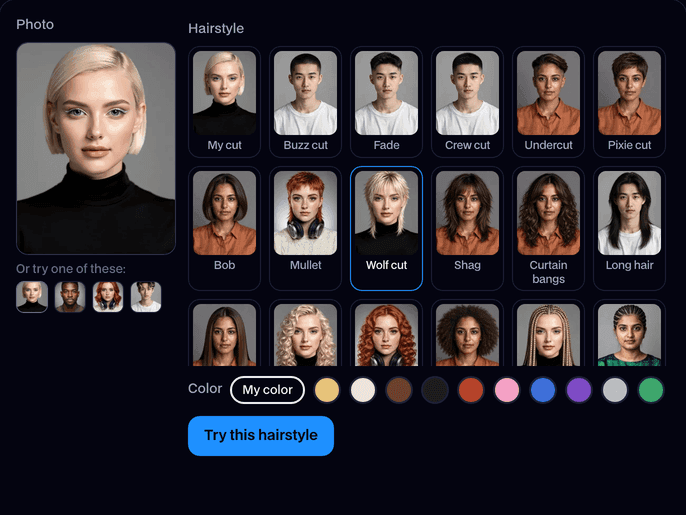
Upload a photo with one clear face, or try one of the built-in faces.
Pick a hairstyle
Choose one of the 23 cuts. Add a color if you want one, or keep your own; a color on its own keeps your cut.
Try it and download
Click Try this hairstyle. In about 15 seconds you see before and after side by side; click Download to keep it.
What is an AI hairstyle changer?
An AI hairstyle changer is a tool that redraws only the hair in a photo, so you can see a cut or color on your own face before you try it for real. Facecam's has 23 cuts and 10 colors and keeps your face untouched.
Before and after


More examples
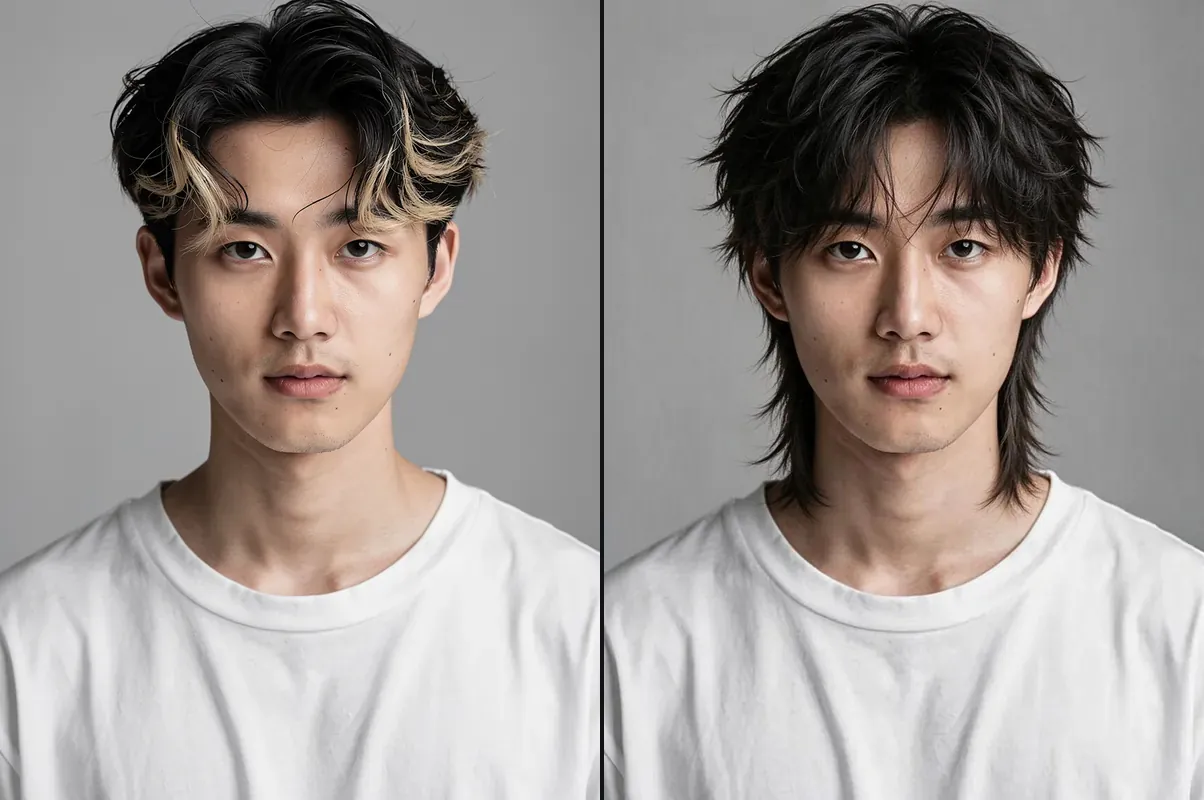
Wolf cut: choppy layers and curtain bangs. 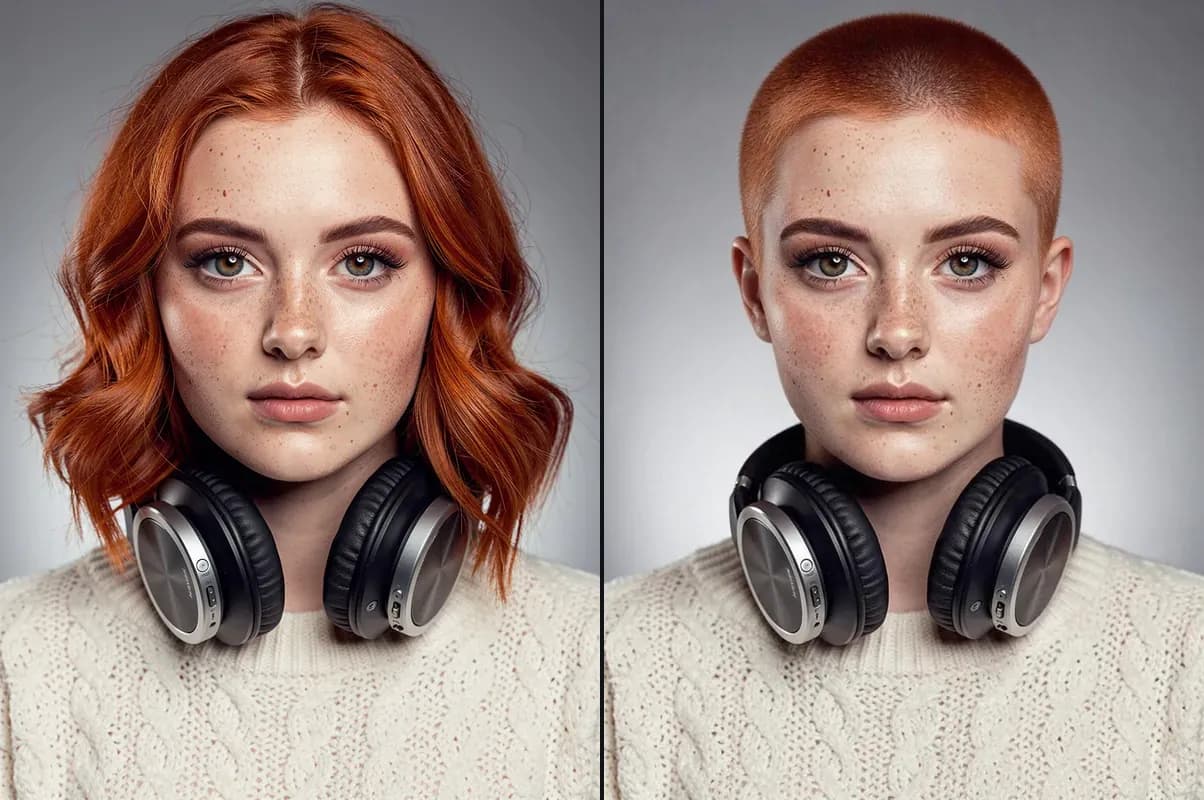
Buzz cut: her own red, clipped short. 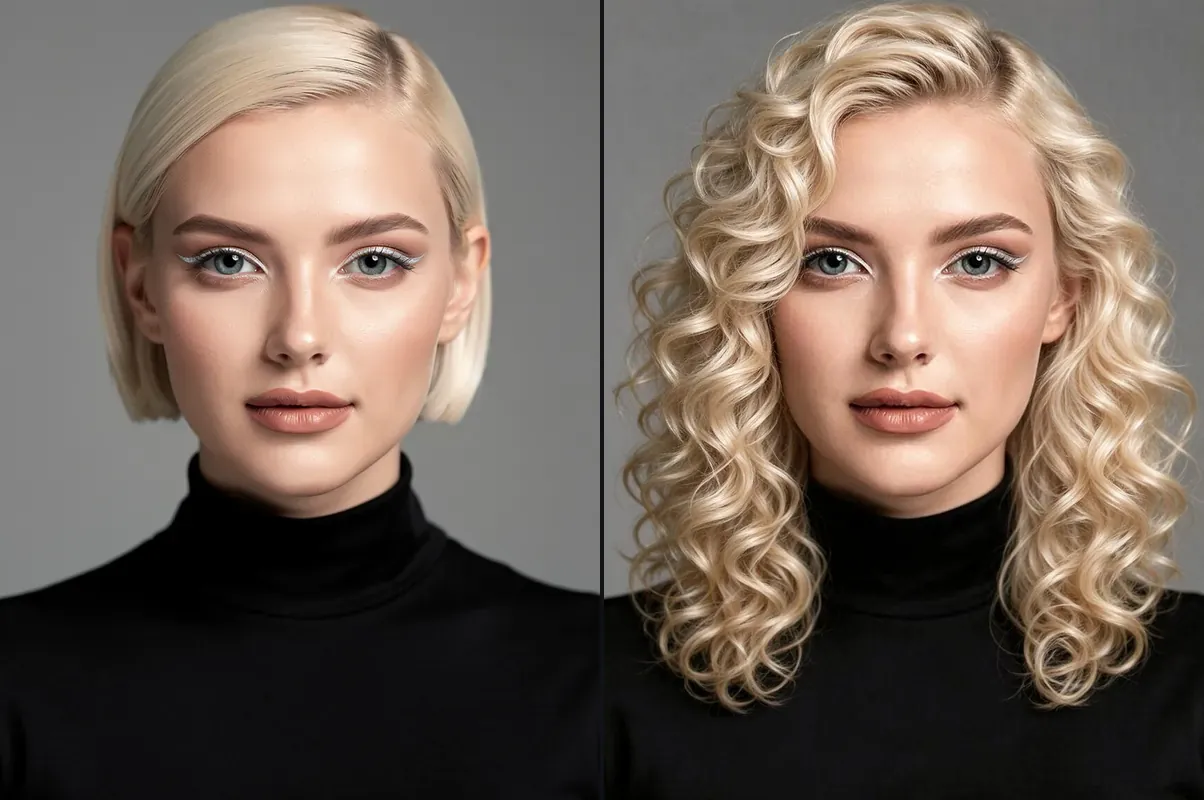
Curly: the same blonde, now in curls. 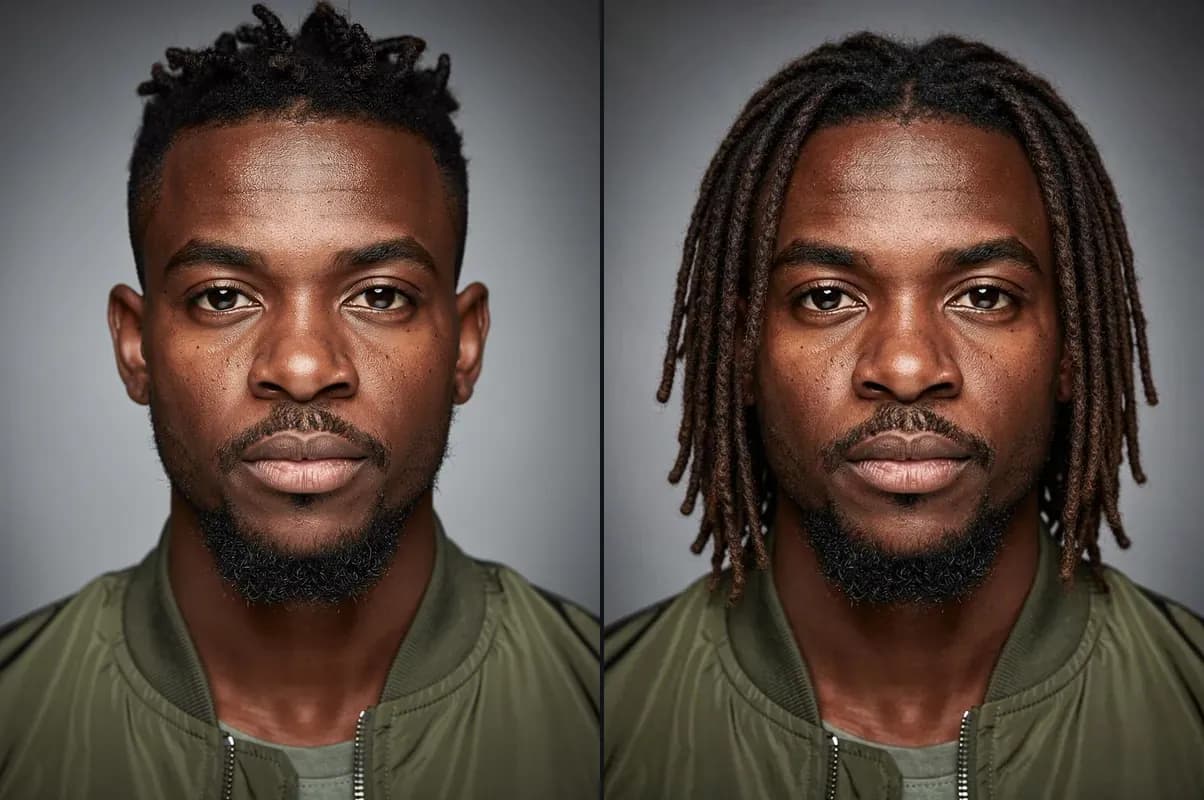
Dreadlocks: grown out to the shoulders. 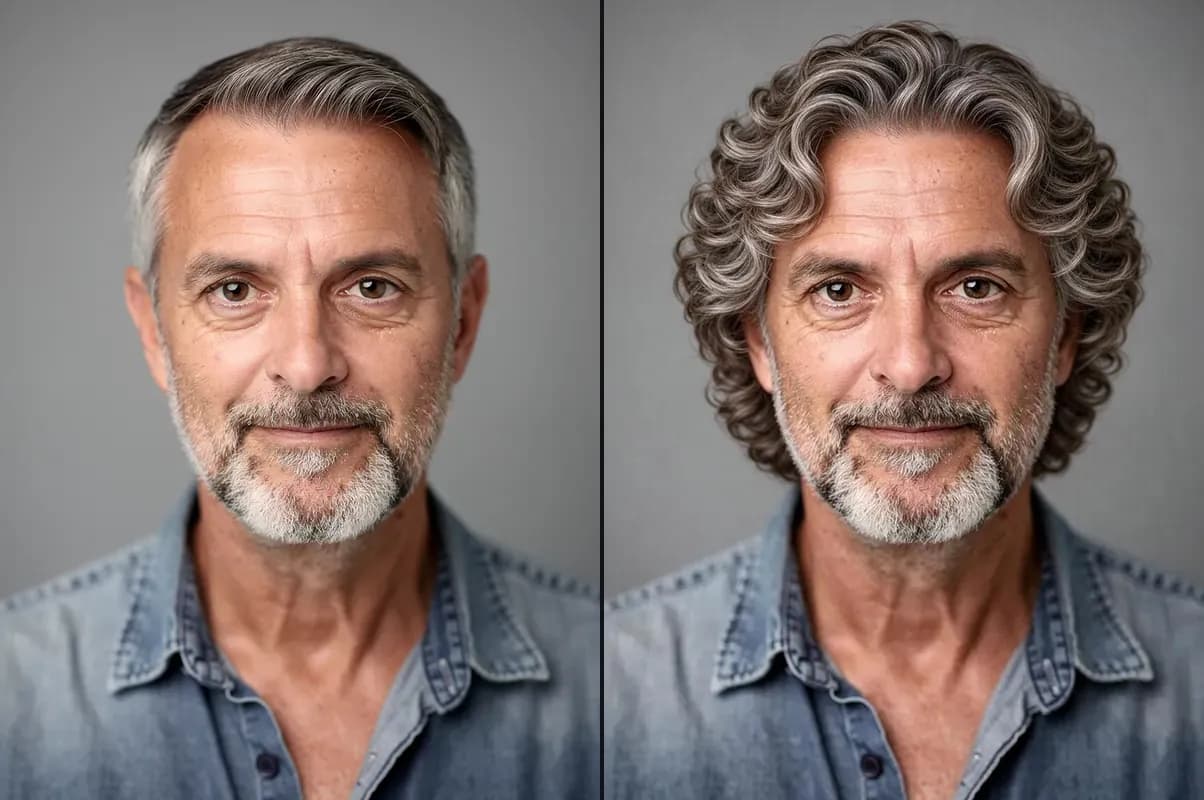
Perm: on short grey hair. 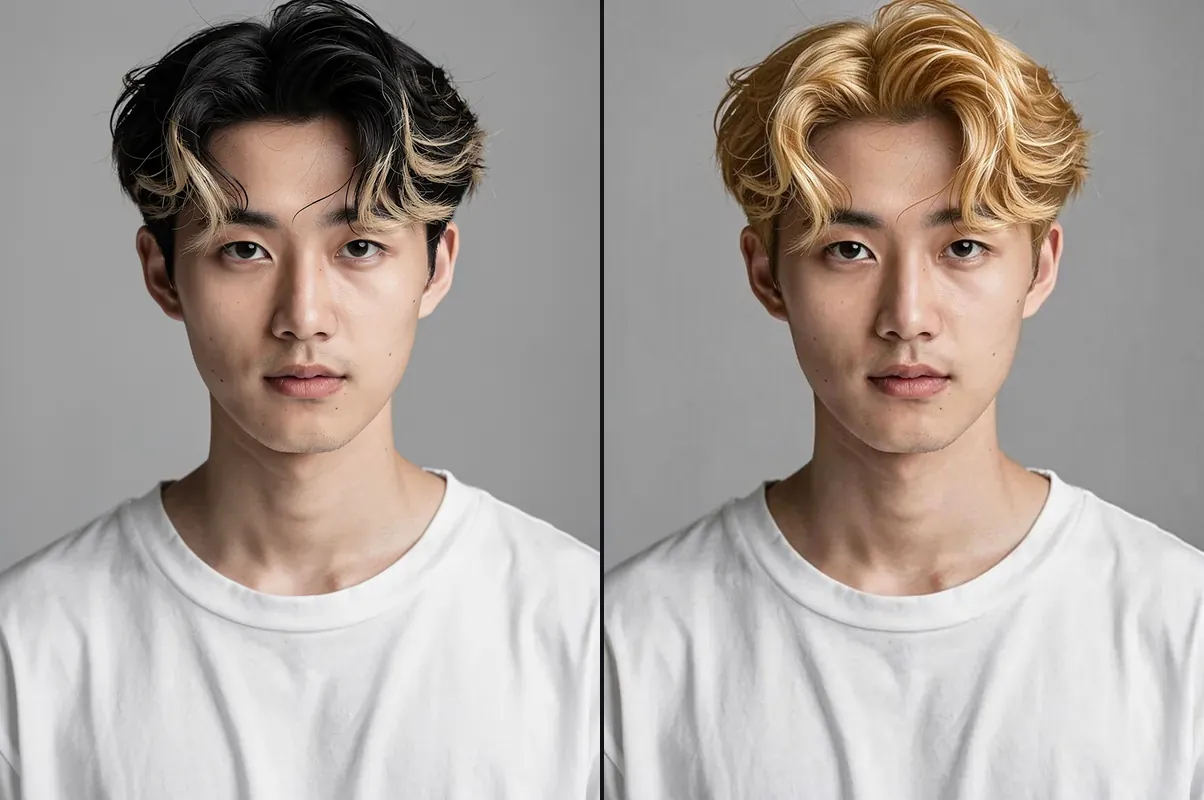
A color on its own: golden blonde, same cut.
What you can do with AI Hairstyle Changer
Before the salon
Show your barber or stylist the exact cut on your own face, not on a model.
Big changes, no risk
Going from long to a pixie cut or a buzz cut is hard to undo. See it first.
Protective styles
Try box braids, cornrows or locs on your photo before booking hours in the chair.
AI Hairstyle Changer features
Only the hair changes
Your face, eyes, skin, beard, expression, clothes and background stay as they are.
23 cuts
Short, long, curly, braided and styled, from a buzz cut to a pompadour.
Cut and color together
Pick a cut and one of 10 colors in the same run, or change only the color.
Any hair to any hair
Straight to curly, curly to straight, short to long: the new hair fits your head and hairline.
Before and after
See both side by side, then try another cut on the same photo.
No face, no charge
We check for a face first; if there isn't one, or a run fails, it doesn't count.




Which hairstyle to try
| Hairstyle | What you get | Suits |
|---|---|---|
| Buzz cut | Clipped to a few millimetres all over | Any head shape you're curious about |
| Perm | Bouncy, even curls through all the hair | Straight or flat hair that wants volume |
| Wolf cut | Choppy layers, curtain bangs, longer at the neck | Medium hair, any texture |
| Box braids | Long, neat braids past the shoulders | A protective style you want to preview |
| Cornrows | Straight-back braids close to the scalp | Short to long hair |
| Mullet | Short on top and sides, long at the back | A bold change from any cut |
| Curly | Defined, bouncy curls about shoulder length | Straight hair, or a curl reset |
| Dreadlocks | Neat shoulder-length locs | Thinking about starting locs |
| Black hair | Your cut, dyed glossy jet black | Any hair color |
| Blonde hair | Your cut, dyed golden blonde | Dark or red hair |

More about AI Hairstyle Changer
AI Hairstyle Changer is an online tool that gives the person in your photo a new haircut, a new hair color or both, from a buzz cut to box braids, while their face, expression and clothes stay exactly the same.
AI Hairstyle Changer: what you need and limits
| How it works | Online. Works on any laptop. |
|---|---|
| You get | Image download |
| You need | Any up-to-date browser |
| Phones and tablets | Supported |
| Photo | JPEG, PNG or WebP with one clear face. Real photos, anime, cartoons and 3D characters all work. |
| Hairstyles | 23 cuts: Buzz cut, Fade, Crew cut, Undercut, Pixie cut, Bob, Mullet, Wolf cut, Shag, Curtain bangs, Long hair, Sleek straight, Curly, Perm, Afro, Box braids, Cornrows, Dreadlocks, Braids, Ponytail, Man bun, Slicked back and Pompadour. |
| Colors | 10: blonde, platinum, brown, black, red, pink, blue, purple, silver and green. Use one on its own or with a new cut. |
| Time | About 15 seconds. |
| Price | Comes with every paid plan, by the photo: 300 hairstyles a month on Premium, if you use nothing else. A photo with no face, or a run that fails, doesn't count. |
| Output | A JPEG the shape of your photo. Free results have a small Facecam mark in the corner; plans remove it. |
| Kept for | 7 days in your Library, then deleted. Your uploaded photo is deleted within an hour. |
Virtual hairstyle try on, step by step
A virtual hairstyle try on works best as a shortlist: try three or four cuts on the same photo, download the ones you like and compare them side by side. Then try your favorite in two colors, or keep your own. Show the result to your stylist: a picture of the cut on your own face says more than a celebrity photo, because it already fits your face shape and hairline.
Getting a good result
Use a photo where your face is clear and looks roughly at the camera, with your hair and the top of your head in the picture. Head-and-shoulders photos work best: a long style needs room below the shoulders to show. Each run is a little different, so if a cut isn't quite right, run it again.
Your photos
Your photo is stored privately while the new hairstyle is made and deleted when it's done, always within an hour. The result stays in your Library for 7 days, then it's deleted.

AI Hairstyle Changer FAQ
How do I try a hairstyle on my photo?
Add a photo with a clear face, pick a cut, a color or both, and click Try this hairstyle. You get the before and after in about 15 seconds.
Can I try on hairstyles with my own photo?
Yes, that's what it's for. Upload a selfie and try on any of the 23 cuts and 10 colors; your face stays exactly as it is, only the hair changes.
Is there a virtual hairstyle try on for men?
Yes. Fades, buzz cuts, undercuts, crew cuts, man buns and every other cut work on men's photos, and on any face.
How much does the hairstyle changer cost?
It comes with every paid plan, by the photo: 300 hairstyles a month on Premium, if you use nothing else. A photo with no face, or a run that fails, doesn't count.
Will my face change?
No. Only your hair is redrawn. Your face, eyes, skin tone, any beard, your expression, clothes and background stay the same.
Can I change only my hair color?
Yes. Keep My cut and pick one of the 10 colors, and only the color changes.
Does it work for men and women?
Yes. Every cut works on any face: a man can try a bob and a woman a fade, and long styles grow out from short hair.
Does it work on anime or cartoon characters?
Yes. A drawn or 3D character gets the new hair in its own art style.
Can I try a hairstyle live on camera?
This is for photos. To change your whole look live in calls and streams, use Live AI Filter.



Try AI Hairstyle Changer now
- Cancel any time
- Runs in your browser
- No gaming PC needed