
Grok Imagine Video Generator
Grok Imagine 1.5 in your browser: quick, punchy clips that come with their own sound.


Where it works
Made with Facecam
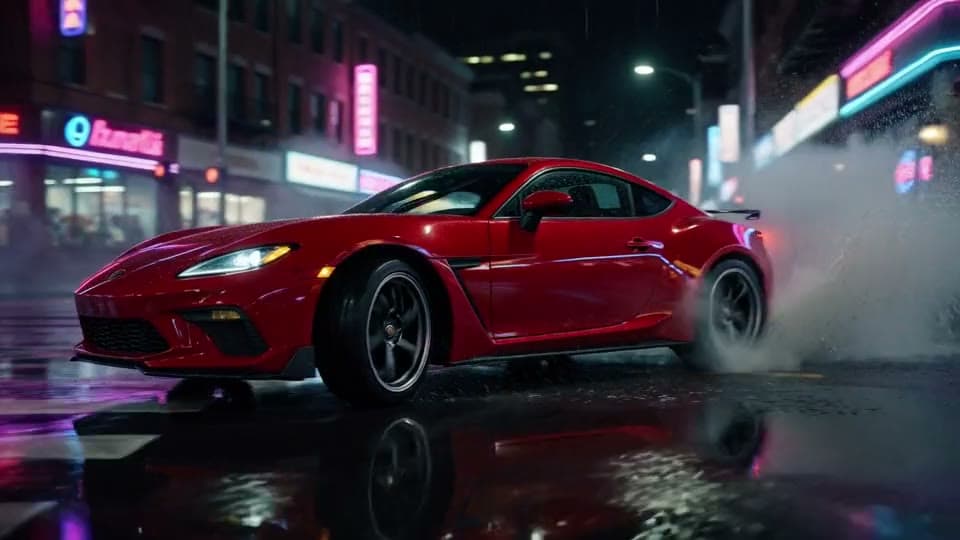
From text, with the engine
“A red sports car drifts around a neon-lit corner in the rain at night, tires smoking, spray flying, the camera tracks low alongside it, then it roars off into the city. Engine roar and screeching tires.”


Before From a picture, with sound
“The little robot looks up as a butterfly lands on its head, its eyes light up and it does a happy little dance, sunflowers swaying.”

How to use Grok Imagine 1.5
Keep Grok Imagine 1.5 picked
Grok Imagine 1.5 is already picked on this page; the Model chip switches to any other.
Write the prompt or add an image
Describe the scene, or click + to add a start image and say what happens next.
Make it and download
Pick the length and quality, click Generate, and download the MP4 when it plays.
What is a Grok Imagine video?
A Grok Imagine video is a clip made by Grok Imagine, xAI's AI video model, from a prompt or a picture. Version 1.5 makes the sound with the picture and is one of the quickest models in the tool.
What you can do with Grok Imagine 1.5
Action shots
Cars, chases, jumps and explosions with the noise to match.
Quick ideas
Clips land in under a minute, so trying five ideas is quick.
Characters that move
Start on a character picture and give it a dance or a reaction.
Grok Imagine 1.5 features
Sound included
Engines, music, voices and ambience with every clip.
Under a minute
Our 6 second clips took about 45 seconds.
6 or 10 seconds
At 720p or 1080p.
Any shape
Wide, tall or square from text.





Grok Imagine 1.5 on Facecam
| Grok Imagine 1.5 | |
|---|---|
| Made by | xAI |
| From | Text, or a start image |
| Lengths | 6 s, 10 s |
| Quality | 720p, 1080p |
| Shapes from text | 16:9, 9:16, 1:1 |
| Sound | Yes, made with the picture |
| Under the hood | Grok Imagine 1.5 |
| End frame | No, a start image only |
| Our clips took | About 45 seconds (6 s, 720p) |
Grok Imagine prompts to try
Night drift, wide
“A red sports car drifts around a neon-lit corner in the rain at night, tires smoking, spray flying, the camera tracks low alongside it, then it roars off into the city. Engine roar and screeching tires.”
Skate trick, tall
“A skateboarder launches off a ramp at a sunny beach skatepark and lands a big trick, the crowd cheers, slow motion on the jump. Wheels on concrete and cheering.”
Dragon over a city, 10 seconds
“A huge green dragon swoops low over a medieval city at sunset, people scatter in the streets below, it breathes fire over the river and climbs into the clouds. Wing beats and a roar.”
Puppy in the snow, square
“A fluffy corgi puppy sees snow for the first time, bounces through the fresh powder and sneezes, close-up, soft winter light. Happy yips and crunching snow.”

More about Grok Imagine 1.5
Grok Imagine Video Generator is an online tool that runs Grok Imagine 1.5, xAI's video model, to make a 6 or 10 second clip with sound from a text prompt or a start image, at 720p or 1080p.
Grok Imagine 1.5: what you need and limits
| How it works | Online. Works on any laptop. |
|---|---|
| You get | Video download |
| You need | Any up-to-date browser |
| Phones and tablets | Supported |
| Make it from | A text prompt (text to video), or a start image plus an optional prompt (image to video). |
| Models | Veo 3.1, Seedance 2.0, Kling 3.0, Gemini Omni Flash, Grok Imagine 1.5, Veo 3.1 Fast, Seedance 2.0 Fast, Wan 3.0, Veo 3.1 Lite and Hailuo 2.3. All but Hailuo make sound; on Kling and Veo 3.1 it's your choice. |
| Length | 4 to 10 seconds, depending on the model. |
| Quality | 720p (Hailuo 768p); 1080p on every model but Seedance 2.0 Fast and Hailuo. |
| Frames | A start image, and on Veo, Kling, Seedance 2.0 and Gemini Omni an end image too. |
| Shape | Wide 16:9, tall 9:16 or square 1:1 from text; a start image keeps its own shape. |
| Time | About 1 to 3 minutes, depending on the model and length. |
| Price | Comes with every paid plan, by the clip; each model, length and quality has its own price, shown before you make it (e.g. 31 Kling 3.0 clips of 5 seconds a month on Premium). A clip that fails doesn't count. |
| Output | An MP4. Free results have a small Facecam mark in the corner; plans remove it. |
| Kept for | 7 days in your Library, then deleted. Start images are deleted within an hour. |
Getting good Grok Imagine clips
Grok Imagine likes big, clear action: say what happens first (“drifts around a corner”, “swoops low over the city”), then the place, the light and the camera. Name the sounds you want and it makes them with the picture. It's quick, so it suits trying an idea several ways before you spend a slower model on the final shot. From a picture, it keeps the look of the image and moves it the way you describe.
Your images and videos
A start image is stored privately while the video is made and deleted when it's done, always within an hour. The video stays in your Library for 7 days, then it's deleted.

Grok Imagine 1.5 FAQ
How do I use Grok Imagine video?
Grok Imagine 1.5 is already picked on this page: write a prompt or add a picture, choose 6 or 10 seconds and 720p or 1080p, and click Generate. The clip comes with its sound.
How much does Grok Imagine 1.5 cost?
It comes with every paid plan, by the clip: 15 Grok Imagine 1.5 clips of 6 seconds a month on Premium, if you use nothing else. Longer clips and higher quality take more; the tool shows what each one takes before you make it, and a clip that fails doesn't count.
Is this the Grok app?
No. Facecam runs Grok Imagine 1.5 inside its own video tool, next to Veo 3.1, Seedance 2.0, Kling and other models, so you can compare them with one plan and no X account.
How long can a Grok Imagine video be?
6 or 10 seconds per clip. For something longer, make a few and join them in any editor.
Does Grok Imagine make sound?
Yes. Every clip comes with sound made for the scene: effects, music, ambience and voices.
Is this Grok Imagine 1.5?
Yes, Grok Imagine 1.5 for both text and pictures, at 720p or 1080p.
How fast is Grok Imagine?
One of the quickest models in the tool: our 6 second 720p clips took about 45 seconds. Ten seconds or 1080p takes a little longer.
Can Grok Imagine make vertical videos?
Yes. Pick 9:16 in the shape chip for Shorts, Reels and TikTok, or 1:1 for a square clip. From a picture, the clip keeps the picture's shape.


Related
- Seedance 2.0 Video GeneratorSeedance 2.0 in your browser: cinematic shots that come with their own sound, up to 1080p.
- Kling AI Video GeneratorKling 3.0 in your browser: lifelike motion from a prompt or a picture.
- Gemini Omni Flash Video GeneratorGemini Omni Flash in your browser: things fall, splash and break the way they would for real.
- Text to VideoWrite one sentence, get a video: any scene, any shot, in a minute or two.

Try Grok Imagine 1.5 now
- Cancel any time
- Runs in your browser
- No gaming PC needed