
Gemini Omni Flash Video Generator
Gemini Omni Flash in your browser: things fall, splash and break the way they would for real.


Where it works
Made with Facecam
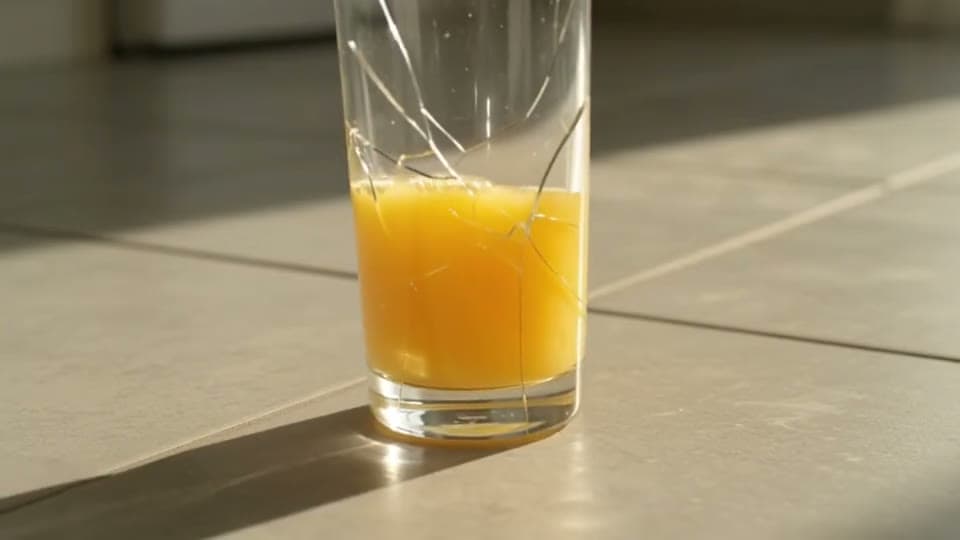
From text, with the crash
“Slow motion close-up: a tall glass of orange juice tips off the edge of a wooden kitchen table and shatters on the tile floor, juice splashes outward, shards scatter and slide, morning light. The crash and the splash.”


Before Start and end frame
“The sneaker slowly rotates a full turn on the podium as soft studio light sweeps across it.”

How to use Gemini Omni Flash
Keep Gemini Omni Flash picked
Gemini Omni Flash is already picked on this page; the Model chip switches to any other.
Write the prompt or add an image
Describe the scene, or click + to add a start image and say what happens next.
Make it and download
Pick the length and quality, click Generate, and download the MP4 when it plays.
What is a Gemini Omni Flash video?
A Gemini Omni Flash video is a clip made by Gemini Omni Flash, Google's fast AI video model, from a prompt or a picture. It makes the sound with the picture and is strong on real-world physics: falls, splashes and collisions.
What you can do with Gemini Omni Flash
Gemini Omni Flash features
Real-world physics
Weight, liquids and breakage that behave.
Sound included
Crashes, splashes and ambience with every clip.
4 to 10 seconds
4, 6, 8 or 10, at 720p or 1080p.
End frame
Add an end image and the clip lands on it.





Gemini Omni Flash on Facecam
| Gemini Omni Flash | |
|---|---|
| Made by | |
| From | Text, or a start image |
| Lengths | 4 s, 6 s, 8 s, 10 s |
| Quality | 720p, 1080p |
| Shapes from text | 16:9, 9:16 |
| Sound | Yes, made with the picture |
| Under the hood | Gemini Omni Flash 1.1 |
| End frame | Yes: add an end image and the clip lands on it |
| Our clips took | About 40 seconds (6 s, 720p) |
Gemini Omni Flash or Veo 3.1
| Gemini Omni Flash | Veo 3.1 | |
|---|---|---|
| Lengths | 4 s, 6 s, 8 s, 10 s | 4 s, 6 s, 8 s |
| Sound | Always | On or off |
| End frame | Yes | Yes |
| Best at | Physics: falls, liquids, collisions | People talking, top quality |
| A Premium month makes | 16 clips of 8 s | 4 clips of 8 s |
Gemini Omni Flash prompts to try
Juice glass shatters
“Slow motion close-up: a tall glass of orange juice tips off the edge of a wooden kitchen table and shatters on the tile floor, juice splashes outward, shards scatter and slide, morning light. The crash and the splash.”
Dominoes, 10 seconds
“Thousands of colorful dominoes fall in a long spiral across a gym floor, the camera follows the wave from above as it speeds up. The clatter of dominoes.”
Paint splash, tall
“Slow motion: a water balloon full of blue paint bursts against a white wall, paint sprays and drips down, tiny droplets catch the light. A wet pop and splatter.”
Jenga collapse in 1080p
“Close-up of a tall wooden block tower on a kitchen table; a hand pulls one block out and the whole tower wobbles and collapses, blocks bounce across the table. Clacking wood and a groan.”

More about Gemini Omni Flash
Gemini Omni Flash Video Generator is an online tool that runs Gemini Omni Flash 1.1, Google's video model, to make a 4, 6, 8 or 10 second clip with sound at 720p or 1080p from a prompt or a start image.
Gemini Omni Flash: what you need and limits
| How it works | Online. Works on any laptop. |
|---|---|
| You get | Video download |
| You need | Any up-to-date browser |
| Phones and tablets | Supported |
| Make it from | A text prompt (text to video), or a start image plus an optional prompt (image to video). |
| Models | Veo 3.1, Seedance 2.0, Kling 3.0, Gemini Omni Flash, Grok Imagine 1.5, Veo 3.1 Fast, Seedance 2.0 Fast, Wan 3.0, Veo 3.1 Lite and Hailuo 2.3. All but Hailuo make sound; on Kling and Veo 3.1 it's your choice. |
| Length | 4 to 10 seconds, depending on the model. |
| Quality | 720p (Hailuo 768p); 1080p on every model but Seedance 2.0 Fast and Hailuo. |
| Frames | A start image, and on Veo, Kling, Seedance 2.0 and Gemini Omni an end image too. |
| Shape | Wide 16:9, tall 9:16 or square 1:1 from text; a start image keeps its own shape. |
| Time | About 1 to 3 minutes, depending on the model and length. |
| Price | Comes with every paid plan, by the clip; each model, length and quality has its own price, shown before you make it (e.g. 31 Kling 3.0 clips of 5 seconds a month on Premium). A clip that fails doesn't count. |
| Output | An MP4. Free results have a small Facecam mark in the corner; plans remove it. |
| Kept for | 7 days in your Library, then deleted. Start images are deleted within an hour. |
Your images and videos
A start image is stored privately while the video is made and deleted when it's done, always within an hour. The video stays in your Library for 7 days, then it's deleted.

Gemini Omni Flash FAQ
How do I use Gemini Omni Flash?
Gemini Omni Flash is already picked on this page: write a prompt or add a picture, choose 4 to 10 seconds and 720p or 1080p, and click Generate. The clip comes with its sound.
How much does Gemini Omni Flash cost?
It comes with every paid plan, by the clip: 16 Gemini Omni Flash clips of 8 seconds a month on Premium, if you use nothing else. Longer clips and higher quality take more; the tool shows what each one takes before you make it, and a clip that fails doesn't count.
Gemini Omni Flash vs Veo 3.1: which is better?
Veo 3.1 is the one for people speaking lines and the highest quality. Gemini Omni Flash goes to 10 seconds, is quicker, takes less of your plan and handles physics well. Both are Google models and both take an end frame.
Is this the Gemini app?
No. Facecam runs Gemini Omni Flash 1.1 inside its own video tool, next to Veo 3.1, Seedance 2.0, Kling and Grok Imagine, so you can compare them with one plan.
Does Gemini Omni Flash make sound?
Yes. Every clip comes with sound made for the scene: impacts, splashes, ambience and music.
How long can a Gemini Omni Flash video be?
4, 6, 8 or 10 seconds. Ten seconds is the longest clip in the tool, shared with Kling, Seedance, Grok, Wan and Hailuo.
Can I make vertical videos with it?
Yes. Pick 9:16 in the shape chip, or 16:9 for wide. From a picture, the clip takes whichever of the two is closer to the picture's shape.
Can Gemini Omni Flash edit a video I upload?
Not here. This page makes new clips from a prompt or a picture, with an optional end picture.


Related
- Veo 3.1 AI Video GeneratorGoogle's Veo 3.1 in three versions, with first and last frames and sound you can switch off.
- Grok Imagine Video GeneratorGrok Imagine 1.5 in your browser: quick, punchy clips that come with their own sound.
- Seedance 2.0 Video GeneratorSeedance 2.0 in your browser: cinematic shots that come with their own sound, up to 1080p.
- Image to VideoAdd a picture and watch it move: photos, art and products, in a minute or two.

Try Gemini Omni Flash now
- Cancel any time
- Runs in your browser
- No gaming PC needed