Free Music Visualizer
Add a song and watch it move: bars, rings and waves that follow every beat, saved as a video for YouTube, TikTok or Instagram.

Where it works
Made with Facecam
Circle, tall
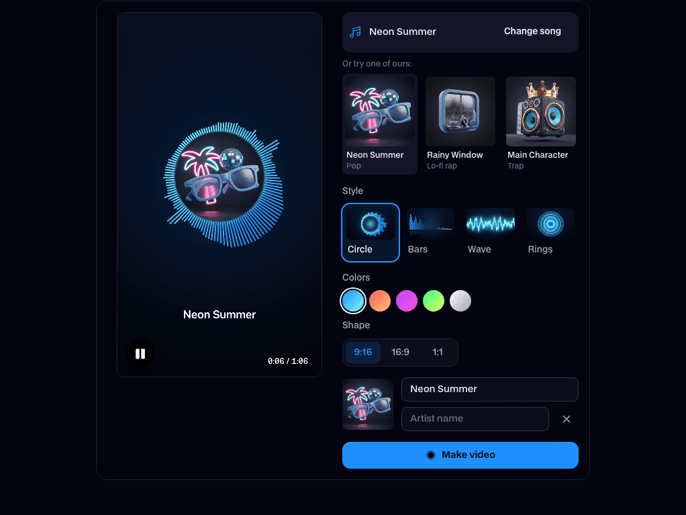
“Neon Summer”, an AI pop song, with its cover art in the middle.
Bars, wide
“Main Character”, an AI trap song, over its blurred cover.
How to use Music Visualizer
Add your song
Pick an MP3, WAV, M4A or OGG from your device, or try one of our songs. Press play to see it move.
Make it yours
Choose Circle, Bars, Wave or Rings and a color set, add cover art, a title and the artist, and pick tall, wide or square.
Make the video
Click Make video. It records while the song plays, then Download video saves an MP4 (WebM in some browsers).
What is a music visualizer?
A music visualizer is a video made from a song's sound: its bass, mids and highs are measured many times a second and drawn as bars, rings or a waveform, so every beat and note shows up on screen.
What you can do with Music Visualizer
Release your song on YouTube
A full-length video for a track that has no music video yet.
Teasers for TikTok and Reels
A tall 9:16 clip of the hook with the cover art spinning in the middle.
Music Visualizer features
Moves with your song
Measured from the audio on every frame, never a canned loop.
Your cover and title
Your artwork in the circle or behind the bars, your names on top.
Any shape
Tall for TikTok, wide for YouTube, square for Instagram.
Free and private
It runs on your device: no upload, no account, no limit.





More about Music Visualizer
Facecam's Music Visualizer is a free browser tool that listens to a song as it plays and draws its sound as moving shapes, with your cover art and title, then records the result and the song together as one video file.
Music Visualizer: what you need and limits
| How it works | Right on this page. Nothing is uploaded. |
|---|---|
| You get | Video download |
| You need | Any up-to-date browser |
| Phones and tablets | Supported |
| Songs | MP3, WAV, M4A, OGG or FLAC, any length |
| Video | 720 × 1280, 1280 × 720 or 1080 × 1080 at 30 fps, with your song |
| Styles | Circle around your cover, Bars, Wave and Rings, in five color sets |
| Runs | In your browser; the song is never uploaded |
| Price | Free, no sign-up |
How the visualizer follows your music
While the song plays, the tool splits its sound into 64 bands from deep bass to treble about sixty times a second. Each band drives one bar or spoke, so a kick drum lights up the left of the Bars style and cymbals the right. The low end alone sets the size of the circle and the glow, and a sudden jump in it counts as a beat and flashes the screen. The Wave style draws the sound wave itself.
Music visualizer styles
| Style | What moves | Best for |
|---|---|---|
| Circle | Spokes around your cover art, which pulses with the bass | Singles with artwork, tall videos |
| Bars | A spectrum of bars with a reflection | EDM, hip-hop, wide YouTube videos |
| Wave | The waveform as a glowing line | Podcasts, voice, ambient |
| Rings | Eight rings, bass inside to treble outside | Lo-fi, chill, square posts |
AI music visualizer or classic visualizer?
A classic visualizer like this one draws the sound itself, so it reacts to every beat exactly and costs nothing. An AI music visualizer has a video model make pictures for the song instead: scenes, people and places cut to the track. That's the AI music video generator, and the two go well together, an AI video for the release and a visualizer for the lyric and teaser posts.

Music Visualizer FAQ
Is this music visualizer free?
Yes. It runs in your browser, so there's no sign-up and no limit on songs or videos.
How do I make a music visualizer video?
Add your song, pick a style, colors and shape, add cover art and a title, then click Make video. Download video saves it when the song ends, or press Stop and save earlier.
Does it react to the music?
Yes. Every frame is drawn from the song's own sound at that moment: bars follow their frequencies, the circle and glow follow the bass, and beats flash the screen.
Why does it take as long as the song?
It records the video while the song plays, in real time, so a three-minute song takes three minutes. Keep the tab open until it's done.
Is my song uploaded?
No. The song is played, analysed and recorded on your device; nothing is sent to a server.
Which format is the video?
MP4 in Chrome, Edge and Safari, WebM in Firefox. Both upload fine to YouTube, TikTok and Instagram.



Try Music Visualizer for free
- Free, no sign-up
- Runs in your browser
- Nothing is uploaded