
AI Video Extender
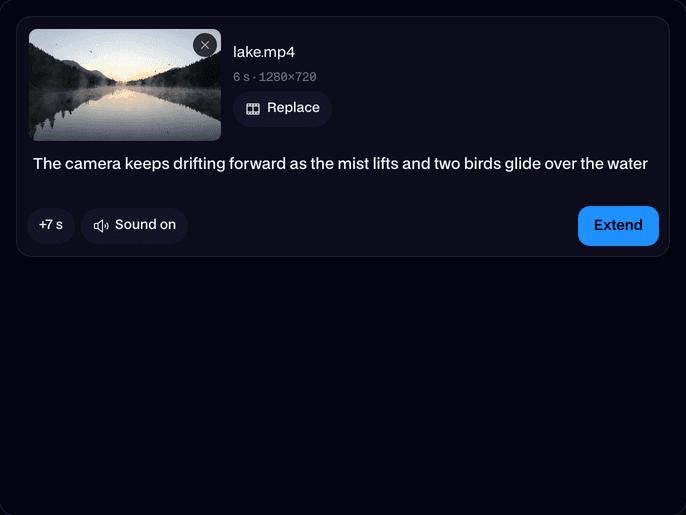
Make any video longer: upload a clip and AI adds 7 seconds that carry on from where it ends.

Where it works

How to use AI Video Extender
Upload your video
Drop in a wide 16:9 or tall 9:16 clip of 2 to 20 seconds, at 720p or 1080p, or try one of ours.
Say what happens next
Optional: a line like "the camera rises over the trees". Left empty, it simply carries on.
Extend and download
Click Extend. In about a minute and a half you get your clip plus 7 new seconds as one MP4.
What is an AI video extender?
An AI video extender is a video model that continues a clip: it reads the last frames and generates new footage that follows on smoothly, so a short video becomes a longer one. Facecam runs Veo 3.1.
Made with Facecam
6 seconds of lake, then 7 more: the mist lifts and birds fly in.
More examples

The clip it started from.
What you can do with AI Video Extender
AI clips that end too soon
A longer B-roll shot
Stretch a short drone or landscape shot to fill the gap in your edit.
Steer the story
Tell it what happens next: a turn to the camera, a door opening, the sun coming up.
AI Video Extender features
+7 seconds
New footage that follows on from the very last frame.
Seamless
The same scene, light, people and camera carry on.
With sound
Matching sound for the new part, or none if you prefer.
Your direction
Add a line on what happens next, or let it continue.
One file
Your clip and the extension come back joined as one MP4.
Extend again
Run the result through again to keep it going.







Extend a video with AI
Upload the clip and click Extend. Veo 3.1 watches how it ends and generates 7 more seconds: the same place, the same people and the same camera move, with sound to match. The new part is joined onto your clip, so you download one longer video.

More about AI Video Extender
AI Video Extender is an online tool that makes a video longer. It runs Veo 3.1, which watches the end of your clip and generates 7 more seconds that continue it, the same scene, people, light and camera, with matching sound, then joins them on.
AI Video Extender: what you need and limits
| How it works | Online. Works on any laptop. |
|---|---|
| You get | Video download |
| You need | Any up-to-date browser |
| Phones and tablets | Supported |
| Input | An MP4, MOV or WebM, 16:9 or 9:16, 720p or 1080p, 2 to 20 seconds. |
| Adds | 7 seconds, with sound or without. |
| Model | Veo 3.1 Fast. |
| Output | One MP4: your clip and the new seconds, at 720p, or 1080p from a 1080p clip. |
| Time | About a minute and a half. |
| Price | Comes with every paid plan, per extension: 12 video extensions a month on Premium, if you use nothing else. Without sound uses less. One that fails doesn't count. |
| Kept for | 7 days in your Library, then deleted. Your upload is deleted within an hour. |
Extend video length, again and again
Each run adds 7 seconds. To go longer, extend the result again: a 6 second clip becomes 13, then 20. Clips up to 20 seconds can be extended, so trim a long one to its best part first.
Getting a smooth extension
- End on a steady moment. A clip that stops mid-cut or on a blur is harder to continue.
- Use a wide 16:9 or tall 9:16 video at 720p or 1080p, the shapes the model makes.
- Describe the next few seconds, not the whole film: one action, one camera move.
- Keep the same style words as the original prompt if the clip came from an AI video generator.
Your files
Your clip is stored privately while it's made and deleted when it's done, always within an hour. The result stays in your Library for 7 days, then it's deleted.

AI Video Extender FAQ
How do I make a video longer with AI?
Upload it, optionally say what happens next, and click Extend. You get your video plus 7 new seconds as one MP4.
Which model extends the video?
Veo 3.1 Fast. In our tests on the same clip it continued the scene as smoothly as the other extenders we tried, with realistic motion and sound.
Can I extend any video?
Wide 16:9 or tall 9:16 videos at 720p or 1080p, 2 to 20 seconds long, as MP4, MOV or WebM. Square and other shapes aren't supported.
Can I extend a video more than once?
Yes. Upload the extended video and extend it again; each run adds 7 seconds.
How much does it cost?
It comes with every paid plan, per extension: 12 video extensions a month on Premium. Without sound uses less. One that fails doesn't count.
Does the extension have sound?
Yes, by default it makes sound to match the new seconds. Turn Sound off for a silent extension.
How long does it take?
About a minute and a half. You can close the page; the video goes to your Library.



Try AI Video Extender now
- Cancel any time
- Runs in your browser
- No gaming PC needed