
Veo 3 Video Generator
Write the line, and the person in your video says it: Veo 3.1 with sound.


Where it works
Made with Facecam
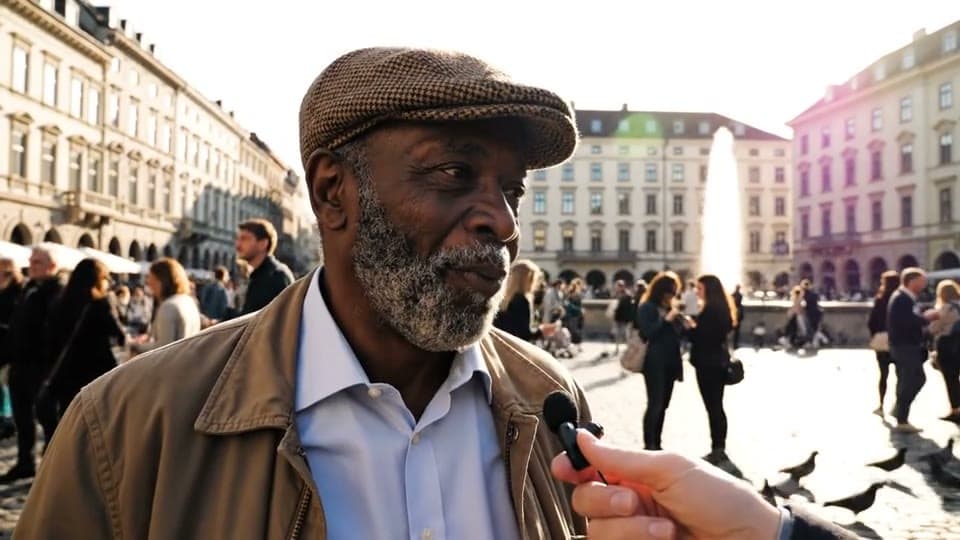
Veo 3.1, with his voice
“A street interview in a sunny city square: a man in his sixties with a grey beard and a flat cap leans toward the handheld microphone, laughs and says: Honestly? Best sandwich in town, and I've tried them all. Busy street noise, pigeons, handheld camera.”
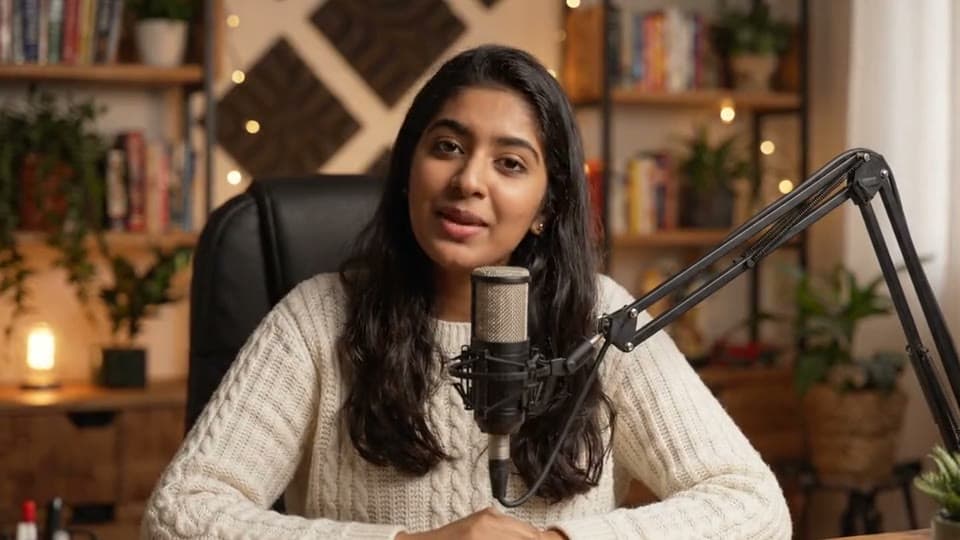
Veo 3.1 Lite, with her voice
“A podcaster in her twenties sits at a desk with a microphone in a warm, cozy studio. She smiles at the camera and says: Welcome back to the show. Today we're making videos out of thin air.”

How to use Veo 3.1
Keep Veo 3.1 picked
Veo 3.1 is already picked on this page; the Model chip switches to any other.
Write the prompt or add an image
Describe the scene, or click + to add a start image and say what happens next.
Make it and download
Pick the length and quality, click Generate, and download the MP4 when it plays.
What is a Veo 3 video?
A Veo 3 video is a clip made by Google's Veo 3 model, with the picture and the sound made together, including people speaking the lines in your prompt. Facecam runs Veo 3.1, its newest version, plus Fast and Lite.
What you can do with Veo 3.1
Talking heads
A presenter, a podcaster or a character says your script.
Street interviews
A passer-by answers into the mic, with the noise of the street.
Ads with a voice
A line of dialogue and the sound of the place, in one clip.
Veo 3.1 features
Spoken lines
Put the words in quotes after “says:”.
Sound on or off
Voices, effects and ambience, or a silent clip.
4, 6 or 8 seconds
At 720p or 1080p.
Fast and Lite
Two cheaper versions in the same menu.





Veo 3.1 on Facecam
| Veo 3.1 | |
|---|---|
| Made by | |
| From | Text, or a start image |
| Lengths | 4 s, 6 s, 8 s |
| Quality | 720p, 1080p |
| Shapes from text | 16:9, 9:16 |
| Sound | Yes, or off (a silent clip takes less of your plan) |
| Under the hood | Veo 3.1 (also Veo 3.1 Fast and Veo 3.1 Lite in the Model menu) |
| End frame | Yes: add an end image and the clip lands on it |
| Our clips took | About 75 seconds (8 s, 720p, with sound) |

Talking prompts on each Veo
Street interview, on Veo 3.1
“A street interview in a sunny city square: a man in his sixties with a grey beard and a flat cap leans toward the handheld microphone, laughs and says: "Honestly? Best sandwich in town, and I've tried them all." Busy street noise, pigeons, handheld camera.”
Podcast intro, on Veo 3.1 Lite
“A podcaster in her twenties sits at a desk with a microphone in a warm, cozy studio. She smiles at the camera and says: "Welcome back to the show. Today we're making videos out of thin air."”
Weather report, on Veo 3.1 Fast
“A cheerful TV weather presenter in a blue suit stands in front of a big map with sun and cloud icons, gestures at it and says: "Sunshine all weekend, so get outside!" Light studio music.”
Tall selfie vlog, on Veo 3.1 Fast
“A young woman films herself on a phone while hiking, out of breath, on a mountain trail at sunrise, and says: "We made it to the top, look at this view!" Wind and birds.”

More about Veo 3.1
Veo 3 Video Generator is an online tool that runs Google's Veo 3.1 to make a 4, 6 or 8 second clip with sound and spoken lines from a prompt or a start image, with Veo 3.1 Fast and Lite as cheaper options.
Veo 3.1: what you need and limits
| How it works | Online. Works on any laptop. |
|---|---|
| You get | Video download |
| You need | Any up-to-date browser |
| Phones and tablets | Supported |
| Make it from | A text prompt (text to video), or a start image plus an optional prompt (image to video). |
| Models | Veo 3.1, Seedance 2.0, Kling 3.0, Gemini Omni Flash, Grok Imagine 1.5, Veo 3.1 Fast, Seedance 2.0 Fast, Wan 3.0, Veo 3.1 Lite and Hailuo 2.3. All but Hailuo make sound; on Kling and Veo 3.1 it's your choice. |
| Length | 4 to 10 seconds, depending on the model. |
| Quality | 720p (Hailuo 768p); 1080p on every model but Seedance 2.0 Fast and Hailuo. |
| Frames | A start image, and on Veo, Kling, Seedance 2.0 and Gemini Omni an end image too. |
| Shape | Wide 16:9, tall 9:16 or square 1:1 from text; a start image keeps its own shape. |
| Time | About 1 to 3 minutes, depending on the model and length. |
| Price | Comes with every paid plan, by the clip; each model, length and quality has its own price, shown before you make it (e.g. 31 Kling 3.0 clips of 5 seconds a month on Premium). A clip that fails doesn't count. |
| Output | An MP4. Free results have a small Facecam mark in the corner; plans remove it. |
| Kept for | 7 days in your Library, then deleted. Start images are deleted within an hour. |
Writing lines for Veo
Describe the speaker and the place first, then the line: “A man in his sixties with a flat cap leans toward the microphone, laughs and says: “Best sandwich in town.”” Keep it to one or two short sentences for a 6 or 8 second clip; longer lines get rushed or cut. Veo 3.1 Fast and Lite speak lines the same way and take less of your plan, so draft there and make the final take on Veo 3.1. Veo's own content checks are strict, and a clip it refuses isn't charged.
Your images and videos
A start image is stored privately while the video is made and deleted when it's done, always within an hour. The video stays in your Library for 7 days, then it's deleted.

Veo 3.1 FAQ
How do I use Veo 3?
Veo 3.1 is already picked on this page: write a prompt (with a line in quotes if someone should speak) or add a picture, choose the length and click Generate.
How much does Veo 3.1 cost?
It comes with every paid plan, by the clip: 4 Veo 3.1 clips of 8 seconds a month on Premium, if you use nothing else. Longer clips and higher quality take more; the tool shows what each one takes before you make it, and a clip that fails doesn't count.
Is this Veo 3 or Veo 3.1?
Veo 3.1, the newest version of Google's Veo 3, with sound and spoken dialogue. Veo 3.1 Fast and Veo 3.1 Lite are in the same Model menu for quicker, cheaper clips.
Can the people in the video talk?
Yes, on all three Veo versions. Write the line in quotes after “says:” and they say it, in a voice that fits them.
Can I turn the sound off?
On Veo 3.1 and Veo 3.1 Fast, yes: switch Sound off under the prompt and the silent clip takes less of your plan. Veo 3.1 Lite always makes sound.
Why was my clip refused?
Veo checks every prompt and picture with its own filter and sometimes turns one down. It isn't charged; reword it or try another model.
How long is a Veo 3 AI video?
You choose 4, 6 or 8 seconds, at 720p or 1080p. Six seconds fits one or two spoken sentences comfortably; eight gives a little room before and after the line.
Can Veo make my photo speak?
Yes. Click + to add the photo and write what they say after “says:”. The clip starts on your picture, keeps its shape, and the person speaks the line with matching sound around them.


Related
- Veo 3.1 AI Video GeneratorGoogle's Veo 3.1 in three versions, with first and last frames and sound you can switch off.
- Gemini Omni Flash Video GeneratorGemini Omni Flash in your browser: things fall, splash and break the way they would for real.
- Kling AI Video GeneratorKling 3.0 in your browser: lifelike motion from a prompt or a picture.

Try Veo 3.1 now
- Cancel any time
- Runs in your browser
- No gaming PC needed