
Seedance 2.0 Video Generator
Seedance 2.0 in your browser: cinematic shots that come with their own sound, up to 1080p.


Where it works
Made with Facecam
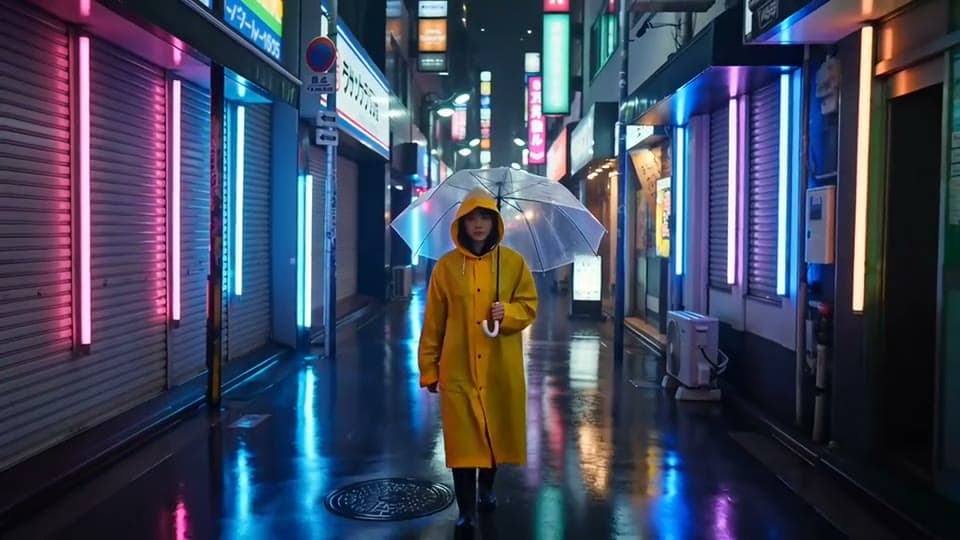
Seedance 2.0, with the rain's sound
“A neon-lit Tokyo alley at night in the rain, a woman in a yellow raincoat walks toward the camera under a clear umbrella, reflections shimmer in the puddles, the handheld camera slowly pulls back. Rain and distant traffic.”

Seedance 2.0 Fast, from text
“A street food cook at a night market tosses noodles in a flaming wok. Sparks and steam rise, the crowd behind her is a blur of neon signs. The handheld camera slowly pushes in. Sizzling oil and chatter.”


Before Seedance 2.0 Fast, from a picture
“The little robot looks up as a butterfly lands on its head, its eyes light up and it giggles with a happy beep, the camera slowly circles around it, sunflowers swaying in the breeze.”

How to use Seedance 2.0
Keep Seedance 2.0 picked
Seedance 2.0 is already picked on this page; the Model chip switches to any other.
Write the prompt or add an image
Describe the scene, or click + to add a start image and say what happens next.
Make it and download
Pick the length and quality, click Generate, and download the MP4 when it plays.
What is a Seedance video?
A Seedance video is a clip made by Seedance, ByteDance's AI video model, from a prompt or a picture. Seedance 2.0 makes cinematic shots and the sound with them: ambience, effects and music that match.
What you can do with Seedance 2.0
Cinematic openers
Handheld push-ins, rain, neon and steam, for the first seconds of a video.
Shots with sound
The clip arrives with its ambience and effects; no sound design needed.
Animated characters
3D and drawn characters keep their style as they move.
Seedance 2.0 features
Sound included
Effects, ambience and music made with the picture.
Up to 1080p
720p or 1080p, wide, tall or square.
Start and end frames
Add an end image and the shot lands on it.
Seedance 2.0 Fast
Quicker and lighter on your plan, at 720p.





Seedance 2.0 on Facecam
| Seedance 2.0 | |
|---|---|
| Made by | ByteDance |
| From | Text, or a start image |
| Lengths | 5 s, 10 s |
| Quality | 720p, 1080p |
| Shapes from text | 16:9, 9:16, 1:1 |
| Sound | Yes, made with the picture |
| Under the hood | Seedance 2.0 (the full model) |
| End frame | Yes: add an end image and the clip lands on it |
| Start images | Scenes, products and drawn characters; not photos of real-looking people |
| Our clips took | About 4 minutes (5 s, 720p) |
Seedance 2.0 or Seedance 2.0 Fast
| Seedance 2.0 | Seedance 2.0 Fast | |
|---|---|---|
| Lengths | 5 s, 10 s | 5 s, 10 s |
| Quality | 720p, 1080p | 720p |
| Sound | Yes | Yes |
| End frame | Yes | No |
| Our clips took | About 4 minutes (5 s) | About 1.5 minutes (5 s) |
| A Premium month makes | 8 clips of 5 s | 10 clips of 5 s |
Try a Seedance shot
Rainy neon alley, on Seedance 2.0
“A neon-lit Tokyo alley at night in the rain, a woman in a yellow raincoat walks toward the camera under a clear umbrella, reflections shimmer in the puddles, the handheld camera slowly pulls back. Rain and distant traffic.”
Night market wok, on Seedance 2.0 Fast
“A street food cook at a night market tosses noodles in a flaming wok. Sparks and steam rise, the crowd behind her is a blur of neon signs. The handheld camera slowly pushes in. Sizzling oil and chatter.”
Desert rider in 1080p, on Seedance 2.0
“A rider in a red cloak gallops along a desert ridge at golden hour, dust trailing behind the horse, a drone shot sweeps around her. Hooves, wind and a low drum.”
Tall street dance, on Seedance 2.0 Fast
“A dancer in a bright yellow tracksuit pops and locks under a streetlight on a wet city street at night, the handheld camera circles him. A hip-hop beat and sneakers squeaking.”

More about Seedance 2.0
Seedance 2.0 Video Generator is an online tool that runs Seedance 2.0, ByteDance's video model, to make a 5 or 10 second clip with sound at 720p or 1080p from a text prompt or a start image.
Seedance 2.0: what you need and limits
| How it works | Online. Works on any laptop. |
|---|---|
| You get | Video download |
| You need | Any up-to-date browser |
| Phones and tablets | Supported |
| Make it from | A text prompt (text to video), or a start image plus an optional prompt (image to video). |
| Models | Veo 3.1, Seedance 2.0, Kling 3.0, Gemini Omni Flash, Grok Imagine 1.5, Veo 3.1 Fast, Seedance 2.0 Fast, Wan 3.0, Veo 3.1 Lite and Hailuo 2.3. All but Hailuo make sound; on Kling and Veo 3.1 it's your choice. |
| Length | 4 to 10 seconds, depending on the model. |
| Quality | 720p (Hailuo 768p); 1080p on every model but Seedance 2.0 Fast and Hailuo. |
| Frames | A start image, and on Veo, Kling, Seedance 2.0 and Gemini Omni an end image too. |
| Shape | Wide 16:9, tall 9:16 or square 1:1 from text; a start image keeps its own shape. |
| Time | About 1 to 3 minutes, depending on the model and length. |
| Price | Comes with every paid plan, by the clip; each model, length and quality has its own price, shown before you make it (e.g. 31 Kling 3.0 clips of 5 seconds a month on Premium). A clip that fails doesn't count. |
| Output | An MP4. Free results have a small Facecam mark in the corner; plans remove it. |
| Kept for | 7 days in your Library, then deleted. Start images are deleted within an hour. |
Getting good Seedance clips
Seedance responds to film language. Write the shot the way a director would: what's in frame, what happens, how the camera moves and what we hear (“rain and distant traffic”). Seedance 2.0 is the slowest model in the tool, so use it for the shots that matter and draft on Seedance 2.0 Fast. From a picture, it animates scenes, objects and drawn or 3D characters; a photo of a real-looking person is turned down before anything is charged, so pick Kling or Veo for those.
Your images and videos
A start image is stored privately while the video is made and deleted when it's done, always within an hour. The video stays in your Library for 7 days, then it's deleted.

Seedance 2.0 FAQ
How do I use Seedance?
Seedance 2.0 is already picked on this page: write a prompt or add a picture, choose 5 or 10 seconds and 720p or 1080p, and click Generate. The clip comes with its sound.
How much does Seedance 2.0 cost?
It comes with every paid plan, by the clip: 8 Seedance 2.0 clips of 5 seconds a month on Premium, if you use nothing else. Longer clips and higher quality take more; the tool shows what each one takes before you make it, and a clip that fails doesn't count.
Is this Seedance 2.0 or Seedance Fast?
Both. The page opens on Seedance 2.0, the full model, at 720p or 1080p. Seedance 2.0 Fast is in the same Model menu: quicker, 720p only, and it takes less of your plan.
Why was my photo turned down?
Seedance doesn't animate photos of real-looking people. Nothing is charged; try the same picture on Kling 3.0 or Veo 3.1.
Does Seedance make sound?
Yes. Every Seedance clip, on 2.0 and 2.0 Fast, comes with sound made for the shot: ambience, effects and music.
How long does a Seedance clip take?
Plan on about four minutes for 5 seconds on Seedance 2.0, the slowest model in the tool, and about a minute and a half on Seedance 2.0 Fast. Start it, keep working, and the clip lands in your Library when it's done.
Can Seedance make vertical or square videos?
Yes. From a prompt, pick wide, tall or square. From a picture, Seedance matches the nearest of 16:9, 4:3, 1:1, 3:4 and 9:16, so a phone photo stays upright.
Can I get Seedance in 1080p?
Yes, on Seedance 2.0: pick 1080p in the quality chip. Seedance 2.0 Fast runs at 720p only.
Can Seedance end on a picture I choose?
On Seedance 2.0, yes: add a start image, then an end image, and the shot moves from one to the other. Seedance 2.0 Fast takes a start image only.


Related
- Veo 3.1 AI Video GeneratorGoogle's Veo 3.1 in three versions, with first and last frames and sound you can switch off.
- Grok Imagine Video GeneratorGrok Imagine 1.5 in your browser: quick, punchy clips that come with their own sound.
- Wan AI Video GeneratorWan 3.0 in your browser: clips with sound, as sharp as 1080p.
- Text to VideoWrite one sentence, get a video: any scene, any shot, in a minute or two.

Try Seedance 2.0 now
- Cancel any time
- Runs in your browser
- No gaming PC needed