Text to Video
Write one sentence, get a video: any scene, any shot, in a minute or two.

Where it works
Made with Facecam
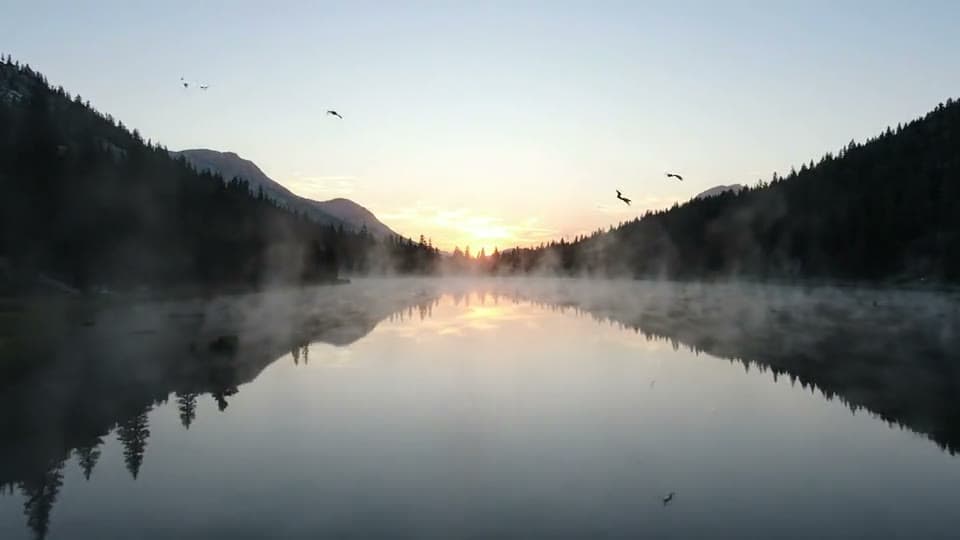
Veo 3.1, with birdsong
“A drone shot glides low over a misty mountain lake at sunrise, pine forests on the shore, birds calling, calm water.”

Hailuo 2.3
“A fluffy orange cat wearing a tiny chef's hat stirs a pot of soup in a toy kitchen, playful, bright light.”

How to use Text to Video
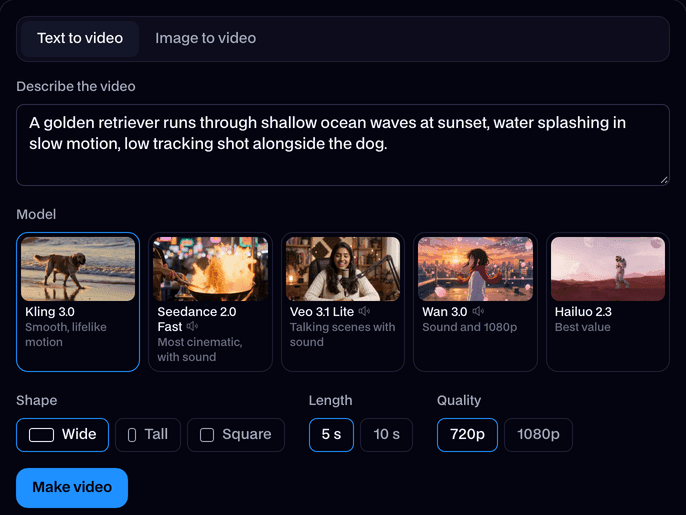
Describe the video
Write what happens: who or what is in it, what they do, where, and how the camera moves.
Pick a model, length and shape
Kling for people, Seedance for cinematic shots with sound, Veo for people talking, Wan for 1080p with sound, Hailuo for the most clips.
Make it and download
Click Make video. In a minute or two the clip plays on the page; click Download to keep the MP4. It's in your Library too.
What is a text to video generator?
A text to video generator is AI that makes a video clip from a written description, with no camera or footage. Facecam turns a prompt into a 4 to 10 second clip on five models in a minute or two.
What you can do with Text to Video
B-roll you can't film
Drone shots, sunsets, cities at night: fill the gaps in an edit.
Ideas before you shoot
Try a scene as a clip before you spend a day filming it.
Shorts from a sentence
A tall 9:16 clip, ready for TikTok or Reels.
Text to Video features
Any scene
People, animals, places, products, anime and 3D styles.
Camera moves
Ask for a push in, an orbit, a drone shot or a tracking shot.
Three shapes
16:9, 9:16 or 1:1 (Veo does 16:9 and 9:16; Hailuo 16:9).
Sound on three models
Seedance, Veo and Wan hear your prompt too.





The prompt formula
| Part | What to write | Example |
|---|---|---|
| Subject | Who or what is in the shot | A fluffy orange cat in a tiny chef's hat |
| Action | What they do | stirs a pot of soup |
| Place | Where it happens | in a toy kitchen |
| Camera | How the shot moves | slow push in |
| Look | Light, style, mood | bright light, playful |
| Sound | What we hear (Seedance, Veo, Wan) | bubbling soup, a happy meow |

More about Text to Video
Text to Video is an online tool that turns a written description into a short video clip, with the people, place, motion and camera you describe, on the video model you pick.
Text to Video: what you need and limits
| How it works | Online. Works on any laptop. |
|---|---|
| You get | Video download |
| You need | Any up-to-date browser |
| Phones and tablets | Supported |
| Make it from | A text prompt (text to video), or a start image plus an optional prompt (image to video). |
| Models | Kling 3.0, Seedance 2.0 Fast, Veo 3.1 Lite, Wan 3.0 and Hailuo 2.3. Seedance, Veo and Wan make sound too. |
| Length | 4 to 10 seconds, depending on the model. |
| Quality | 720p (Hailuo 768p); 1080p on Kling, Veo and Wan. |
| Shape | Wide 16:9, tall 9:16 or square 1:1 from text; a start image keeps its own shape. |
| Time | About 1 to 3 minutes, depending on the model and length. |
| Price | Comes with every paid plan, by the clip; each model, length and quality has its own price, shown before you make it (e.g. 31 Kling 3.0 clips of 5 seconds a month on Premium). A clip that fails doesn't count. |
| Output | An MP4. Free results have a small Facecam mark in the corner; plans remove it. |
| Kept for | 7 days in your Library, then deleted. Start images are deleted within an hour. |
Which model for text to video
For realistic people moving, start with Kling 3.0. For a cinematic shot with its own sound, Seedance 2.0. When someone has to say a line, Veo 3.1 speaks it. Wan 3.0 gives sound and 1080p, and Hailuo 2.3 stretches your plan furthest, at 6 or 10 seconds. The examples on this page came from Veo and Hailuo.
Shape and length
Pick wide 16:9 for YouTube and websites, tall 9:16 for Shorts, Reels and TikTok, or square for feeds. Lengths run from 4 to 10 seconds depending on the model; shorter clips use less of your plan.
When the clip isn't what you pictured
- Too much happening? A 5 second clip fits one action. Split a story into several prompts and join the clips later.
- Wrong look? Put the style first (“Anime style:”, “3D animation of”, “A watercolor painting of”) so it frames everything after it.
- Camera doing its own thing? Ask for one move only, or write “static camera” for a still shot.
- Missing a detail? Say it plainly and early: “a red scarf”, “two moons in a pink sky”.

Text to Video FAQ
How do I turn text into a video?
Write what should happen, keep Text to video picked, choose a model, shape and length, and click Make video. The clip is ready in a minute or two.
How long should my prompt be?
One to three sentences is plenty. Say the subject, the action, the place and the camera move; add the sound you want on Seedance, Veo or Wan.
Can it make people talk?
Yes, on Veo 3.1: write the line in quotes after “says:” and the person says it in the clip.
How much does text to video cost?
It comes with every paid plan, by the clip, at each model's own price, shown before you make it: 47 Hailuo 2.3 clips of 6 seconds a month on Premium, for example. A clip that fails doesn't count.
How long does it take to turn text into a video?
Usually one to three minutes from clicking Make video. Short 720p clips on Kling or Veo come back fastest. You don't have to wait on the page; the finished clip is saved to your Library.
Can I get a tall video for TikTok from text?
Yes. Choose Tall before you make it and you get a 9:16 clip on Kling, Seedance, Veo or Wan. Hailuo only makes wide 16:9 clips from a prompt.
Can the video have music or sound effects?
On Seedance, Veo and Wan, yes: write what we should hear, like “rain on the window and soft jazz”, and the sound comes out with the picture. Kling and Hailuo make silent clips.
What styles can I ask for?
Real-looking footage unless you say otherwise. Name another look at the start of the prompt: anime, 3D animation, watercolor or a vintage film look. The cat chef above is a playful, bright style from one line.



Try Text to Video now
- Cancel any time
- Runs in your browser
- No gaming PC needed