
AI Hyperlapse Video Maker
A moving camera and racing time: day to night and streaking lights in one clip.


Where it works
Made with Facecam
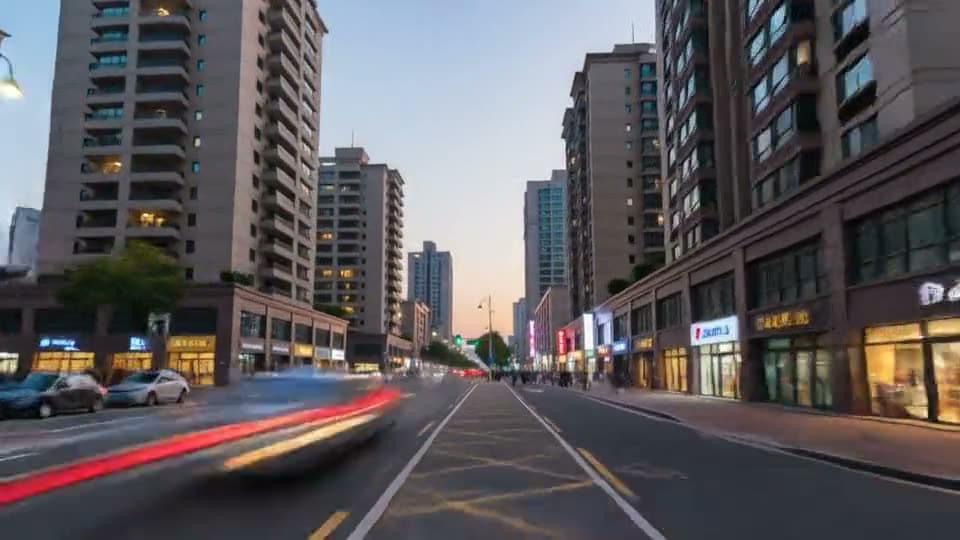
Day to night, from text
“A hyperlapse moving forward through a busy city street from day into night, the camera glides steadily forward while cars and people streak past as light trails, the sky turns from blue to deep orange to night, neon signs switch on”

How to use AI Hyperlapse Maker
Pick the path
Where the camera travels: down a street, along a forest trail, through a station.
Say how time changes
Day to night, clouds racing, light trails, seasons turning. Ask for a “steady” or “smooth” camera.
Generate and download
Pick 10 seconds for a longer journey, 5 for a quick transition.
What is a hyperlapse video?
A hyperlapse video is a time-lapse in which the camera also moves, traveling through a place while time races: clouds rush, lights streak and day turns to night. Shot for real it takes hundreds of photos; AI makes one from a prompt.
AI Hyperlapse Maker features
No tripod, no hundreds of photos
One sentence makes the shot.
Time you choose
Day to night, seasons, rush hour.
A steady glide
Smooth forward motion through the scene.
5 or 10 seconds
A quick transition or a full journey.




Hyperlapse prompts
City, day to night
“A hyperlapse moving forward through a busy city street from day into night, the camera glides steadily forward while cars and people streak past as light trails, the sky turns from blue to deep orange to night, neon signs switch on”
Forest seasons
“A hyperlapse moving slowly along a forest path while the seasons change, green summer leaves turn orange and fall, snow covers the ground, the camera keeps gliding forward steadily”
Station rush hour
“A hyperlapse gliding through a busy train station hall, crowds of people blur past in fast motion, the departure board flickers, the light shifts from morning to evening, steady camera”
Clouds over a peak
“A hyperlapse slowly circling a mountain peak as clouds race over it and pour down the valleys, the sun sets and stars appear, smooth steady camera”

More about AI Hyperlapse Maker
AI Hyperlapse Video Maker is an online tool that makes hyperlapse clips, where the camera travels steadily while time speeds up, from a text prompt or a photo, on video models like Kling 3.0.
AI Hyperlapse Maker: what you need and limits
| How it works | Online. Works on any laptop. |
|---|---|
| You get | Video download |
| You need | Any up-to-date browser |
| Phones and tablets | Supported |
| Starts on | Kling 3.0, text to video, wide 16:9; the chips switch model and shape |
Hyperlapse or time-lapse?
A time-lapse keeps the camera still and lets time race: clouds over a fixed skyline. A hyperlapse moves the camera too, which is what makes it feel like a journey. In a prompt, say both: the camera's path (“glides forward along the street”) and the change in time (“from day into night, cars become light trails”). A steady camera matters more than speed, so ask for it.

AI Hyperlapse Maker FAQ
How do I make a hyperlapse video?
Describe where the camera travels and how time changes on the way, ask for a steady glide, and click Generate. The clip is ready in a minute or two.
Can I make a hyperlapse from my photo?
Yes. Add a street or landscape photo with + and ask for a hyperlapse moving forward from it as day turns to night.
How long can the hyperlapse be?
5 or 10 seconds on Kling 3.0. Join a few for a longer sequence.
Do I need a camera or a tripod?
No. The whole shot is made from your prompt.
Which scenes work best?
Places with movement and light to speed up: city streets, crowds, roads at night, clouds over mountains, changing seasons.



Try AI Hyperlapse Maker now
- Cancel any time
- Runs in your browser
- No gaming PC needed