
AI B-Roll Generator
The cutaway shot your edit needs, from one sentence: no stock site, no shoot.


Where it works
Made with Facecam
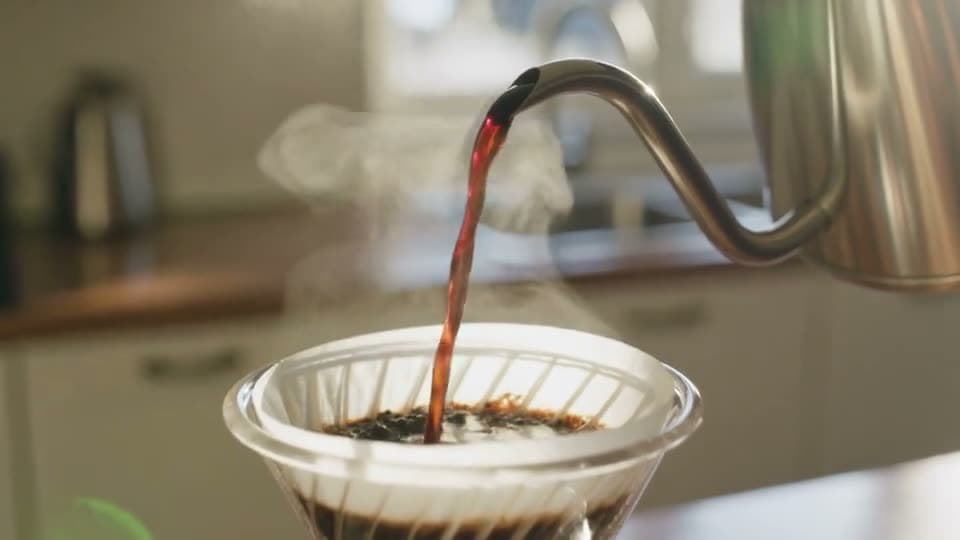
A coffee cutaway, from text
“Cinematic b-roll: close-up of hot coffee being poured from a gooseneck kettle over a pour-over filter in a sunny kitchen, steam rising, slow motion, shallow depth of field, warm morning light”

How to use AI B-Roll Generator
Describe the cutaway
Subject, action and setting, plus the look: “slow motion”, “close-up”, “shallow depth of field”.
Match your footage
16:9 for YouTube, 9:16 for Shorts. Name the light (warm morning, neon night) so it cuts in with your main shots.
Generate and drop it in
Download the MP4 and put it on the timeline over your voiceover.
What is a b-roll clip?
A b-roll clip is supporting footage cut in over the main shot, like hands typing, a coffee pour or a city at night. An AI b-roll generator makes those clips from a prompt, so you get the exact shot your edit is missing.
AI B-Roll Generator features
The exact shot
No scrolling stock libraries for something close.
Cinematic look
Slow motion, shallow focus, film-like light.
5 or 10 seconds
The length of a cutaway.
Wide, tall or square
Matches YouTube, Shorts or feeds.





B-roll prompts
Pour-over coffee
“Cinematic b-roll: close-up of hot coffee being poured from a gooseneck kettle over a pour-over filter in a sunny kitchen, steam rising, slow motion, shallow depth of field, warm morning light”
Typing at night
“Close-up of hands typing on a laptop keyboard at night, the screen glow lights the fingers, a cup of tea steams beside it, shallow depth of field, slow push-in, cinematic”
City crosswalk
“Slow motion shot of people crossing a busy city crosswalk at golden hour, seen from a low angle, long shadows, blurred traffic in the background, cinematic b-roll”
Planning on paper
“Top-down shot of a hand writing a to-do list in a notebook on a wooden desk, a plant and a phone beside it, soft daylight, the camera slowly rotates”

More about AI B-Roll Generator
AI B-Roll Generator is an online tool that makes cinematic b-roll, the cutaway shots edited in between talking parts, from a text prompt or a photo, on video models such as Kling 3.0.
AI B-Roll Generator: what you need and limits
| How it works | Online. Works on any laptop. |
|---|---|
| You get | Video download |
| You need | Any up-to-date browser |
| Phones and tablets | Supported |
| Starts on | Kling 3.0, text to video, wide 16:9; the chips switch model and shape |
Matching b-roll to your video
B-roll works when it feels like part of the same shoot. Say the light and color of your main footage in the prompt, and keep the camera move gentle: a slow push-in or a slight drift. Five seconds is usually enough for a cutaway. Kling clips start silent, which suits footage that sits under your own voice; for clips with ambience, switch to Veo 3.1 or Seedance 2.0.

AI B-Roll Generator FAQ
How do I make b-roll with AI?
Describe the shot (subject, action, setting, look), pick the shape that matches your video, and click Generate. Download it and cut it into your timeline.
Can I use AI b-roll in YouTube videos?
Yes. Download the MP4 and use it in your edit like any other clip.
Does the b-roll have sound?
Kling 3.0, picked here, makes silent cutaways for under a voiceover. Switch the model to Veo 3.1 or Seedance 2.0 for clips with ambience.
What length should b-roll be?
3 to 5 seconds on screen is typical. Make 5 second clips and trim them in your editor.
Can I make b-roll from my own photo?
Yes. Add a photo of your product, workspace or location with + and describe the camera move.



Try AI B-Roll Generator now
- Cancel any time
- Runs in your browser
- No gaming PC needed