
AI Drone Shot Generator
Aerial footage from a sentence: rising reveals, flyovers and orbits, with no drone or pilot.


Where it works
Made with Facecam
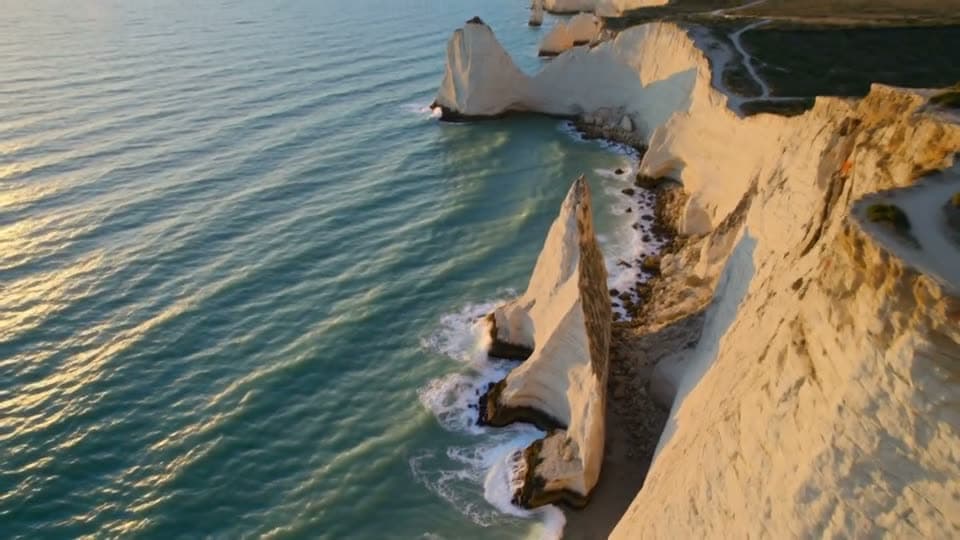
A coastal reveal, from text
“Aerial drone shot rising slowly over turquoise sea and white limestone cliffs at sunrise, waves breaking on the rocks below, the camera tilts up to reveal the coastline stretching to the horizon, cinematic”

How to use AI Drone Shot Generator
Name the place and the move
Say what's below and how the camera flies: “rising slowly over sea cliffs”, “gliding low over a pine forest”, “orbiting a lighthouse”.
Or fly over your own photo
Click + and add a landscape or building photo; the drone move starts from it.
Generate and download
Pick 5 or 10 seconds and 720p or 1080p, click Generate and save the MP4.
What is an AI drone shot?
An AI drone shot is an aerial video clip made by an AI video model instead of a real drone: the model draws the landscape and flies the camera over it, rising, gliding or circling the way the prompt asks.
What you can do with AI Drone Shot Generator
AI Drone Shot Generator features
Every classic move
Rise, reveal, flyover, orbit, top-down, pull-back.
Any place
Real-looking coasts, cities, deserts and forests.
From text or a photo
Invent the view or fly over yours.
No flight rules
No license, no permit, no battery swaps.





AI drone shot prompts
Coastal reveal
“Aerial drone shot rising slowly over turquoise sea and white limestone cliffs at sunrise, waves breaking on the rocks below, the camera tilts up to reveal the coastline stretching to the horizon, cinematic”
Low forest flyover
“A fast, low drone flyover skimming the tops of a pine forest in autumn fog, the camera pushes forward and rises as a mountain lake appears ahead, cinematic aerial shot”
City orbit at night
“A slow aerial orbit around a glass skyscraper at night, the city lights stretching to the horizon, traffic streaks on the streets below, smooth drone shot”
Top-down beach
“A top-down drone shot looking straight down at waves rolling onto a white sand beach, the camera slowly rises and turns, turquoise water, bright midday sun”

More about AI Drone Shot Generator
AI Drone Shot Generator is an online tool that makes aerial, drone-style video from a text prompt or a photo, with camera moves like a rising reveal, a flyover or an orbit, on video models such as Kling 3.0.
AI Drone Shot Generator: what you need and limits
| How it works | Online. Works on any laptop. |
|---|---|
| You get | Video download |
| You need | Any up-to-date browser |
| Phones and tablets | Supported |
| Starts on | Kling 3.0, text to video, wide 16:9; the chips switch model and shape |
Drone moves and what to type
| Move | Type this | Good for |
|---|---|---|
| Rising reveal | “rises slowly, tilting up to reveal …” | Openers and landscapes |
| Flyover | “flies low and fast over …” | Energy and travel edits |
| Orbit | “circles slowly around …” | Buildings and landmarks |
| Top-down | “looking straight down, rising” | Beaches, fields, patterns |
| Pull-back | “pulls back and up from …” | Endings and a sense of scale |

AI Drone Shot Generator FAQ
How do I make an AI drone shot?
Describe the place and the drone's move in one or two sentences, click Generate, and download the clip in a minute or two.
Can I turn my own photo into a drone shot?
Yes. Add it with + and ask for a move like a slow push-in and rise. Photos taken from up high, like a hilltop or a rooftop, give the most convincing flight.
What's a good AI drone shot prompt?
Place, move, light: “aerial drone shot rising over sea cliffs at sunrise, tilting up to reveal the coastline”. The table above lists the wording for each move.
Which model is best for aerial shots?
Kling 3.0, picked here, keeps landscapes steady and the motion smooth. Switch to Veo 3.1 or Seedance 2.0 when you want wind and ambience with the shot.
Can it look like FPV drone footage?
Yes: ask for “a fast FPV drone dives down the cliff and races through the canyon”. Fast moves work best at 5 seconds.



Try AI Drone Shot Generator now
- Cancel any time
- Runs in your browser
- No gaming PC needed