Free Streamlabs Soundboard
Air horns, applause and your own clips in Streamlabs Desktop, with their own fader in the mixer. Free, no sign-up.

Your browser will ask for microphone access when you click.
Set it up in Streamlabs
Build your board
Open the Facecam soundboard, keep the ten starter sounds or add your own clips, and click Use these sounds in calls.
Send the mic from vdo.ninja
In Chrome, open vdo.ninja → Add your Camera to OBS. Under Audio Source(s), tick “Facecam Virtual Mic”, untick your real mic, press Start and copy the view link.
Add it to Streamlabs
In the Sources panel click “+”, choose Browser Source, paste the link, and tick Control Audio via Streamlabs Desktop in its properties.
Play sounds
Press pads in the Facecam popup (More → Soundboard), or set up to six keys at chrome://extensions/shortcuts to fire them from any window.
Our test recording
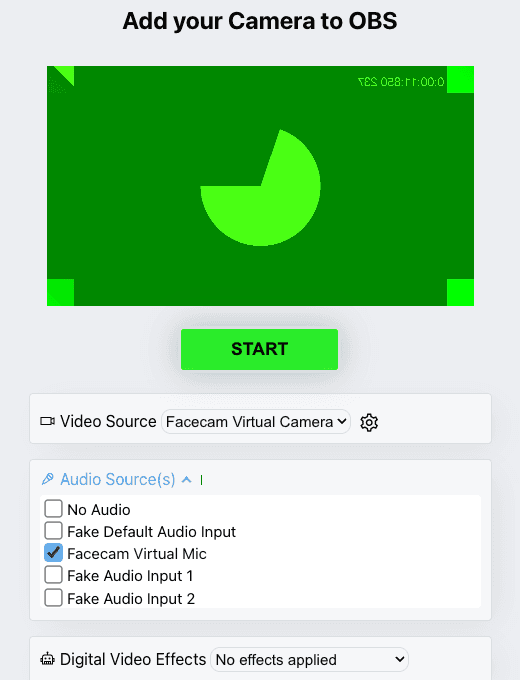
Our screenshot, 2026-10-04: vdo.ninja in Chromium with the Facecam extension. The preview is Chromium's built-in test camera, and the other inputs are its test devices.
If it doesn't work
| Problem | Fix |
|---|---|
| The clips play but my voice is missing | You added the soundboard page itself, which carries only the clips. Use the vdo.ninja route to get voice and clips together. |
| My voice dips whenever a clip plays | That's voice ducking: your voice drops while a sound plays so the sound comes through clearly. Keep clips short so the dip is brief. |
| The clips are louder than my voice | Lower the Browser Source's fader in Streamlabs, or trim the clip's loudness before you upload it. |
Two ways to bring sounds into Streamlabs
| Route | What Streamlabs gets | Extension needed | Good for |
|---|---|---|---|
| Soundboard page as a Browser Source | Clips only | No | Solo streams; play with Interact |
| VDO.Ninja view link as a Browser Source | Your voice and clips mixed | Yes | Voice ducking, voice effects plus clips |
Streamlabs' help says to tick Control Audio via Streamlabs Desktop to send a browser source's audio through Streamlabs rather than straight to your speakers. Do that for either route so the sounds get a fader you can lower before a big moment.

More about Streamlabs
Keeping clips stream-safe
- Use clips you made or have the rights to; music clips are what triggers stream takedowns.
- Short beats more: one to three seconds lands better than a long track.
- Set the fader so a clip peaks a little below your voice.
Sources
- VDO.Ninja: getting started (add your camera to OBS) — docs.vdo.ninja/getting-started (checked 2026-10-03)
- VDO.Ninja: share audio with OBS (Control audio via OBS) — docs.vdo.ninja/guides/share-obs-audio-with-vdo-ninja (checked 2026-10-03)
- OBS: browser source — obsproject.com/kb/browser-source (checked 2026-10-03)
- Streamlabs: add a Browser Source (Sources panel → “+” → Browser Source) — support.streamlabs.com, “How to Locate and Use Streamlabs Widget URLs” (checked 2026-10-04)
- Streamlabs: Control Audio via Streamlabs Desktop on a browser source — support.streamlabs.com/hc/en-us/articles/360043743994 (checked 2026-10-04)

Questions
Does Streamlabs have a built-in soundboard?
Streamlabs' help center returns no soundboard article. Adding a board as a Browser Source is the usual way, and this one is free.
Can I use the voice changer on the same link?
Yes. The voice changer and soundboard share Facecam Virtual Mic, so the vdo.ninja source carries both.
Is VDO.Ninja part of Facecam?
No. It's a separate free tool that sends a camera or mic from a browser tab to streaming software.
Other platforms
- Discord Soundboard
- Soundboard for streaming
- Soundboard for Zoom
- Soundboard for Teams
- Webex soundboard
- StreamYard soundboard
- Riverside soundboard
- Soundboard for YouTube
- Soundboard for Kick
- Soundboard for Twitch
- Soundboard for OBS
- Soundboard for Mac
- Slack soundboard for huddles
- Meme soundboard
- Goofy ahh soundboard
- Brainrot soundboard
- FNAF soundboard
- Fart soundboard
- Halloween sound effects
Related
- Soundboard for OBSGet the Facecam soundboard into OBS: on its own as a browser source, or mixed with your mic through VDO.Ninja. Free, no sign-up.
- Soundboard for TwitchA free soundboard for Twitch streams: three ways to get your sounds on stream, with or without OBS.
- Soundboard for streamingFacecam's soundboard can run inside OBS as a browser source, so its clips go straight into your stream mix for Twitch, YouTube or Kick without touching your mic.
- OBS voice changerA free voice changer for OBS with no plugin to install: your changed voice arrives as a Browser source.
- Live Face SwapLive face swap for Meet, Zoom and Discord: become anyone you want, in real time, while you talk. Upload any photo or pick a built-in face.
- Mic TestA free online mic test with no sign-up: check your volume, background noise and distortion, then play back 10 seconds of yourself.