
AI Explainer Video Maker
An animated presenter says your script out loud, one short scene at a time.


Where it works
Made with Facecam
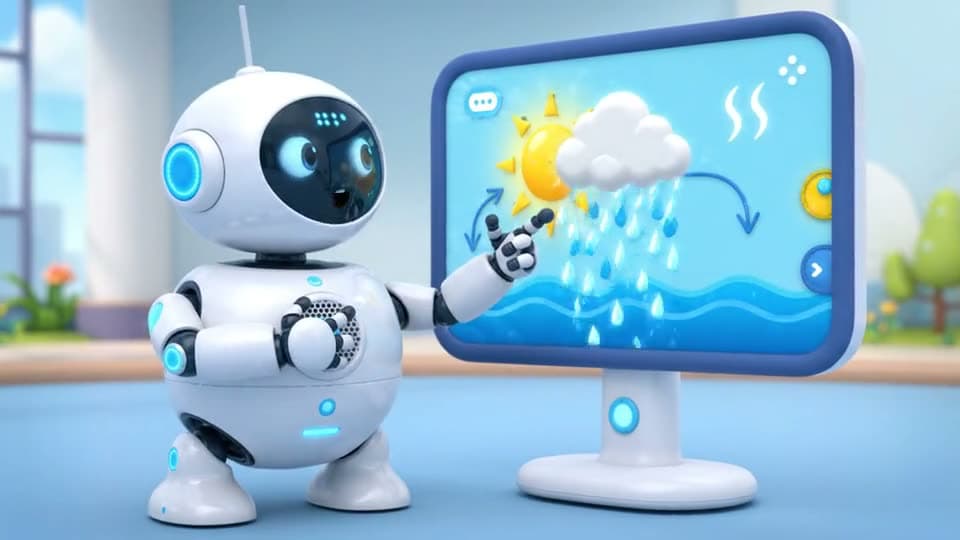
An explainer scene, spoken
“A bright 3D animated explainer video: a friendly round white robot stands next to a big screen showing a simple glowing diagram of the sun, a cloud and raindrops. It points to the screen and says cheerfully: 'Here's how rain works: the sun heats water, it rises, and falls back as rain.' Clean pastel colors, soft studio light.”

How to use AI Explainer Video Maker
Split the script into scenes
One idea per scene, about 20 spoken words each, which fits an 8 second clip.
Describe the scene and the line
The style (3D, flat 2D, whiteboard), the presenter, what's on screen, and the line in quotes.
Make each scene, then join them
Generate every scene, download them and put them in order in any editor.
What is an AI explainer video?
An AI explainer video is a short video that explains a product, an idea or a process, with the scenes, the presenter and the voice made by AI from a written script instead of animated by hand.
What you can do with AI Explainer Video Maker
AI Explainer Video Maker features
Says your lines
Voice and lip movement made with the scene.
Any style
3D, flat 2D, whiteboard or a real presenter.
Scene by scene
Fix one scene without redoing the rest.
Wide or tall
16:9 for sites and YouTube, 9:16 for Reels.





Explainer video prompts
3D robot teacher
“A bright 3D animated explainer video: a friendly round white robot stands next to a big screen showing a simple glowing diagram of the sun, a cloud and raindrops. It points to the screen and says cheerfully: "Here's how rain works: the sun heats water, it rises, and falls back as rain." Clean pastel colors, soft studio light.”
Flat 2D app explainer
“A flat 2D motion graphics explainer: an animated phone screen shows an app sending money between two friends, coins fly from one phone to the other, clean pastel shapes. A friendly narrator says: "Split the bill in two taps, right from the group chat."”
Whiteboard style
“A whiteboard animation: a hand quickly sketches a lightbulb, a gear and an arrow in black marker on a white board as a calm narrator says: "Every good plan starts with one simple idea." Marker squeaks.”
Presenter to camera
“A friendly presenter in her thirties stands in a bright modern office next to a big screen with a rising chart, looks at the camera and says: "In the next minute, here's how we cut our costs in half." Clean, corporate look.”

More about AI Explainer Video Maker
AI Explainer Video Maker is an online tool that makes short animated explainer scenes, a character or presenter saying your lines next to a simple visual, from a prompt on Veo 3.1 with voice and sound.
AI Explainer Video Maker: what you need and limits
| How it works | Online. Works on any laptop. |
|---|---|
| You get | Video download |
| You need | Any up-to-date browser |
| Phones and tablets | Supported |
| Starts on | Veo 3.1, text to video with voice and sound, wide 16:9 |
Keeping a series of scenes consistent
Each scene is made on its own, so repeat the same description of the presenter and the style in every prompt: “a friendly round white robot, bright 3D animation, pastel colors”. Write the whole narration first, then cut it into lines of about 20 words, one per scene. Keep what's on screen simple, one diagram or object at a time, so it reads at a glance.

AI Explainer Video Maker FAQ
How do I make an explainer video with AI?
Write the script, split it into short lines, and make one scene per line here with the line in quotes. Join the scenes in order and you have the explainer.
How long can an AI explainer video be?
Each scene is 4 to 8 seconds; a 60 second explainer is about eight scenes joined together.
Can the character talk?
Yes. Veo 3.1 speaks the line in quotes with matching lip movement, whether the presenter is a person, a robot or a cartoon.
Which style works best?
Bright 3D animation and flat 2D motion graphics read clearest. Whiteboard works for step-by-step ideas; a real-looking presenter suits business topics.
Can I keep the same character in every scene?
Describe it the same way every time. For an exact match, make the character once as a picture and start each scene from it with image to video.



Try AI Explainer Video Maker now
- Cancel any time
- Runs in your browser
- No gaming PC needed