
AI Claymation Generator
Clay characters, thumbprints and stop-motion jitter, from one sentence.


Where it works
Made with Facecam
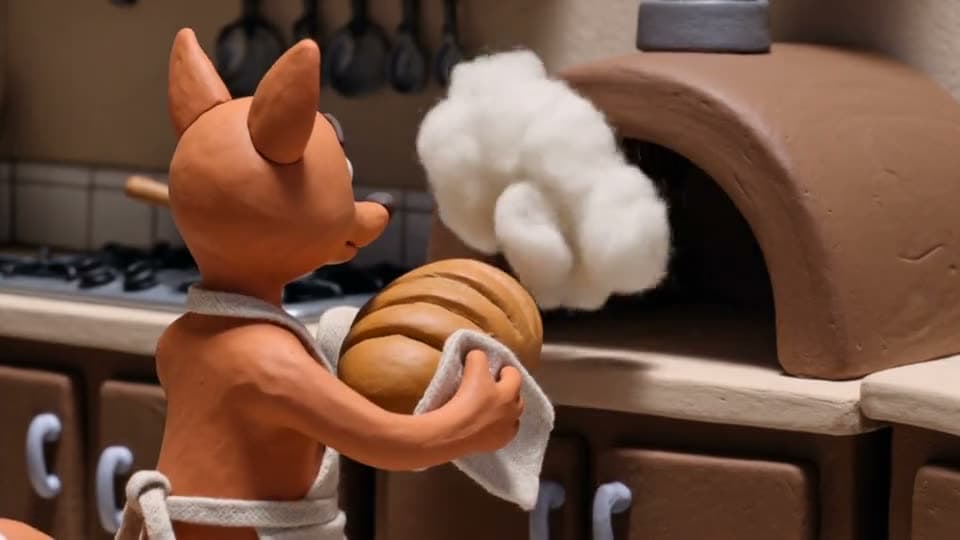
A clay fox baker, from text
“Claymation stop-motion animation: a little orange clay fox in a tiny apron pulls a loaf of bread out of a clay oven in a cozy clay kitchen, steam puffs, it sniffs and smiles, visible fingerprints in the clay, slightly jerky stop-motion frame rate, warm light”

How to use AI Claymation Generator
Start with the style
Open the prompt with “Claymation stop-motion animation:” so the model commits to the look.
Describe the character and one action
A little clay fox baking bread, a clay astronaut planting a flag. One small action per clip.
Generate and download
5 seconds is the sweet spot; make a few and string them into a short.
What is an AI claymation video?
An AI claymation video is a clip in the look of stop-motion clay animation, with soft clay figures, visible fingerprints and a slightly jerky frame rate, made by an AI video model from a prompt instead of moved by hand.
What you can do with AI Claymation Generator
AI Claymation Generator features
The handmade look
Fingerprints, soft edges, little imperfections.
Stop-motion timing
That slightly jerky frame rate.
Any story
Characters, sets and props in clay.
From text or a picture
Describe it, or start from a clay-style image.





Claymation prompts
Fox baker
“Claymation stop-motion animation: a little orange clay fox in a tiny apron pulls a loaf of bread out of a clay oven in a cozy clay kitchen, steam puffs, it sniffs and smiles, visible fingerprints in the clay, slightly jerky stop-motion frame rate, warm light”
Clay astronaut
“Claymation stop-motion animation: a chubby clay astronaut plants a little flag on a lumpy grey clay moon, waves at the camera and bounces in low gravity, cardboard stars behind, visible thumbprints”
Monster at breakfast
“Claymation stop-motion animation: a small purple clay monster with one big eye pours cereal into a bowl, it spills everywhere, the monster blinks and shrugs, cozy clay kitchen, jerky stop-motion”
Clay town
“Claymation stop-motion animation: tiny clay cars drive through a colorful clay town, a clay bus stops and clay people with round heads get off, soft warm light, handmade set”

More about AI Claymation Generator
AI Claymation Generator is an online tool that makes stop-motion clay animation clips, with handmade-looking characters, sets and frame-by-frame movement, from a text prompt or a photo, on Kling 3.0.
AI Claymation Generator: what you need and limits
| How it works | Online. Works on any laptop. |
|---|---|
| You get | Video download |
| You need | Any up-to-date browser |
| Phones and tablets | Supported |
| Starts on | Kling 3.0, text to video, wide 16:9; the chips switch model and shape |
Getting the clay look
Name the material (clay or plasticine) and the details that sell it: visible fingerprints, a handmade set, a slightly jerky stop-motion frame rate. Round, simple characters hold their shape best. Keep the action small, like a sniff, a wave or a bounce, because stop-motion is about little gestures. Warm, soft light makes the clay look touchable.

AI Claymation Generator FAQ
How do I make claymation with AI?
Start the prompt with “Claymation stop-motion animation:”, describe a clay character and one action, and click Generate.
Can AI make it look like real stop-motion?
Yes. Ask for a jerky stop-motion frame rate and visible fingerprints; the fox clip above was made that way on Kling 3.0.
Can I turn myself into claymation?
Live on camera, yes: Live AI Filter has a claymation look for video calls and streams. For a clip, describe a clay figure of yourself here.
How long are the clips?
5 or 10 seconds each. Join several for a longer clay short.
Which model makes the best claymation?
Kling 3.0, picked here, keeps the clay texture steady. Wan 3.0 is good for 3D and animated styles too, and adds sound.



Try AI Claymation Generator now
- Cancel any time
- Runs in your browser
- No gaming PC needed