Oil Painting Filter for Video
Become a moving oil painting: thick brush strokes, canvas texture and bright color, live on camera.

Live AI Filter needs Chrome on a computer. Send yourself the link, or see the examples below.
Where it works
How to use the Oil Painting Filter
Start your camera
Click Start camera. You see yourself right away, and nothing leaves your device until the filter starts.
Keep Oil painting picked
Oil painting is already picked on this page. Describe another painting style if you prefer, like watercolor or pencil sketch.
Start the filter
Click Start filter. To use it in a call, add the Facecam extension and pick “Facecam Virtual Camera” as your camera.
What is an oil painting filter?
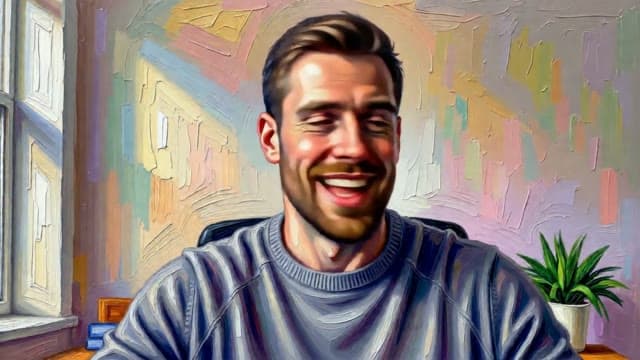
An oil painting filter is an effect that makes a picture look like paint on canvas: visible brush strokes, blended color and texture. Facecam's paints your live video, so the portrait moves and talks.
Made with Facecam
Before and after, on the same clip. A portrait that talks back.
What you can do with the Oil Painting Filter
Art class and workshops
Teach or join a painting class as a painting. It sets the mood before anyone picks up a brush.
A calmer camera
Paint over a plain room or a tired face for a relaxed catch-up call.
Music and poetry streams
Play or read on stream as a living portrait. Capture the Chrome window in OBS.
The Oil Painting Filter features
Real brush texture
Thick strokes, swirls and canvas grain over the whole frame.
Your likeness kept
Your face, beard and clothes stay recognisable, just painted.
Paints as you move
Every frame is repainted live, so the portrait talks and turns with you.
Any painting style
Ask for watercolor, a charcoal sketch or a pop-art print in your own words.





More about the Oil Painting Filter
The Oil Painting Filter is a live AI video filter that repaints your whole webcam picture as an expressive oil painting, with thick impasto strokes and canvas texture, while you move and talk.
The Oil Painting Filter: what you need and limits
| How it works | Live, on any laptop. Needs a steady internet connection. |
|---|---|
| You get | Camera in Chrome calls |
| You need | A computer (for calls: Chrome and the Facecam extension), a webcam |
| Phones and tablets | Not supported |
| What changes | The style of the whole picture: your face, clothes and room become thick oil paint on canvas. You and your room stay where they are. |
| Other looks | 11 more ready-made looks, any look you describe in words, or an image to look like. |
| Picture | Sharp and smooth, with about the delay of a normal video call. |
| Works in | This page, and Google Meet, Zoom, Teams and Discord in Chrome with the extension. |
| Price | Comes with every paid plan, by the minute while it's on: ≈ 11 min of Live AI Filter a month on Premium. |
| Recording | We don't record or keep your video. Each frame is changed and sent straight back. |
An oil painting filter for live video
Photo apps paint one picture and hand it back. This filter paints your camera while you use it, frame after frame, so you can talk, laugh and turn your head as a portrait in thick oil paint. The wall behind you becomes part of the painting too: a plain wall turns into swirling pastel strokes.
Painting styles to type
Oil painting is the ready-made look. Describe a look takes any other style in plain words; start with “Change the style of the video to” and name the medium:
- “a soft watercolor painting with paper texture”
- “a charcoal sketch on cream paper”
- “a bold pop-art print with halftone dots”
- “a post-impressionist painting with swirling night-sky colors”

The Oil Painting Filter FAQ
Can I put an oil painting filter on a video call?
Yes. With the Facecam extension in Chrome, choose Live AI Filter and Oil painting in its popup, then pick “Facecam Virtual Camera” as your camera in Google Meet, the Zoom web app, Teams or discord.com.
How much does the oil painting filter cost?
It comes with every paid plan and counts by the minute only while the filter is on: ≈ 11 min of Live AI Filter a month on Premium, if you use nothing else. Trying the camera and picking looks costs nothing.
Does it work on photos?
It's made for your live camera. For a painted portrait of a character, the Character Generator makes still pictures in any style.
Will the painting flicker?
Brush strokes shift a little as you move, like a hand-painted animation, but the picture stays steady while you talk.
Does it work on my phone?
Yes, on this page in Safari or Chrome. Using it as your camera in calls needs Chrome on a computer.



Try the Oil Painting Filter now
- Cancel any time
- Works in Meet, Zoom and Discord
- No gaming PC needed