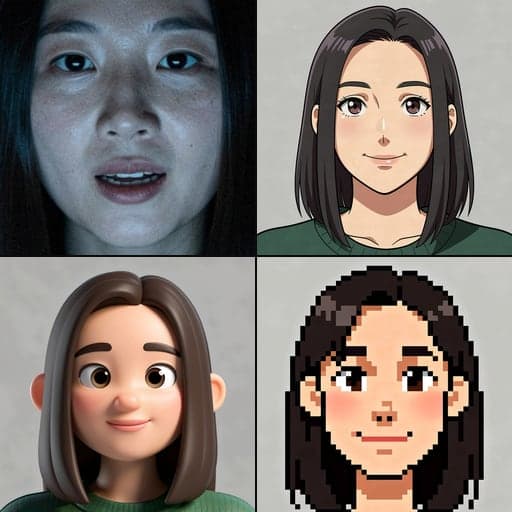
How to Turn a Photo Into a VTuber Avatar
You can turn a selfie into a cartoon avatar that opens its mouth when you talk, in about a minute. We ran our AI Avatar Maker on a good photo and a bad one to show what actually changes.
By Facecam team
Published · 4 min read

On this page
Short answer
Upload a clear, front-facing photo to an AI avatar maker, pick a style such as anime or chibi, and it draws an original cartoon character with your hair, clothes and colours. Ours also draws a second frame with the mouth open and removes the background, so you can drop both pictures straight into a PNGTuber app. Use a well-lit photo: a dim one gave us the wrong hair colour.
Most people who want a VTuber avatar don't draw. The usual answer is "commission an artist", which is the right call for a long-term character but a lot of money to spend on a maybe. An AI avatar from a photo is the cheap way to find out whether you like streaming as a character at all.
What happens when you turn a photo into an avatar?
The AI doesn't trace your face. It redraws you as a new cartoon character and keeps only general traits: hair style and colour, clothing, accessories. That's on purpose. Our AI Avatar Maker is told to keep "only general traits", so the result is an original character inspired by you, not a filter over your face.
To be useful for streaming, an avatar needs more than one picture. Our tool runs four steps:
| Step | What it does | Our run |
|---|---|---|
| 1. Idle frame | Redraws the photo as a character with its mouth closed | 16.8 s |
| 2. Talking frame | Edits that picture so only the mouth opens | 15 s |
| 3. Cut out idle | Removes the background | 2.7 s |
| 4. Cut out talking | Removes the background | 2.8 s |
That's about 37 seconds of model time, and it costs 27 credits a run. You get two transparent PNGs.
What photo works best?
We ran the same photo twice. Once as it was, well lit and 1024 pixels wide. Once darkened and shrunk to 384 pixels, like a grab from a dim webcam. The difference was bigger than we expected.
| Good photo | Dim, small photo | |
|---|---|---|
| Hair colour | Black, like the photo | Light brown (wrong) |
| Hair style | Long and straight, kept | Shoulder length (changed) |
| Clothes | Green knit sweater, kept | A collared shirt and a necklace that weren't there |
| Model time | 16.8 s | 18.1 s |
In the dark photo the model couldn't see the hair or the sweater, so it guessed. So before you upload:
- Face a window or a lamp. Light on your face beats a better camera.
- Frame your head and shoulders, looking at the camera.
- Wear the clothes and accessories you want the character to have. They carry over; your exact face doesn't.
- Use a photo at least 1000 pixels wide if you can.
Which style should you pick?
The tool has four styles: anime, 3D cartoon, pixel art and chibi. We also ran chibi on the good photo (15 seconds). It kept the hair and the green sweater but turned the long hair into a short bob, which chibi's big-head proportions tend to do. Anime kept the most detail.

How do you make the avatar talk?
- 01
Download both pictures
Save the idle and talking PNGs from the AI Avatar Maker.
- 02
Open the PNGTuber Maker
Go to the PNGTuber Maker and press Start mic.
- 03
Add your frames
Drop the idle picture into Idle and the talking one into Talking. A blink frame is optional.
- 04
Talk
The mouth opens when your voice passes the threshold (12% by default). Raise it if background noise sets it off.


What are the limits?
- It won't look exactly like you. That's by design: you get an original cartoon character. If you want a realistic face moving live on camera instead, any face you choose, that's live face swap, a different tool.
- Two frames is a PNGTuber, not a rigged model. Your avatar talks and bounces but doesn't turn its head. For that you need a 3D model; see how to make a VTuber avatar.
- Text prompts that ask for celebrities or real public figures are blocked.
- Results vary run to run. If one comes out wrong, run it again with a better photo before changing styles.
Questions
Can I turn a picture of myself into a VTuber for free?
The talking part is free: PNGTuber Maker costs nothing. The AI drawing step uses 27 credits a run. If you can draw two pictures yourself, the whole thing is free.
Will the avatar look like me?
It keeps your hair, clothes and colours, not your exact face. It's an original character inspired by your photo.
Can I use the avatar on Twitch or YouTube?
Yes. Show the PNGTuber Maker tab in OBS with a Window Capture, or use it as your camera in Chrome calls with the Facecam extension.
Can I make a 3D VTuber model from a photo?
Not with this tool. It makes 2D pictures. For a 3D model, VRoid Studio lets you build one by hand for free.
Keep reading
VTubing
How to Make a VTuber Avatar for Free, With No Download
How to make a VTuber avatar in a browser tab: a 3D model that copies your face, or a 2D one that talks when you do. We timed the setup, and we say where a download is still needed.
7 min read
VTubing
What Is a VTuber?
A VTuber is a streamer or video maker who appears as an animated character instead of on camera. Here's how the character follows a real person, the four kinds you'll see, and where the idea came from.
5 min read
Voice
Is Voicemod Safe?
Is Voicemod safe to install? We read its privacy policy, help center and store listings so you don't have to: what it puts on your computer, what data it collects, and how to download it without risk.
6 min read


Try it
AI Avatar Maker
AI Avatar Maker is a browser tool that turns a description or your photo into an original stylized avatar with an idle and a talking frame, ready for a PNGTuber.
Open AI Avatar Maker