Free Left Right Audio Test
Play a chime in your left ear, then your right, and know in five seconds if your headphones or speakers are wired the right way.
Where it works
- Chrome, Edge, Firefox and Safari, on desktop and mobile.
Updated · Tested by the Facecam team
How to use Left Right Audio Test
Put your headphones on
Check the L and R marks on the ear cups, then set your volume low.
Click Left, then Right
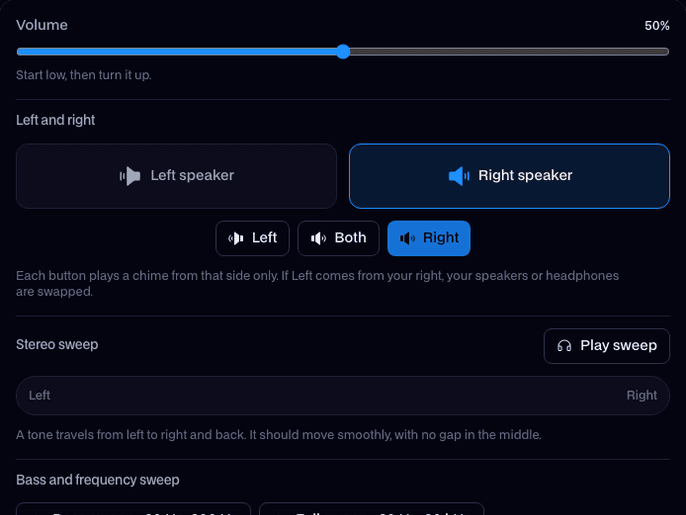
Each button plays three rising notes from that side only. The tile for that side lights up while it plays.
Run the stereo sweep
A tone glides from your left ear to your right and back. It should move smoothly through the middle of your head.
What is a left right audio test?
A left right audio test is a quick stereo check that plays a sound in one channel at a time, so you can hear that the left speaker or ear cup plays left and the right plays right. Facecam's runs free in your browser.
What you can do with Left Right Audio Test
New headphones or earbuds
Make sure both sides work before the return window closes, and that the L cup really is the left.
Before a game
Footsteps and gunfire come from a side for a reason. If your channels are swapped, you turn the wrong way.
Desk speakers after a move
Cables get swapped when you unplug everything. One click tells you which speaker is which.
Left Right Audio Test features
One side at a time
Each chime is panned all the way to one channel, so a leak into the other side is easy to hear.
You can see it too
The left or right tile lights up while its chime plays, so there's no guessing which button you pressed.
Stereo sweep
A moving tone shows gaps, a weak side or a speaker wired out of phase.
Nothing to install
The sounds are made by your browser on the spot. No files, no mic, no account.




What your result means
| What you hear | What it means | Fix |
|---|---|---|
| Left in the left ear, Right in the right | Your stereo is fine | Nothing to do |
| Left in the right ear | Channels are swapped | Turn the headphones around, or swap the speaker cables |
| Left and Right both sound centered | Your sound is being mixed to mono | Turn off mono audio in your system's accessibility settings |
| One side is silent | A dead driver, a loose plug or the balance slider at one end | Reseat the plug, check balance, try another pair |
| One side is quieter | Balance is off center, or one earbud doesn't seal | Center the balance; try a different ear tip size |

More about Left Right Audio Test
Facecam's Left Right Audio Test is a free online stereo test that plays a short chime in only the left channel, only the right channel or both, so you can hear at once whether each side of your headphones or speakers is working and in the right place.
Left Right Audio Test: what you need and limits
| How it works | Right on this page. Nothing is uploaded. |
|---|---|
| You get | Result on the page |
| You need | Any up-to-date browser |
| Phones and tablets | Supported |
| Left / Right | Three rising chimes, panned fully to one channel |
| Both | The same chimes in the center, from both sides at once |
| Stereo sweep | A 440 Hz tone, left to right and back over 6 seconds |
| Price | Free, no sign-up, nothing uploaded |
Why stereo gets swapped or lost
Most of the time it's simple: headphones worn backwards, or two speaker cables plugged into the wrong sockets. Mono is the sneaky one. Windows, macOS, iOS and Android all have a mono audio switch in their accessibility settings, and some Bluetooth headsets drop to mono when their mic is in use during a call. If Left and Right sound the same, check that switch first, then end any call that has your headset's mic open.
Bluetooth earbuds can also show up as two devices: a stereo one for music and a hands-free one for calls. Pick the stereo one as your output and run the test again.
Left and right on a phone
Most phone speakers play the same thing from both ends, so plug in or connect headphones before you test. Turn off the phone's mono audio setting if both chimes still sound centered in your headphones.

Left Right Audio Test FAQ
How do I check if my left and right speakers are correct?
Click Left. The chime should come only from your left speaker or ear cup. Then click Right. If they come from the wrong sides, swap the cables or turn your headphones around.
Why do I hear left and right in both ears?
Your device is playing mono. Turn off the mono audio switch in your system's accessibility settings, and make sure a Bluetooth headset isn't in its hands-free call mode.
Why is only one of my earbuds working?
Play Left and Right to see which one is silent. Then put both buds back in the case for a few seconds, check the balance setting, and try the test again. If one side stays silent, the bud itself may be faulty.
Is the left right audio test free?
Yes. It runs in your browser with no sign-up and no limit.
Does it work with Bluetooth headphones?
Yes. Pick your headphones as the output, then click Left and Right. Bluetooth adds a short delay, so the chime may start a moment after you click.
What does the Both button do?
It plays the same chime from both sides at once, so it should sound like it comes from the middle of your head. If it leans to one side, your balance is off.
Can I test the bass and volume too?
Yes. The same tool has a bass sweep and a volume check below the channel test, and the Bass Test page opens with the bass sweep first.


Related
 Bass TestPlay a sweep from 20 to 200 Hz and tap the moment you hear it, to find how deep your speakers, headphones or subwoofer really go.

Further reading: Stereophonic sound on Wikipedia

Try Left Right Audio Test for free
- Free, no sign-up
- Runs in your browser
- Nothing is uploaded