AI Hug
Two photos in, one hug out: make a video of you hugging anyone from two selfies.

Where it works

How to use AI Hug
Add two photos
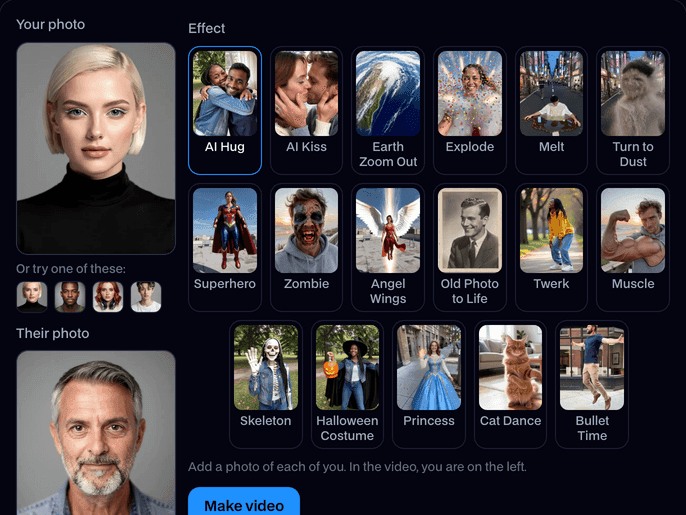
Upload a photo of you and one of the other person, each with a clear face, or try the built-in faces.
Pick AI Hug
AI Hug is already picked on this page. Your photo goes on the left, theirs on the right.
Make it and share
Click Make video. In about a minute the clip plays on the page; click Download to keep the MP4 and post it anywhere.
What is an AI hug?
An AI hug is a short video made from two still photos in which the two people turn to each other and embrace. Facecam makes one from any two selfies in about a minute.
Made with Facecam
Two selfies from two places, one hug. Different backgrounds blend into one scene. City meets beach.
What you can do with AI Hug
Long-distance couples
Two selfies from two cities, one hug to send each other.
Hug a friend you miss
Make a hug with a friend far away and drop it in the group chat.
Your younger self
Put a childhood photo next to a photo of you today and hug yourself.
AI Hug features
Two photos, any background
They don't need to be taken together.
Both of you, recognisable
Faces, hair and clothes carry into the hug.
Natural motion
A turn, a smile, arms around each other.
About a minute
A 5 second MP4 ready to post or send.




More about AI Hug
AI Hug is an online tool that takes two photos, yours and someone else's, puts the two of you side by side and makes a short video of you turning to each other and hugging.
AI Hug: what you need and limits
| How it works | Online. Works on any laptop. |
|---|---|
| You get | Video download |
| You need | Any up-to-date browser |
| Phones and tablets | Supported |
| Photo | JPEG, PNG or WebP with one clear face. Selfies and portraits work best; anime and 3D characters work too. |
| Effects | AI Hug, AI Kiss, Earth Zoom Out, Explode, Melt, Turn to Dust, Superhero, Zombie, Angel Wings, Old Photo to Life and Twerk. Hug and Kiss take a second photo. |
| Time | About a minute. |
| Price | Comes with every paid plan, by the clip: 48 effect clips a month on Premium, if you use nothing else. A photo with no face, or a clip that fails, doesn't count. |
| Output | An MP4 of about 5 seconds, 720p, the shape of your photo. Free results have a small Facecam mark in the corner; plans remove it. |
| Kept for | 7 days in your Library, then deleted. Your uploaded photos are deleted within an hour. |
Photos that hug best
Use two photos taken from about the same distance, each with one person from the chest up and looking roughly at the camera. Both photos are cropped to a portrait and placed side by side, so a face near the edge of a wide photo can be cut off: center each person. Selfies at arm's length work well, as the examples show.
Your photos
Your photos are stored privately while the video is made and deleted when it's done, always within an hour. The clip stays in your Library for 7 days, then it's deleted.

AI Hug FAQ
How do I make an AI hug video?
Add your photo and the other person's, keep AI Hug picked and click Make video. In about a minute you get a 5 second clip of the two of you hugging.
Do the two photos need the same background?
No. Each photo can be anywhere; the clip blends them into one scene as you come together.
How much does an AI hug cost?
It comes with every paid plan, by the clip: 48 effect clips a month on Premium. A photo with no face, or a clip that fails, doesn't count.
Can I hug someone who isn't with me?
Yes. Any two photos with a clear face work: a partner, a friend, family, or a character.
Who goes on which side?
Your photo goes on the left and the second photo on the right.



Try AI Hug now
- Cancel any time
- Runs in your browser
- No gaming PC needed