
Animate Old Photos
Bring an old photo to life: scan the print, give it words, and watch the face talk, smile and blink.

Where it works
- One clear face, with audio up to 60 seconds.
- The result is a file you download.
Updated · Tested by the Facecam team

How to use Talking Photo
Scan the photo
Scan the print, or photograph it flat in daylight, and upload it. Crop it so one face fills a good part of the picture.
Give it words
Type what the person should say and pick a voice, or upload audio or record a family member reading the line.
Make it talk
Click Make it talk. The video plays on the page in about a minute; click Download MP4 to keep it.
What is an animated old photo?
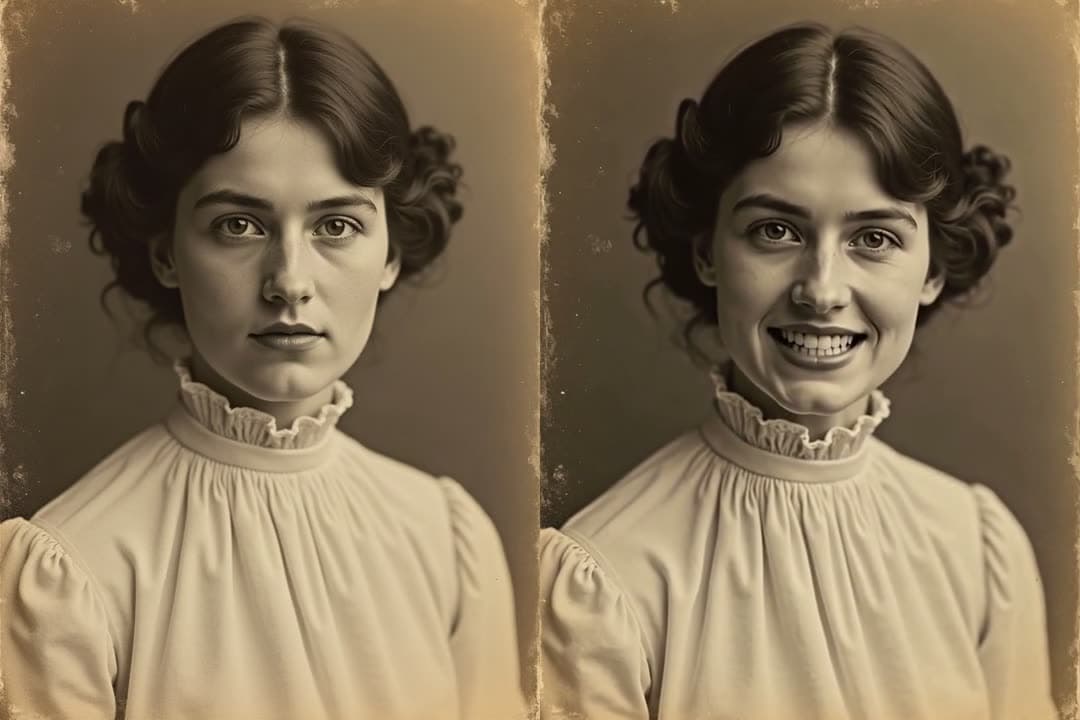
An animated old photo is a still picture from the past made to move: the head turns a little, the eyes blink and, with Talking Photo, the mouth speaks a line. You get an MP4 that keeps the look of the original print.
Made with Facecam
A sepia portrait from around 1910, as uploaded and talking. A black and white 1940s print, with a warm storyteller voice.
What you can do with Talking Photo
Family history
Make a great-grandparent's portrait say hello in a family tree post or a reunion slideshow.
Birthday and anniversary videos
Open the video with the couple's wedding photo saying a line, then cut to today.
History lessons
Let a period portrait introduce the topic in the first person. Pupils remember a face that talks.
Talking Photo features
Made for old prints
Faded, grainy, scratched and sepia photos animate as well as new ones.
Natural movement
The mouth follows each word, and the head and eyes move like a person talking.
Keeps the original look
Grain, scratches and colors stay, so it still looks like the photo you know.
Any words, any length
Up to 60 seconds of speech, typed or recorded.





More about Talking Photo
Animating an old photo means turning a still portrait, often black and white or sepia, into a short video where the person moves. Talking Photo goes a step further: the face speaks the words you choose, with matching mouth, head and eye movement.
Talking Photo: what you need and limits
| How it works | Online. Works on any laptop. |
|---|---|
| You get | Video download |
| You need | Any up-to-date browser |
| Phones and tablets | Supported |
| Photo | JPEG, PNG or WebP up to 10 MB with one clear face. Black and white, sepia and faded color prints all work. |
| Colors | The video keeps the photo's own colors: a sepia print talks in sepia. |
| Voice | A typed line in one of our voices, an audio file or a recording, up to 60 seconds. |
| Price | Comes with every paid plan, by the second of video: ≈ 3 min of talking video a month on Premium, if you use nothing else. Refunded if it fails. |
| Output | An MP4 with the voice, as long as the audio. |
| Kept for | 7 days, then deleted. Your photo is deleted within an hour. |
Getting a good scan
- Use a flatbed scanner at 600 dpi if you have one. A phone works too: lay the print flat by a window and shoot straight down, with no flash.
- Avoid glare. A glossy print photographed under a lamp gets a white patch the animation can't see through.
- Crop to one person. For a group photo, crop around the face you want to talk; the tool animates one face.
What it does and doesn't change
It animates the face: the mouth, the head and the eyes. It doesn't colorize, sharpen or repair the photo, so a faded sepia print stays a faded sepia print, now talking. The background and clothes stay as they are, with only the small movement of the head and shoulders.

Talking Photo FAQ
How do I animate an old photo?
Scan the photo or photograph it flat, upload it, type what the person should say and pick a voice, then click Make it talk. You get an MP4 in about a minute.
Does it work with black and white photos?
Yes. Black and white, sepia and faded color photos all work, as long as one face is clear.
Can it colorize the photo?
No. The video keeps the photo's own colors. Colorize it first in another app if you want color.
How much does it cost?
Talking Photo comes with every paid plan and is charged by the second of video: ≈ 3 min of talking video a month on Premium, if you use nothing else. Before you start, the tool shows how much of your time it uses.
Can it use a family member's voice?
Yes, if they record it: record them reading the line on the page, or upload a recording you have. You can also read it yourself.
Do you keep the photo?
Your photo and audio are deleted when the video is done, always within an hour. The video stays in your Library for 7 days.



Try Talking Photo now
- Cancel any time
- Runs in your browser
- No gaming PC needed