Free T-Pain Auto Tune Effect
The T-Pain sound, free in your browser: sing or upload a vocal, and every note snaps to the key with that hard, robotic jump.
Where it works
- Chrome, Edge, Firefox and Safari, on desktop and mobile.
- The result is a file you download.
Updated · Tested by the Facecam team
How to use T-Pain effect
Sing or upload
Record a few lines or upload a vocal. Sing the melody plainly; the effect does the jumps.
Keep Hard
The page opens on Hard: instant retune, full strength. Check the key it found, or set the song's key.
Download
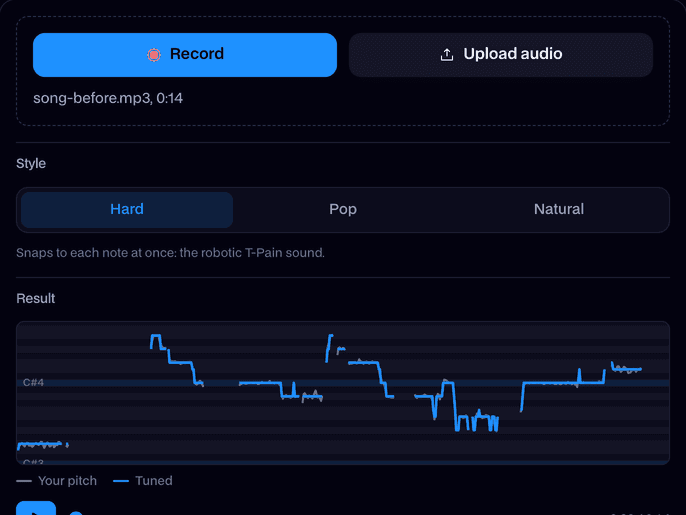
Compare Before and Tuned, then click Download WAV and drop it into your beat.
What is the T-Pain effect?
A T-Pain effect is pitch correction with the retune speed at zero: every note is snapped onto the key at once, so slides become steps and the voice sounds robotic. Here it's the Hard style of Facecam's free Auto-Tune.
Before and after
What you can do with T-Pain effect
Hooks over a trap beat
Sing a hook, tune it hard, and lay it over your beat for the classic sound.
Covers and memes
Turn a cover, a voice note or a joke song into the auto tune sound in one step.
Use it live in calls
T-Pain effect features
Instant retune
Notes jump with no glide, the defining sound of the effect.
Steady held notes
Long notes sit dead on the pitch instead of warbling around it.
Your key
It finds the key from your singing; set it yourself for a song you know.
Free, on your device
No account and no upload. The tuning runs in your browser.





More about T-Pain effect
The T-Pain effect is auto tune set to its fastest: the pitch is pulled onto each note instantly, so the voice jumps between notes in steps instead of sliding. It's the sound T-Pain made famous in 2000s R&B and that trap and hip-hop still use.
T-Pain effect: what you need and limits
| How it works | Right on this page. Nothing is uploaded. |
|---|---|
| You get | Audio download |
| You need | Any up-to-date browser |
| Phones and tablets | Supported |
| Files | WAV, MP3, M4A, OGG, WebM or FLAC, up to 10 minutes. Or record on the page. |
| Runs | On your device, in the browser. Nothing is uploaded. |
| Controls | Key and scale (found for you), style, retune speed, strength, humanize and formant. |
| You get | A mono WAV at your file's sample rate. |
| Price | Free, no account, no limit. |
How the T-Pain sound works
Auto tune normally glides a note onto pitch over a few dozen milliseconds, so you don't hear it. T-Pain's trick, and Cher's in Believe before him, was the opposite: retune speed at zero. Every note is moved the instant it's sung, so the natural slides between notes turn into steps, and the voice gets its robotic, almost synth-like edge.
That's what Hard does here. The tool tracks your pitch, picks the nearest note of the key for each moment, and moves your voice onto it at once. Held notes stay perfectly flat, which is part of the sound.
Make it sound more like the records
- Sing in the key of the beat, and set that key in the tool so the jumps land on the beat's notes.
- Move between notes on purpose: the bigger the leap, the more you hear the step.
- Add reverb and a short delay in your editor afterwards; the dry vocal is meant to be mixed.
- For a lighter version, try Pop: fast, but with a hint of glide.

T-Pain effect FAQ
Is the T-Pain effect free here?
Yes. It's the Hard style of Facecam's free Auto-Tune, with no account and no limit.
What settings give the T-Pain sound?
Retune speed at zero (Instant), strength 100%, humanize off, and the key of the song. The Hard style sets all of that.
Does it work on rap or talking?
It works best on singing. On speech it still snaps the pitch, which gives a robotic talking voice.
Can I use the T-Pain voice on Discord?
Yes. The Auto-Tune voice in the Real-Time Voice Changer tunes your mic live in Discord, Meet and Zoom in Chrome.


Related


Try T-Pain effect for free
- Free, no sign-up
- Runs in your browser
- Nothing is uploaded